Add Gemini TTS narration to an Opus video with the Ofox API
Generate real scene audio through Ofox, measure each WAV, fix timing overruns and export a narrated MP4. Includes Python code, audio files and a working demo.
 Ofox
Ofox 
To add AI narration to an Opus-assisted video, generate speech separately, measure the actual audio, place each sentence on the video timeline and export a file containing both streams. Here we use Gemini 3.8 Flash TTS through the Ofox speech API, then assemble a 32-second MP4 with Python and FFmpeg. The downloadable scene audio came from real API responses on October 9, 2026.
This is the audio-production continuation of our Opus video workflow. The visual input is the existing 30-second screenshot demonstration from that series, not a newly measured Opus generation. Its interface captures are historical reference material from September 30. Gemini supplies the new voice; local code supplies timing and export. These are separate responsibilities, and that separation makes failures easier to locate.
Download the complete reproducible kit, watch the narrated MP4, or download the assembled WAV. You can rebuild from saved audio without making another paid request. The sample has English narration; translating this article does not turn it into a localized audio demonstration.
1. Start with a scene script, not a paragraph of narration
A continuous voice track is convenient for a podcast. A screen demonstration has a different constraint: a sentence about documentation should be heard while the documentation is visible. We therefore kept five short lines, one for each scene, and generated them separately. That lets us replace one sentence without regenerating an entire voice track.
The text is ordinary instructional narration: begin with a brief, show the catalog, locate documentation, connect the API reference to the scene, and finish with a check. It makes no claims about model quality, discounts or current catalog counts. That matters when reusing an older screenshot video: narration should not convert historical interface details into promises about today’s product.
Before running speech generation, write down the scene start, the latest acceptable audio end and the exact words to speak. Also decide whether existing sound should be replaced or mixed. This example replaces the source audio entirely. It contains no background music, voice cloning, character lip-sync or word-level subtitle alignment. Those would require additional inputs and separate verification.
If you need the underlying visual project, see the screenshot-to-video tutorial. If your only goal is caption timing, the existing audio and subtitle guide covers that workflow; this article adds an actual Ofox TTS request and its measured output.
2. Check the exact model, voice and format
The tested request uses google/gemini-3.8-flash-tts, voice Kore, language en-US, speed: 1.0 and response_format: wav. Use the precise model ID from the Gemini TTS model page, rather than a Gemini text-model name. Our successful files are mono, 16-bit PCM WAV at 24,000 Hz. A .wav extension alone does not prove those properties; the probe and decoder checks below do.
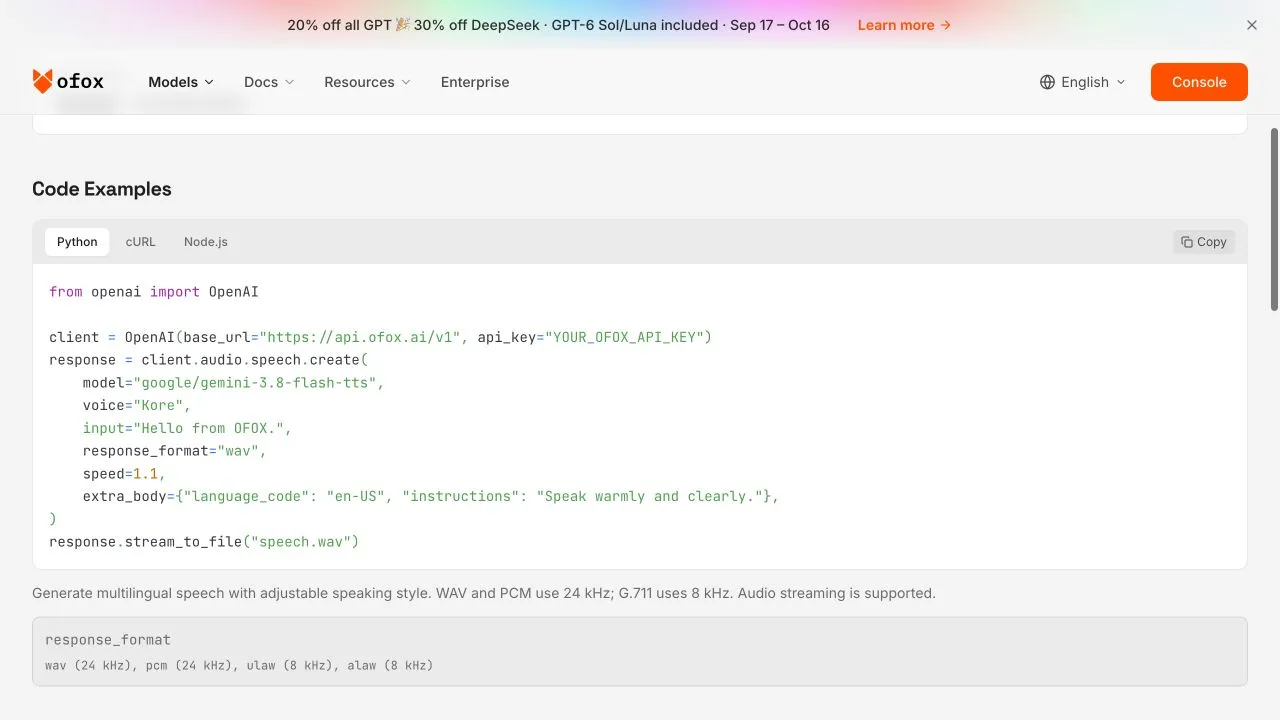
Real model-page capture, October 9, 2026. The page’s example uses speed 1.1; our recorded requests use 1.0. A documentation screenshot establishes the displayed interface, not generation success; the supplied WAV files and request records establish the latter.
You need Python 3, the requests package, FFmpeg and ffprobe. The scripts check media-tool availability before the main client sends a paid request. On Windows, the environment variable and virtual-environment activation syntax differ from the shell examples here; the Python request itself is portable. Put your key in the OFOX_API_KEY environment variable, not in a shared script, browser-side code or a committed configuration file.
python3 -m venv .venv
. .venv/bin/activate
python3 -m pip install requests
ffmpeg -version
ffprobe -version
The format selection is deliberate. WAV is larger than a compressed delivery track but straightforward to inspect and assemble. We encode AAC only in the final MP4. Google documents the Gemini speech interface and formats; the Ofox model page is the relevant source for the gateway request shown here. An upstream option is not automatically an option on every intermediary endpoint.
3. Make a small request and keep failures out of audio files
The downloadable audio_api.py uses a fixed Ofox base URL, reads the key from the environment and records response metadata without the Authorization header. It checks HTTP status and content type before saving audio, then measures and fully decodes the file. It does not retry paid POST requests automatically.
python3 audio_api.py speech --engine gemini \
  --text narration.en.txt --output first-take.wav --language en-US
That command generates one continuous test take from the included text. To understand the request, this is the essential Python call; use the kit client for its additional validation and evidence handling:
import os
from pathlib import Path
import requests

response = requests.post(
    "https://api.ofox.io/v1/audio/speech",
    headers={"Authorization": "Bearer " + os.environ["OFOX_API_KEY"]},
    json={
        "model": "google/gemini-3.8-flash-tts",
        "voice": "Kore",
        "input": "A clear product video starts with a clear brief.",
        "language_code": "en-US",
        "speed": 1.0,
        "response_format": "wav",
    },
    timeout=(15, 120),
)
response.raise_for_status()
if not response.headers.get("content-type", "").startswith("audio/"):
    raise RuntimeError("Expected audio; inspect the response before saving")
Path("line.wav").write_bytes(response.content)
The first continuous test returned HTTP 200 and a 10.4-second WAV. For the finished demonstration, we made five separate scene requests. HTTP 200 proves that these particular calls returned audio, not that a provider has unlimited capacity or that every sentence will have the same duration on another run. Keep the request parameters alongside the audio hash so later script changes cannot relabel an older output as a new result.
If a request times out, inspect its request status and usage before resending. A lost response does not establish that generation never happened. Conversely, a JSON error saved as speech.wav is not malformed speech; it is an application error written to the wrong kind of file. Preserve the error and request ID separately.
4. Measure the five sentences and fix the actual overruns
Use ffprobe on each saved file. Our timing table measures the complete WAV, including any trailing silence; it does not claim phoneme-level speech boundaries.
ffprobe -v error -show_entries stream=codec_name,sample_rate,channels \
-show_entries format=duration -of json scenes/line-1.wav| Scene | Exact narration | Start | WAV duration | Audio end |
|---|---|---|---|---|
| Brief | A clear product video starts with a clear brief. | 0.35 s | 3.56 s | 3.91 s |
| Catalog | Show the real interface. Here, we begin with the model catalog. | 4.35 s | 4.64 s | 8.99 s |
| Documentation | Then show where a viewer can find the documentation. | 11.35 s | 3.44 s | 14.79 s |
| API reference | Connect each scene to an actual page, such as this API reference. | 18.35 s | 4.96 s | 23.31 s |
| Closing | Keep the message simple. Plan, build, and verify. | 25.35 s | 5.44 s | 30.79 s |
Two lines failed the original window check. The first exceeded its planned 3.60-second boundary by 0.31 seconds. We expanded that window to 4.00 seconds, before the next scene starts. The last exceeded its 29.50-second boundary by 1.29 seconds and extended beyond the 30-second video. We held the last video frame for two more seconds, producing a 32-second result. Its new window ends at 31.50 seconds.
We did not trim the spoken words or silently accelerate the clips. If a platform requires an exact 30-second deliverable, this extended version is not suitable: shorten the closing sentence, regenerate only that line and repeat the measurement. A requested speed is an approximate control, not a guarantee that 5.44 seconds becomes a mathematically exact target.
5. Assemble from saved audio, then export both streams
The kit contains scenes/line-1.wav through line-5.wav, a timing manifest and source.mp4. The source is the historical silent reference. Run assembly from the extracted kit directory:
python3 assemble_scenes.py scenes source.mp4 rebuiltNo API key is needed for that command. The assembler verifies each audio hash, checks the expected PCM format and rejects a sentence that exceeds its revised window. It places samples at the recorded starts and fills the remaining timeline with silence. It then maps only the source video and the newly assembled voice into a portable H.264/AAC MP4.
The 24 kHz audio clock and the video’s frame clock are different. We place audio with sample offsets; that does not create word-level subtitle timings. The final file keeps the existing visual scenes and adds a two-second hold. The separate mux.py utility supports an already assembled narration track, but deliberately rejects narration longer than its video. Use the scene assembler for this specific extended example, rather than expecting the generic muxer to guess your editorial decisions.
An Opus editing brief can help adapt your own project after these measurements. This template is provided for reuse, not as a record of another model call:
Update only the existing video composition and its timing data.
Keep the approved screenshots and scene order.
Use the attached WAV files; do not generate or shorten the spoken words.
Insert each sentence at the measured start in timing.json.
Flag an overrun before rendering. If a scene must be extended, explain
which cuts and total duration change. Preserve all visible text.
Return changed files, render command and frames to inspect.
Do not claim lip-sync or word-level alignment from sentence timings.
6. Verify the exported file, not just the editor preview
ffprobe -v error -show_streams -show_format -of json rebuilt/narrated.mp4
ffmpeg -v error -i rebuilt/narrated.mp4 -f null -
The supplied final media has a 32-second video timeline with H.264 video and AAC audio; the assembled source WAV is exactly 32 seconds. Container and compressed-stream durations can differ slightly because of encoding padding. The decoder check must finish successfully, but it cannot judge pronunciation or whether a sentence explains the right screen.
Review the first sentence, each cut, the longest sentence and the last word. Listen to product names and acronyms; check whether the selected voice and pauses suit your audience. Our recorded checks establish API success, file format, duration, placement and decoding. They are not a human listening panel or a claim that Gemini sounds better than another service. The downloadable output lets you assess that distinction directly.
Do not reuse this English track as evidence of Japanese, Korean or Russian speech quality. Generate and review each localized script separately, because text expansion, pronunciation and pauses change the timing. A translated caption also does not replace spoken localization.
7. Diagnose the layer that actually failed
| Symptom | What to inspect | Next action |
|---|---|---|
| 401 with a quota message | Error body, request ID and whether it names a provider limit | Check the relevant account or upstream route; do not assume the Ofox wallet is empty |
| 400 for a format | Exact model and supported format combination | Use the documented WAV preset for this example |
| JSON saved as WAV | HTTP status and content type | Keep errors separately; never rename them into media |
| Voice runs past a scene | Measured duration and next cut | Rewrite that line or extend the scene and recheck the timeline |
| Output MP4 has no sound | Stream mapping and final-file probe | Explicitly map the new audio stream and decode the export |
| Retry produces another charge | Original request outcome and usage record | Avoid blind POST retries; reconcile before requesting again |
During preparation, the same Ofox key successfully generated Gemini audio while the ElevenLabs speech and Scribe routes returned 401 quota errors. A read-only Ofox balance check was positive. That evidence does not support telling the user to refill their Ofox wallet; it points to the affected provider route, whose precise account state still needs investigation. ElevenLabs documents this class of 401 quota error. It is a dated troubleshooting observation, not a claim that those services are generally unavailable.
For budgeting, distinguish published model rates, usage quantities and settled charges. Audio-token pricing cannot be converted into an exact per-minute bill from duration alone. This tutorial reports no total API cost or savings percentage because the media responses are not an independently reconciled bill. Inspect the current model page and your own request usage before scaling to a full series.
The reusable deliverable is the script, five raw scene WAVs, measured timing data, assembled narration and final MP4. Keep that package versioned. For the next video, change one scene at a time, measure its replacement audio and export again; do not rely on the old durations simply because the text length looks similar.
Frequently Asked Questions
- Does Opus 5.5 generate the voice in this example?
- No. Gemini 3.8 Flash TTS generates the WAV files through Ofox. FFmpeg assembles the audio and video locally. Opus can help edit the video project; this article does not claim a new Opus model run.
- Can I reproduce the finished video without spending API credits?
- Yes. The download includes the five saved WAV files and source MP4. Local assembly makes no API calls. Generating replacement speech requires your own valid key and sufficient model access and quota.
- Why not set speed higher until every sentence fits?
- A requested speaking speed does not guarantee an exact duration. Measure each result. Shorten the script or extend its scene when needed, then verify that no words are cut off.