The Enterprise AI Gateway for 100+ Models
— Transparent by Design
100+ models behind one API — GPT, Claude, Gemini, alongside DeepSeek, Qwen, GLM and Kimi, from text to image and video generation. Governed as a team: roles, budgets and an audit trail built in.

Our Enterprise Commitments, in Four Numbers
* SLA covers Ofox platform availability. Upstream model-provider outages are excluded.
Enterprise-Grade AI Infrastructure from the First Request
One API, one dashboard, one bill — with the controls, reliability and data handling a production rollout demands. The 0% platform fee is just the baseline.
0% Platform Fee — Official Provider Pricing
Billed at the model provider's official rate — the price on the card is the price you pay. Volume credits up to 7% apply automatically as you scale.
One API Key for GPT, Claude, Gemini & 100+ Models
Access Claude, GPT, Gemini, DeepSeek, Qwen and 100+ models through a single API key. Fully compatible with the OpenAI SDK.
99.9% Uptime SLA with Multi-Region Failover *
Multi-region redundancy with automatic failover. Availability commitments in black and white — reliability you can count on.
Granular Cost Controls per Key and per User
Set daily, monthly or total budgets for the team, each member or each API key; requests over the limit are stopped. Real-time usage dashboards eliminate surprise bills.
Zero Data Retention by Default
Prompts and responses are never used for training, and are not stored unless your team turns on request logs. Otherwise only short-term operational logs, plus request metadata and token usage for billing.
Tiered Technical Support
Higher usage unlocks faster response times. Top-tier accounts get a dedicated technical contact and priority ticket handling.
Request Logs
Off by default. Team owners and admins can turn it on to review each prompt and response in the console. Credentials are redacted before saving; we keep up to the latest 3 days, 10,000 requests or 1 GB.
* SLA covers Ofox platform availability only; upstream model-provider outages are excluded.
Security & Compliance: Routing, Not Storage
A gateway's job is to move your requests, not to keep them. Traffic is TLS-encrypted, content is not stored unless you turn on request logs and is never used for training — and where a certification is still in progress, we say so below.
How Your Data Is Handled
TLS-Encrypted in Transit
All API traffic is encrypted end to end between your systems and ours.
No Prompt or Response Storage by Default
Prompts and responses are not persisted by default — only short-term operational logs, plus the request metadata and token counts required for billing. If your team turns on request logs, we keep up to the latest 3 days, 10,000 requests or 1 GB, with credentials redacted.
Your Data Is Never Used for Training
Your content is not used to train models, ours or anyone else's. Upstream providers are bound by their own enterprise terms.
Certifications & Data Agreements
SOC 2 Type II
Audit underway — not yet issued
ISO 27001
Information security management system
GDPR
DPA with standard contractual clauses; subprocessor list on request
DPA
On request, before contract signature
We do not claim certifications we do not yet hold. If a framework matters to your review timeline, tell us and we will share the current audit stage.
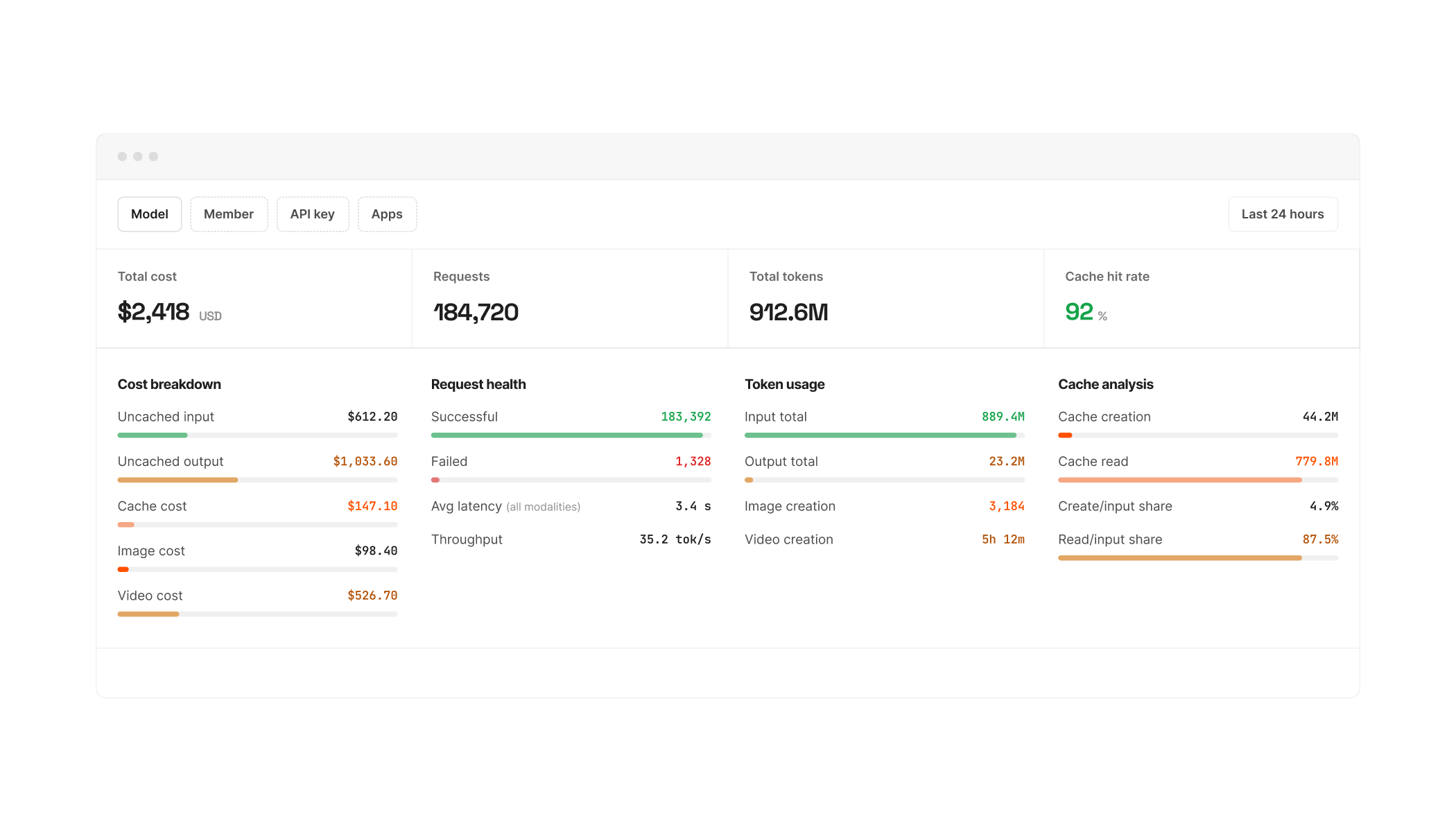
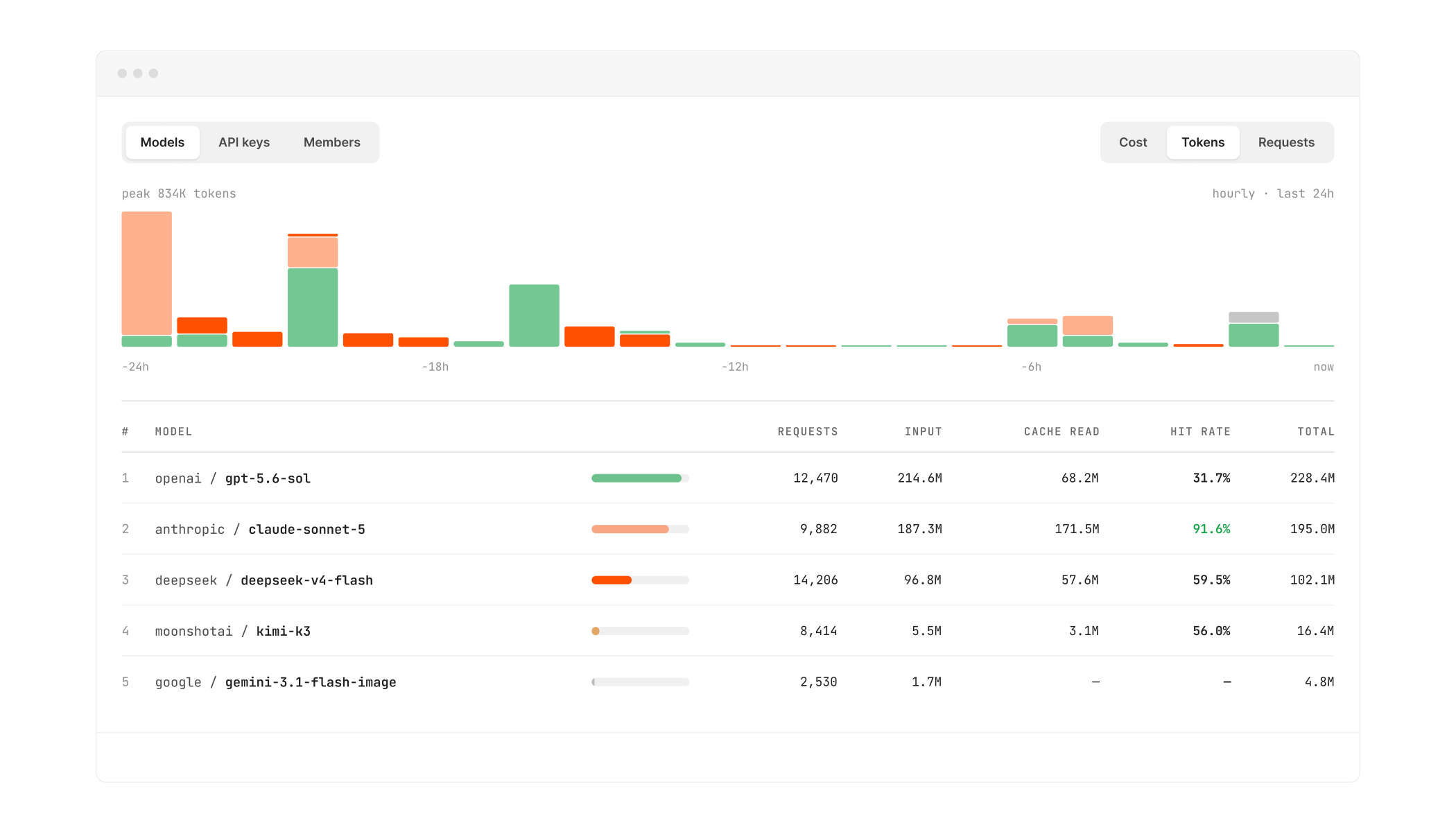
Usage Analytics Built for Dev Teams
Cost, performance and usage in real time — attributed to every model, API key and member. Spend reviews and capacity planning run on data, not month-end reconciliation.

Integration: Change the Base URL, Keep Your SDK
Ofox is compatible with the OpenAI, Anthropic and Gemini SDKs. There is no rewrite and no proprietary client to adopt.
Compatible with OpenAI, Anthropic and Gemini SDKs
from openai import OpenAI

client = OpenAI(
    base_url="https://api.ofox.io/v1",  # ← the only change
    api_key="YOUR_OFOX_API_KEY",
)

response = client.chat.completions.create(
    model="openai/gpt-6-sol",
    messages=[{"role": "user", "content": "Hello!"}],
)

print(response.choices[0].message.content)
Works with Claude Code, Cursor, LangChain and More
All integrations


How an Enterprise Rollout Works
Step 1 Sign Up and Test
Create an account, add credits and run your own evaluation — no sales call needed to find out whether the models, latency and pricing fit your workload.
Step 2 Run a Pilot with Budgets in Place
Ship one workload with budgets and limits in place. Validate latency, quality and billing against your own numbers.
Step 3 Go Live with Roles and Per-Key Limits
Roll out with roles and per-key budgets across the team. Higher usage unlocks faster response times and a named technical contact.
Enterprise FAQ
How is Ofox different from the providers' official APIs?
You keep official pricing — 0% platform fee — and replace many integrations with one: a single key, a single bill and one dashboard across OpenAI, Anthropic, Google, DeepSeek, Qwen, GLM, Kimi and 100+ models, with roles, budgets and an audit trail built in. Going direct means one vendor relationship, one SDK and one bill per provider; Ofox consolidates them without a markup.
What does the 99.9% SLA cover?
Availability of the Ofox platform — the gateway, routing and API layer. Outages originating at an upstream model provider are excluded, since we do not control their infrastructure. Ask us for the current service-credit terms.
What happens when an upstream model provider has an outage?
Platform-level failures are routed around automatically across our regions. When an upstream provider itself is down, we surface the error clearly rather than silently degrade — and because the API is model-agnostic, most teams fail over to an equivalent model by changing one string. Upstream outages are excluded from our SLA, and we say so upfront.
How long does integration take?
Minutes for most teams. The API is compatible with the OpenAI, Anthropic and Gemini SDKs, so you change the base URL and key and keep your existing code.
Do you store our prompts and responses?
Not by default. Request content is processed in real time and not persisted — only short-term operational logs, plus the request metadata and token counts needed for billing. If a team owner or admin turns on request logs, we keep up to the latest 3 days, 10,000 requests or 1 GB, with credentials such as API keys and tokens replaced by [REDACTED]; personal data such as emails and phone numbers is not removed. Saved logs can be deleted at any time, and a request sent with the header X-OfoxAI-Log-Content: off is not saved. All traffic is TLS-encrypted in transit.
Is our data used for model training?
Never. Your prompts and outputs are not used to train models — ours or anyone else's. Upstream providers are bound by their own enterprise terms.
Are you SOC 2 certified?
Not yet. Our SOC 2 Type II audit is still in progress and the report has not been issued. We do hold ISO/IEC 27001:2022 certification for our information security management system. We will not claim a certification before it is issued — if your review depends on SOC 2, contact us and we will share the current audit stage in writing.
Are you GDPR compliant?
Yes. We offer a DPA with standard contractual clauses, encrypt all traffic in transit, store no request content by default, and can share our subprocessor list on request. Contact us and we will provide the documents for your review.
How does pricing work?
Pay per use at the model provider's official rate, with a 0% platform fee — the price shown on the model card is the price you are charged. No monthly fee, no platform minimum, no top-up percentage. Sustained volume earns credits automatically, up to 7%.
Are failed requests billed?
No. Requests that fail return a clear error and are not charged — you pay for completed requests only.
Do prepaid balances expire?
No. Your balance stays available until you use it — there is no expiry date and no monthly minimum required to keep it active.
How do we cap a team member's spend?
Set a daily, monthly or total limit for the team, a member or an API key in the console; members without their own limit can follow a default monthly budget set for the team. Once a limit is reached, new requests are stopped — no surprise bills from a stray script.
Can we restrict which models our team can call?
Yes. In Settings → Limits & access, allow only a list of models or block specific models or whole vendors for the team, then narrow it further on each API key. “Check effective rules” on a key shows whether a model would be blocked, without using credit. The team IP allowlist works the same way: every key follows it and can narrow it further.
Do you support SSO?
Contact us with your identity provider and we will confirm what is supported today and what is on the roadmap.

Every model your team needs, all the control your company expects.
Test a model in the playground first, or talk to us about your team's rollout — models, regions and review requirements included.