Claude Sheets tutorial: build a project tracker you can check
Create a project tracker with a downloadable CSV, precise prompts, expected totals and an export checklist. Learn how to catch missing rows and incorrect overdue flags.
 Ofox

Start a Claude Sheets tracker with a small source file, explicit calculation rules and expected answers. Check the result before sharing it or exporting it to Excel. The goal is a tracker whose numbers and exceptions you can explain, not merely a nicely formatted table.
This tutorial gives you a six-task CSV, prompts, reference results and a Python validator. The input is synthetic and the arithmetic was checked locally. We have not run these prompts in a paid Claude Sheets account or verified a native export. The product navigation follows Anthropic’s documentation checked on November 12, 2026; the workflow below is a reproducible exercise for your own account, not a hands-on product review.
Get the input and define success
Download these files into one folder:
- tasks.csv: six original tasks, dates, statuses and USD amounts.
- validate.py: an offline source-preservation and arithmetic check.
- handoff.md: a proposed weekly-review outline, with verified fixture totals.
No file contains customer data or credentials. The Python script uses only the standard library and makes no network calls. You do not need Python to follow the tutorial: all expected values are also shown below.
The exercise succeeds when you have six identifiable task rows, formulas for remaining budget, correctly separated exception lists and a usable exported file. A response describing the tracker without creating an editable artifact does not satisfy that goal. Neither does a screenshot of a table when the recipient needs a workbook.
Check access before uploading
Sheets is a paid-plan beta. Open Claude on web or desktop and look for Artifacts → Sheets; you can also request a sheet in chat. Enterprise access may require the organization owner to enable it. The official Sheets guide documents these entry points and CSV import/export support. The broader artifact settings guide explains the file-creation capability required for artifacts.
If Sheets is unavailable, resolve the plan or administrator setting first. Repeating a prompt will not grant a missing entitlement. You can still inspect the sample CSV locally, but that is not evidence that your account has native Sheets access. If your real workbook relies on advanced Excel features, read Claude Sheets vs Excel before attempting to move it.
1. Preserve the source before adding calculations
Create a sheet and import the CSV using the available import control, or paste the CSV content into your request. Confirm that the resulting columns run from task_id through spent_usd. Tell Claude to name the tab Tasks and retain the original column order.
Use this first prompt with the file attached or its CSV pasted below it:
Create a native Claude Sheets project tracker from this synthetic CSV.
Name the source tab Tasks. Preserve these columns in order:
task_id, task, owner, due_date, status, budget_usd, spent_usd.
Keep all six rows and every task_id exactly once.
Do not invent missing owners, change dates or infer new spending.
Treat due_date as a calendar date in YYYY-MM-DD format.
Treat budget_usd and spent_usd as numeric USD amounts.

Before adding analysis, report the row count, unique task IDs,
blank owners, and any values that could not be parsed.
Do not silently remove or repair a source row.
You should see T001 through T006. T006 has a blank owner on purpose. T002 has spending above its budget. Do not “clean” these away: they are the cases the tracker must surface.
Check the date display and one underlying date value. A string that looks like a date may not behave like a date in a comparison. If parsing is uncertain, ask Claude to explain the field type and resolve that column before creating overdue flags.
2. Define remaining budget and overdue precisely
Use a fixed reporting date, 2026-11-12. A moving “today” value makes a tutorial result change depending on when someone reads it.
Keep all source cells unchanged. Add derived columns after spent_usd:
remaining_usd, overdue, missing_owner, overspent.

remaining_usd = budget_usd minus spent_usd.
overdue = due_date is strictly earlier than 2026-11-12 AND status
is not Done. A task due on 2026-11-12 is not overdue.
missing_owner = owner is blank.
overspent = spent_usd is greater than budget_usd.

Use visible cell formulas for derived values where supported.
Explain any unsupported formula instead of replacing it with a
hard-coded answer. Show the formula used for T002 and T006.
Do not equate Blocked with overdue or invent an owner.
With the original columns in A:G, remaining budget in H2 can be expressed as =F2-G2. If the due-date column is a real date value, the intended spreadsheet logic for the next column is:
=AND(D2<DATE(2026,11,12),E2<>"Done")These formulas state the desired calculation. This article does not claim to have executed them in Claude Sheets’ formula engine. If the editor rejects a function, inspect its supported equivalent and verify the same truth conditions; do not accept a fixed list that only happens to match the first input.
The expected row-level results are:
| ID | Remaining USD | Overdue | Missing owner | Overspent |
|---|---|---|---|---|
| T001 | 20 | No | No | No |
| T002 | -40 | Yes | No | Yes |
| T003 | 300 | No | No | No |
| T004 | 60 | No | No | No |
| T005 | 400 | No | No | No |
| T006 | 80 | Yes | Yes | No |
T001 is complete despite its older due date. T004 is due on the reporting date. T005 is blocked but due later. Those distinctions make a better test than six uniformly clean rows.
3. Build a summary that can be traced to rows
Ask for a separate Summary tab containing totals and exception IDs. Keep numbers linked to the source rather than rewriting them as prose alone.
Add a Summary tab. Show total budget, total spent and remaining
budget from Tasks. Add three separate exception lists:
overdue incomplete tasks, overspent tasks, and missing owners.
List task IDs as well as names. State the reporting date.
Add a simple budget-versus-spent chart if supported.
Do not invent reasons for delay or overspending.
Below the summary, explain which source ranges feed each result.
Expected totals are 1,300 budget, 480 spent and 820 remaining, in USD. The overdue list is T002 and T006; the overspent list is T002; the missing-owner list is T006. A chart is optional. It should communicate those same values, not substitute for the numerical reconciliation.
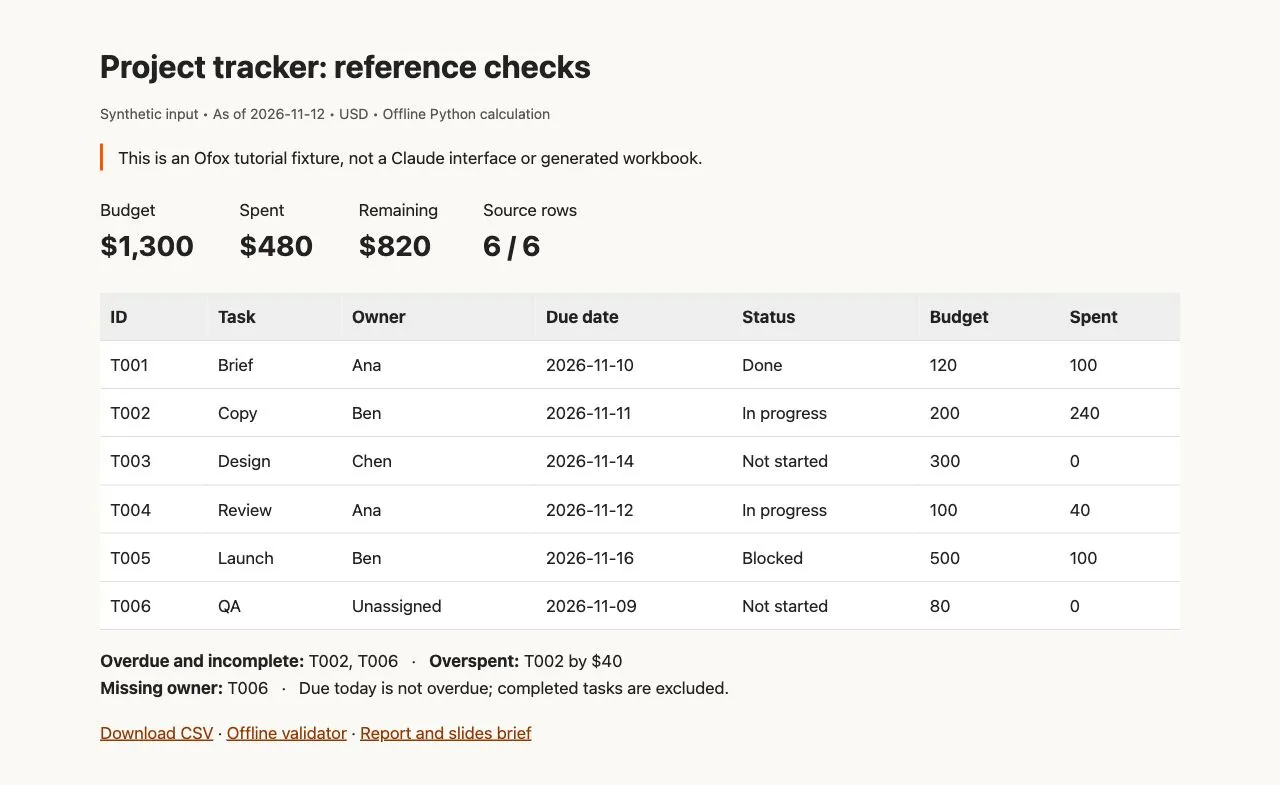
Reference report generated from the synthetic CSV and Python checks. It is not a screenshot of Claude Sheets or a generated workbook.
If you already have Python 3, run:
python3 validate.pyA successful run prints the expected counts, totals and IDs. The script asserts the fixture’s source values; a missing row, duplicate ID or changed amount causes a failure. It is an independent check of input preservation and arithmetic, not a substitute for checking formulas inside the editor.
4. Make one edit and check its consequences
In a copy of the tracker, change T002’s spending from 240 to 180. Ask Claude to change that cell only and leave dates, status and owners intact.
The summary should now show 420 spent and 880 remaining. T002’s remaining budget becomes 20, so it should disappear from the overspent list. It stays overdue. T006 stays overdue and unassigned. This checks whether the result responds to a real input change rather than displaying plausible fixed totals.
If you use version history to restore the original, check that collaborators have not made intervening changes that you intend to keep. For an isolated tutorial copy, restore or manually reset the spending value to 240 before continuing. The supplied validator expects the original fixture, not your edited scenario.
5. Export and inspect the recipient’s file
Export as .xlsx when the recipient needs a workbook. Use CSV for an additional source-value check. Reopen the workbook in the application where it will actually be used, then compare totals, dates, formulas and required formatting with the working artifact.
For the CSV check, export the Tasks data with the original headers, save it beside the validator, and run:
python3 validate.py exported.csvThe validator accepts extra calculated columns and ignores row order, but requires the six original IDs and original source values. If an export changes a header, date format or source field, it stops. Inspect the difference before changing the file. Do not transform a failed export merely to make the test pass without understanding what changed.
This CSV test cannot verify workbook formulas, chart behavior, multiple tabs or collaboration permissions. In the .xlsx file, repeat the T002 spending edit and check the dependent totals again. If the recipient only receives static numbers, describe the file as a snapshot rather than an editable live model.
Troubleshoot the specific failure
| Symptom | First check | Useful correction |
|---|---|---|
| No Sheets tile | Plan, artifact setting and organization access | Resolve availability before generating |
| Chat returns a Markdown table | Output type | Request a native Sheets artifact explicitly |
| Five rows instead of six | Task IDs and blank-owner row | Restore T006 and reconcile all IDs |
| Budget is 1,300 but spending is wrong | Numeric values and sum range | Inspect spent_usd, then recompute |
| T004 marked overdue | Strict-before rule and date type | Use 2026-11-12 as a fixed date; exclude equality |
| Blank owner gets a person’s name | Invented source change | Restore the blank and keep a separate flag |
| Summary fails the edit test | Constants or stale references | Inspect dependencies instead of restyling |
| Export opens but results differ | Recipient application and formulas | Compare a small changed-input case |
For wider data-cleaning issues, the Excel analysis tutorial covers reconciliation and missing categories. If your problem occurs in a coded Claude integration with an actual artifact-schema 400 response, use the separate API schema troubleshooting article. Its API instructions do not repair a missing feature in the Claude web app.
Share a checked tracker, not an unchecked claim
Before handing it over, record the source filename, reporting date, checks passed and checks still outstanding. Invite the intended collaborators only after reviewing the artifact’s contents and access settings. Keep owner assignments and budget decisions as human decisions, even when Claude helps propose them.
For a report or presentation built from these results, use the Claude office workflow guide and the supplied handoff outline. If you are evaluating Ofox Chat as another task environment, start with this same example and request the same deliverable checks. Ofox publishes this tutorial; Ofox Chat is a separate product, not a way to unlock Claude Sheets.