Manus Alternatives for Office Work: Which Tool Fits Your Task?
Compare Ofox Chat, Claude, Genspark and Skywork as Manus alternatives for reports, spreadsheets and slides. See the evidence, switching trade-offs and a shared task check.
 Ofox

For a Manus alternative, start with the part of your office work you need to replace. Consider Ofox Chat for a conversational brief-to-result workflow, Claude for downloadable office files, Genspark for a presentation-focused workspace, and Skywork for its separate document, sheet and slide workspaces. These are different starting points, not a ranking of overall intelligence. If your Manus workflow depends on browser actions or connected applications, replacing only its report-writing step may not replace the whole workflow.
This guide focuses on comparing supplied information, preparing reports, working with tables and creating presentations. It excludes coding agents, creative-video rankings and self-hosted automation platforms. Our broader AI agent overview covers other categories.
Ofox publishes this comparison and is one of the products discussed. Official sources were checked on November 4, 2026. We also ran one identical English vendor-brief task and one revision in Ofox Chat and Manus that day. Claude, Genspark and Skywork receive documentation-based assessments here, not fresh hands-on verdicts. Testing and editing were AI-assisted, with independent AI review; no human reviewer verified every run. There is no measured speed, reliability or price winner.
Choose by the work you need to hand over
| Your immediate job | Candidate | Why it belongs on the shortlist | Boundary of our evidence |
|---|---|---|---|
| Turn supplied briefs into a comparison and revise it after a clarification | Ofox Chat | In our paired test, it preserved costs and updated the decision | One text-based task; no PDF parsing or export test in this run |
| Produce an office file you will continue editing elsewhere | Claude | Its file-creation help documents XLSX, PPTX, DOCX and PDF output | Documented support, not our verification of your template or workbook |
| Build and refine a presentation in a slide workspace | Genspark | Its AI Slides help documents refinement and export | Access and export entitlement must match the account you use |
| Choose among document, spreadsheet and slide workflows | Skywork | Its help center exposes these workspaces and General | Product organization is documented; accuracy and file handoff untested here |
| Continue a workflow combining research, browser work and connected apps | Manus may remain appropriate | Its feature directory explicitly includes these routes | A simpler chat workflow does not automatically replace existing integrations |
The useful comparison is between finished workflows. “Can make slides” does not answer whether an agent can preserve your figures, revise one page and hand over the format your colleague needs. Likewise, “reads documents” does not establish that a long scanned PDF was fully read.
Decide what you are replacing before switching
Write the current workflow as three parts: inputs → work → handoff. For example: three vendor briefs → calculate comparable annual totals and resolve missing terms → a decision memo with sources and a table. That is different from opening three supplier portals, collecting quotations, emailing questions and creating purchase orders.
The first workflow can be evaluated with a small supplied-text test. The second also requires browser access, authenticated connections and authorization for external actions. Manus’s feature directory lists research, browser operation, automations and connectors. We did not test all of those capabilities, nor establish equivalent coverage in the alternatives.
A switch is worthwhile only if the new tool covers the part you actually depend on. Moving the writing while keeping an existing automation can be a reasonable partial replacement. Do not disconnect the working process until the replacement has produced an acceptable result and survived a revision.
Ofox Chat: a candidate for a supplied brief and a follow-up decision
Our Ofox Chat test used Balanced mode. We pasted three fictional vendor briefs and asked for a sourced memo for 12 users, CSV export and a ten-working-day deadline. No documents were uploaded and no web search was requested. Ofox calculated the explicit first-year totals correctly: Alder USD 1,200, Birch USD 1,032 and Cedar USD 1,290. These are fictional supplier figures, not Ofox or Manus prices.
More useful than the arithmetic was its handling of unknowns. Birch’s original brief did not mention CSV export. Ofox treated that as missing evidence, rather than a failed feature or an implied inclusion. It also separated Alder’s eight-day implementation duration from the time needed to get the input file ready.
When a follow-up confirmed Birch’s CSV export and put Alder’s file readiness four working days after the order, Ofox moved Alder to an earliest completion of day 12 and recommended Birch under the supplied conditions. All three annual totals stayed unchanged.
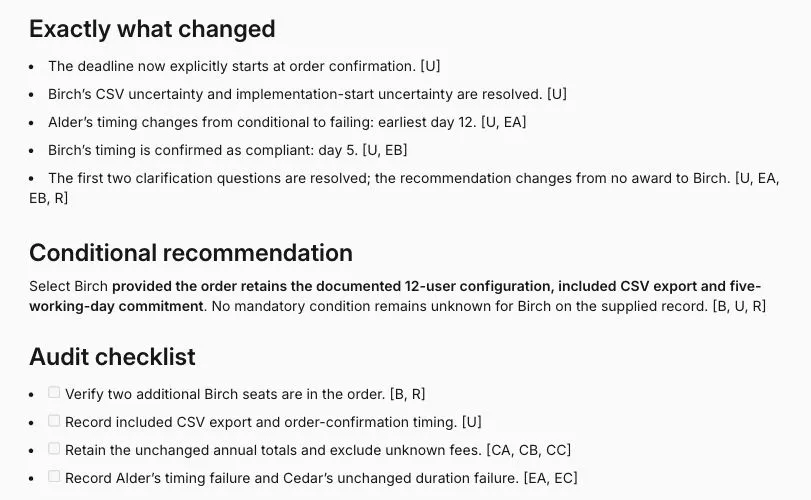
Actual English result from November 4. Cropped to the memo; the complete paired procedure is in our Ofox Chat versus Manus task comparison.
This makes Ofox a concrete candidate for turning a bounded brief into an inspectable answer. It does not prove universal procurement accuracy or that the same result will recur on every run. For file-based work, consult our separate Excel analysis and multiple-PDF summary walkthroughs, which describe their own inputs, outputs and limitations.
Claude: consider it when the handoff is an office file
Claude’s file-creation documentation lists downloadable Excel, PowerPoint, Word and PDF files. This establishes a relevant output route; it does not establish preservation of a particular corporate template or complex spreadsheet.
For a file-centered evaluation, ask for the artifact you actually need. “Give me an XLSX with formulas for annual totals and a separate unresolved-questions sheet” is more discriminating than “analyze these offers.” Open the workbook in the application your team uses, change an input and see whether the total recalculates. A correct number stored as a fixed value and a working formula meet different requirements.
Choose this candidate when continuing the work in familiar office software matters more than keeping every step in a dedicated presentation workspace. Keep the chat interface and other Claude products separate in your evaluation: a file-creation capability does not by itself prove an autonomous browser workflow or access to your organization’s applications. We did not create or inspect a Claude artifact for this guide.
Genspark: consider it when the presentation is the main deliverable
Genspark’s AI Slides guide describes slide refinement and PDF, PPTX and Google Slides export. Its Sheets and Slides product page also describes native office-file editing. These are vendor-documented capabilities, not comparative quality measurements.
The appropriate test is a short deck with known figures, followed by a tightly scoped correction. Ask it to replace one recommendation while preserving the totals, source notes and remaining slides. Then open the exported file. Check whether important content is editable and whether the layout still works outside the service. A good-looking preview alone cannot settle the handoff question.
Genspark is worth evaluating when slide composition and iterative visual edits dominate the job. If your main output is a source-by-source decision memo, a presentation workspace may add a stage you do not need. Before committing substantial work, verify that your account can export the required format; we have not established your current entitlement or a universal export policy from a previous account’s experience.
Skywork: consider it when several deliverable types belong together
Skywork’s help center lists General, Documents, Sheets and Slides. That makes it a candidate for evaluating a workflow that moves from a report to a table and a presentation. The listing alone does not prove that citations, formulas or edits remain synchronized between outputs.
A useful evaluation starts with one source pack and asks for two related deliverables: a comparison table and a short recommendation document. Change one source fact and inspect both outputs. If the report changes but the table retains the old condition, the workflow still needs manual reconciliation, even when each individual artifact looks polished.
Shortlist Skywork if switching between deliverable formats is your main problem. Keep it as a documentation-based candidate until you have checked the relevant workspace and file handoff. We did not run Skywork in this comparison and do not treat that access gap as evidence that it performs worse.
What the paired task tells us—and what it does not
Manus and Ofox both got the three annual totals right, withheld a final decision while mandatory information was missing, and changed the recommendation after clarification. Both were useful for this small supplied-text task.
There were also differences worth inspecting. Ofox explicitly kept Cedar’s unknown implementation start trigger separate from its 12-day duration. Manus called Cedar’s duration an elapsed timeline. In its final recommendation, Manus also referred to a five-day implementation requirement even though the requirement remained ten days. Its preferred vendor still met the actual deadline; the issue was an inaccurate restatement, not a reversed result.
These observations justify checking condition wording after a revision. They do not justify calling one agent generally more accurate: the evidence is one task in the visible modes, not repeated runs across models, languages and file types. The detailed comparison includes the input and expected calculations so the conclusion can be inspected.
Compare the switching cost, not just the displayed price
No verified product-price comparison is included here. Use the current terms for the exact product and account you would adopt, then account for the whole workflow:
- Can you export the format you need, and is that included in your access?
- Which prompts, source files, project instructions and connections need rebuilding?
- How much checking or correction remains after the first output?
- Can a colleague reopen and revise the delivered file without using your account?
- Does the destination support your actual region and payment method? Do not infer this from a translated interface.
A simple evaluation worksheet can record task / input / required output / access cost / attempts / correction time / accepted result. Keep money and staff time as separate columns unless you have an explicit hourly-rate assumption. Counting generated drafts without counting accepted outputs can make a cheaper-looking workflow misleading.
A practical switching decision
Keep Manus if its existing connections and execution workflow already deliver the job and the proposed alternative has only demonstrated text generation. Try Ofox Chat when your immediate need is to turn supplied information into a comparison and continue revising it in conversation. Evaluate Claude for office-file handoff, Genspark for presentation-led work, and Skywork for a multi-format workspace.
Start with one non-sensitive task and one follow-up change. Preserve the original inputs, check the final result, and keep the existing workflow until the replacement is usable. You can open Ofox Chat to try the supplied-brief workflow; sign-in is required. For the next stage, our sourced research report and work presentation tutorials explain their own verified procedures.