How to use Gemini 4 Hydrogen API with Google or Ofox
Connect Hydrogen through Google or Ofox, check free-tier eligibility, run a first request, read the right response fields and choose thinking settings.
 Ofox

To call Gemini 4 Hydrogen directly through Google, use gemini-4-hydrogen with a Google API key. Through Ofox’s Chat Completions route, use google/gemini-4-hydrogen with an Ofox key. Keep each route’s endpoint, credentials and response parser together. Changing only the model name is not enough when you switch protocols.
Google released Hydrogen for developers on November 12, 2026. Unlike Carbon’s paid-only API access, Hydrogen supports Google’s free and paid tiers. Free access still depends on the project’s eligibility, verification and active limits. This guide checks the documentation and Ofox catalog on November 13, 2026 and takes you from choosing a route to saving and validating one text response.
Ofox publishes this guide. We checked the request contracts and tested the response checks with synthetic fixtures; we did not run a paid Hydrogen inference or measure speed or answer quality. The examples are reproducible requests for you to run, not a claim that an account-specific route has already passed a live test. For a broader model decision, use the Carbon, Hydrogen and Argon comparison.
Choose one route before creating a key
The two examples below reach the same model family through different services. Run the one that matches your account; you do not need to run both to complete the tutorial.
| Integration detail | Google native example | Ofox example |
|---|---|---|
| Model string | gemini-4-hydrogen | google/gemini-4-hydrogen |
| Interface used here | Interactions API through google-genai | OpenAI-compatible Chat Completions through REST |
| Request endpoint | https://generativelanguage.googleapis.com/v1beta/interactions | https://api.ofox.io/v1/chat/completions |
| Credential | Google project API key | Ofox API key |
| Authentication on the wire | x-goog-api-key | Authorization: Bearer … |
| Main request input | input | messages |
| Text in the saved JSON | steps → model_output → content → text | choices → message → content |
| Completion signal for this text-only test | status: completed | finish_reason: stop |
| Where to check allowance and charges | Google project quota and billing | Ofox account usage and balance |
Google recommends Interactions for new integrations, while GenerateContent remains supported. Ofox’s current public catalog lists Hydrogen with OpenAI and Gemini protocol support and explicitly lists /v1/chat/completions for the OpenAI route. This article uses that listed route. It does not claim that replacing the base URL in Google’s Interactions example makes it work through Ofox.
Ofox also documents a Gemini-native route. That is a separate request contract; its general documentation does not mean every Gemini model supports every feature, such as explicit caching. Choose a protocol deliberately before adding tools, streaming or multimodal inputs.
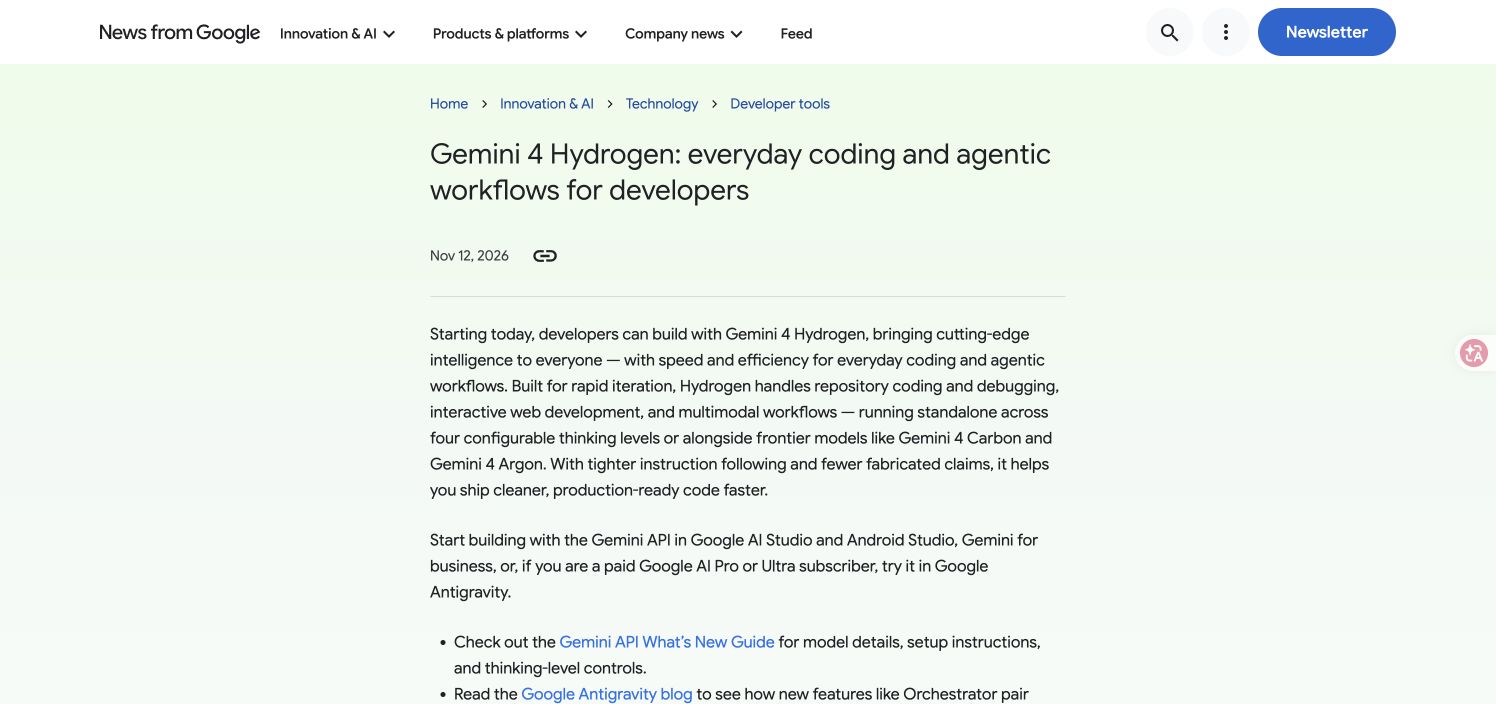
Official developer announcement captured November 13, 2026. This records the release announcement, not an API test or measured performance. Original source.
Prepare a Google project, including free-tier verification
For the Google example, open AI Studio’s API key page and identify the project that will own the request. New users can receive a default project; existing Cloud projects may need to be imported into AI Studio. Create or select a key for the intended project, then check that project’s tier and available quota. A key from another project can authenticate successfully while using a different allowance.
Hydrogen’s availability on the free tier does not mean every newly created project is immediately ready. Google’s project verification guide identifies additional and externally created projects as cases that can require verification. Affected requests return 403 with FREE_TIER_VERIFICATION_REQUIRED.
If that is your error:
- Open the verification link in the error, or select Verify project on AI Studio’s Projects page. Confirm the project number matches the one behind your key.
- Follow Google’s device-verification flow using a supported physical phone. If you lack the necessary project permissions, ask the project administrator to complete verification.
- Wait for the project’s verified confirmation, then retry the small request below once.
Creating another key in the same project does not remove a project-level verification requirement. Setting up paid billing is a separate alternative with its own charges; it is not a required first step for every Hydrogen user. Do not change billing just because a generic 403 appeared before you have read its specific cause.
Check your active rate limits in AI Studio. Google applies limits per project, not per key, and separate request and token limits can bind at different times. This is why two keys in one project do not create two independent quotas. We do not publish a universal free requests-per-minute figure: use the limits shown for your project and model.
Keep the key in a server-side environment variable named GEMINI_API_KEY, or load it through your deployment’s secret manager. Do not put it in browser code or commit it to the repository. Google’s current key documentation distinguishes authorization keys from standard keys: new AI Studio keys default to authorization keys; unrestricted standard keys are rejected, while explicitly restricted standard keys can still work.
The program below reads GEMINI_API_KEY explicitly. This avoids the SDK’s automatic precedence rule, where an existing GOOGLE_API_KEY would otherwise take priority if both variables were set. For a local macOS/Linux shell, use export GEMINI_API_KEY="YOUR_GOOGLE_KEY"; in PowerShell, use $env:GEMINI_API_KEY="YOUR_GOOGLE_KEY". Replace the placeholder with your own key in the local terminal, and avoid retaining secrets in shared shell history. Configure it in the same terminal that runs the program.
Make the Google request in Python
Use Python 3.11 or newer for the current SDK, then create an isolated environment. Our local checks used google-genai 3.3.0 on Python 3.11; the package declares Python 3.11 as its minimum. This example uses Python’s google-genai package, not the older google-generativeai package.
python3 -m venv .venv
source .venv/bin/activate
python -m pip install --upgrade 'google-genai>=2.34.0'
python -m pip show google-genai
On Windows PowerShell, activate the environment with .venv\Scripts\Activate.ps1. The version floor includes Python foreground-continuation support, although this short test stays within Hydrogen’s single-hop budget. Save the following as hydrogen_google.py:
import json
import os
from pathlib import Path
from google import genai

key = os.environ.get("GEMINI_API_KEY")
if not key:
    raise SystemExit("Set GEMINI_API_KEY for the intended Google project.")

client = genai.Client(api_key=key)
interaction = client.interactions.create(
    model="gemini-4-hydrogen",
    input="Give exactly three short bullet points about avoiding duplicate API retries.",
    store=False,
    generation_config={
        "thinking_level": "low",
        "max_output_tokens": 65536,
    },
)
Path("hydrogen-google.json").write_text(
    json.dumps(interaction.model_dump(mode="json"), indent=2),
    encoding="utf-8",
)
print("Saved hydrogen-google.json")
print("Interaction:", interaction.id)
print("Status:", interaction.status)
Run python hydrogen_google.py. The command sends a real request against the project behind your key; paid-tier use is billable. It saves the response even if the interaction did not finish with useful text. Run the response checker below before treating the test as successful.
The prompt is deliberately short and uses low thinking. The 65,536 setting is a maximum for thinking plus visible output, not a request to produce that many tokens and not a guaranteed charge. A tiny cap can leave no space for visible text after reasoning. For this access check, keep the prompt small and inspect actual usage rather than equating the cap with consumption.
store=False makes this a one-shot, unstored interaction. Do not reuse that setting unchanged in a background job or a conversation that relies on previous_interaction_id. It is also not a general promise about every form of provider logging. The Interactions overview explains the storage contract.
Make the Ofox request with Chat Completions
For this route, create or select an Ofox key following API Key Setup & Usage, and store it as OFOX_API_KEY in your server or local terminal environment. In a macOS/Linux shell, set export OFOX_API_KEY="YOUR_OFOX_KEY"; in PowerShell, set $env:OFOX_API_KEY="YOUR_OFOX_KEY", replacing the placeholder locally. Check the account’s available balance and the current Hydrogen model page before running a request. Google’s free-tier allowance does not fund Ofox requests, and an Ofox balance does not fund Google’s endpoint.
Our complete public catalog snapshot contained 133 models and listed google/gemini-4-hydrogen. That verifies the dated catalog entry and advertised protocols; it is not a successful inference test or a guarantee about every account, provider or future configuration.
Save this as hydrogen-ofox-request.json:
{
  "model": "google/gemini-4-hydrogen",
  "messages": [
    {
      "role": "user",
      "content": "Give exactly three short bullet points about avoiding duplicate API retries."
    }
  ],
  "max_tokens": 65536,
  "stream": false
}
Send it from a terminal with curl:
curl --silent --show-error --fail-with-body --max-time 900 \
  'https://api.ofox.io/v1/chat/completions' \
  -H "Authorization: Bearer $OFOX_API_KEY" \
  -H 'Content-Type: application/json' \
  --data-binary @hydrogen-ofox-request.json \
  --output hydrogen-ofox.json
This follows Ofox’s Chat Completions endpoint and parameter documentation. Keep the /v1 segment exactly once if you later configure an OpenAI-compatible SDK: its base URL is https://api.ofox.io/v1, while the complete REST endpoint includes /chat/completions.
The example deliberately omits temperature, top_p and a provider-specific thinking extension. Google’s native generation_config object is not an OpenAI Chat Completions parameter. Do not paste it into this request and assume the gateway forwards it. To configure reasoning through a particular Ofox route, first verify the documented parameter mapping for that route; the native four-level table later in this article is not proof that an arbitrary compatibility field works.
A nonzero curl exit code means the HTTP or transport operation failed. Inspect the saved error body, with the key removed from any shared logs. The explicit timeout is a client limit, not a latency estimate. If a call times out, do not immediately launch repeated paid requests: a client timeout does not prove that processing stopped upstream.
Validate the response for the protocol you used
An HTTP 200 can contain an unfinished interaction, a tool request or no usable text. Conversely, a correct response can look empty if you parse the other API’s fields. Google’s SDK provides interaction.output_text as a convenience, but the saved interaction resource uses steps; Chat Completions uses choices.
Save this complete checker as check_hydrogen.py. It makes no network requests and never resubmits an inference.
import json
import sys
from pathlib import Path

def validate(payload, route):
    if "error" in payload:
        raise ValueError("API error: " + json.dumps(payload["error"]))
    if route == "google":
        if payload.get("status") != "completed":
            raise ValueError("Interaction is not completed: " + str(payload.get("status")))
        text = "".join(
            part.get("text", "")
            for step in payload.get("steps", [])
            if step.get("type") == "model_output"
            for part in step.get("content", [])
            if part.get("type") == "text"
        )
    elif route == "ofox":
        choices = payload.get("choices") or []
        if not choices:
            raise ValueError("No Chat Completions choices in response")
        choice = choices[0]
        if choice.get("finish_reason") != "stop":
            raise ValueError("Text did not finish normally: " + str(choice.get("finish_reason")))
        text = (choice.get("message") or {}).get("content") or ""
    else:
        raise ValueError("Route must be google or ofox")
    if not isinstance(text, str) or not text.strip():
        raise ValueError("No usable text; inspect the saved JSON")
    return text

def main():
    if len(sys.argv) != 3:
        raise SystemExit("Usage: python check_hydrogen.py google|ofox response.json")
    payload = json.loads(Path(sys.argv[2]).read_text(encoding="utf-8"))
    try:
        text = validate(payload, sys.argv[1])
    except ValueError as exc:
        raise SystemExit(str(exc))
    print("Response ID:", payload.get("id"))
    print("Usage:", json.dumps(payload.get("usage")))
    print(text)

if __name__ == "__main__":
    main()
For the Google example, run python check_hydrogen.py google hydrogen-google.json. For Ofox, run python check_hydrogen.py ofox hydrogen-ofox.json. A pass prints the response ID, usage and visible text. Read that text and confirm it contains three short, relevant bullet points. The checker validates protocol completion and nonempty text; it does not judge the factual quality of the model’s advice.
We checked this logic locally with synthetic completed, empty, error, incomplete and tool-response fixtures, including text spread across multiple Google output steps. These tests establish the checker’s behavior, not live authentication, quota, latency or answer quality. A tool_calls finish reason can be correct in a tool-using application; it fails this particular text-only acceptance check because there is no final answer yet.
Choose thinking effort without confusing it with output length
Hydrogen’s native API supports four thinking levels. The default is high, whereas Carbon and Argon default to medium. Google’s thinking documentation describes reasoning effort; it is not a fixed word-count setting.
Native thinking_level | Practical starting point | What to verify |
|---|---|---|
low | A small access test or straightforward transformation | The answer still satisfies the requested constraints |
medium | Interactive work where you want to evaluate a lower effort setting | Compare task success and observed latency against your baseline |
high | Hydrogen’s default; a starting point for more demanding coding and reasoning | Check correctness, usage and whether the answer completed |
xhigh | A harder problem that your high baseline does not solve reliably | The extra effort improves your acceptance result enough to justify its observed cost and wait |
These are starting choices, not results of an Ofox benchmark. Keep the same input and acceptance criteria when comparing levels. Record the exact model, level, response status, elapsed time, usage and pass/fail reason. Change one setting at a time; a shorter answer does not establish that fewer thinking tokens were consumed.
Hydrogen shares 1,048,576 tokens across input, thinking and output. It does not give you a million-token input allowance plus a separate million-token answer. Its default synchronous thinking/output allowance is 65,536, and its single streaming or non-streaming hop supports that limit. Larger outputs require the continuation or background mechanisms described in long decode.
Do not set a million-token output cap for a first test. If you later use background execution, retain the job ID and handle pending and terminal states explicitly; setting background=true alone does not raise the default output cap. This tutorial validates a short foreground request, not a long-running job controller.
Hydrogen produces text. Its model card lists image, video, audio and PDF inputs, but does not list native image generation, audio generation or Live API support. Accepting an image for analysis is different from producing a generated image. Add a supported input type only after the text baseline works.
Fix failures at the layer that failed
Keep the endpoint, model string, project or account, SDK version and exact error together in a diagnostic note. Remove credentials before sharing it. Avoid rebuilding the whole setup when one field is wrong.
| Symptom | Likely layer to inspect | Next step |
|---|---|---|
FREE_TIER_VERIFICATION_REQUIRED | Google project verification | Verify the project identified in the error; replacing its key does not change project state |
| Other authentication or permission error | Key, owning account/project, restrictions or eligibility | Read the specific error; confirm Google and Ofox credentials were not swapped |
| Model/resource not found | Endpoint and model identifier | Use the route matrix; check the current catalog rather than inventing a -preview suffix |
429 or quota exhausted | Project/account limits and usage | Inspect the limit that was hit; reduce concurrency and use bounded backoff only for retryable conditions |
HTTP 200, checker reports no text | Response shape or completion state | Confirm the selected parser route; inspect status or finish_reason before retrying |
| Output ends early | Thinking/output allowance or response restriction | Inspect the saved status, usage and error details; do not assume visible length equals total token use |
400 after copying an older config | Unsupported parameters or wrong protocol shape | Remove old sampling/cache fields and return to the minimal request |
Python lacks interactions | Package or interpreter mismatch | Check python -m pip show google-genai inside the environment that runs the script |
For Ofox responses, use the Ofox error-handling guide. For Google’s error categories, use its troubleshooting reference. The Argon API error walkthrough provides another example of separating route, quota and parsing failures; its model-specific settings are not Hydrogen defaults.
When you extend the program to tools, declare tools through the selected API’s native tool fields. Do not merely ask the model to print an improvised tool-call format and expect a tool executor to recognize it. Preserve the required conversation history and signatures; if that becomes the specific failure, follow the missing thought signature diagnosis.
Finish with a baseline you can reproduce
Your first integration is ready for the next feature when you have one saved response, the correct completion signal, usable text that meets the three-bullet prompt, and a usage record tied to the intended project or account. Save the exact model, route, SDK version and configuration alongside that response. Keep secrets out of the record.
Then add one change: a real task prompt, a supported file input, streaming, or a declared tool. Rerun the baseline if the new version fails. This separates an access regression from a problem introduced by the new feature.
If the next decision is whether a harder task belongs on Carbon, compare the models using the Gemini 4 selection guide. For Carbon’s different access requirements and first-call settings, use the Carbon API setup guide. A working Hydrogen request is useful evidence about your integration; it is not proof that the same account, parameters or parser can be copied unchanged to every service.