Gemini 4 Carbon vs Hydrogen vs Argon: which should you use?
Choose a Gemini 4 model for coding, agents and document work. Compare access, thinking levels, token costs and the conditions that justify switching.
 Ofox

Start with Hydrogen for a new everyday coding or agent workflow. Consider Carbon when a difficult reasoning problem survives a properly configured, well-specified first attempt. Keep Argon when your existing evaluation already shows that it meets the task requirements. Do not migrate a working application solely because one model has a newer name.
That is our practical selection rule, based on Google’s specifications checked on November 13, 2026. It is not a three-model performance benchmark: we have not run these models against a shared test set for this article. The task briefs and cost calculations below are reproducible evaluation aids, not reported model results.
Hydrogen became available after Carbon, so the old choice between “the strongest model” and “the cheaper model” needs another column. Google positions Hydrogen for efficient execution, Argon for advanced work with less reasoning expenditure than Carbon, and Carbon for harder problems that benefit from deeper verification. Those descriptions suggest starting points; your accepted output, elapsed time and total bill determine the final choice. Sources: Google’s Hydrogen guide, Argon guide and Carbon guide.
The differences that actually change your choice
| Decision | Hydrogen | Argon | Carbon |
|---|---|---|---|
| Exact model ID | gemini-4-hydrogen | gemini-4-argon | gemini-4-carbon |
| Sensible first evaluation | Interactive coding, tool execution and routine multimodal work | Existing advanced workflows that already pass acceptance checks | Difficult debugging, architecture and evidence synthesis |
| Thinking settings | low, medium, high, xhigh | low, medium, high | low, medium, high |
| Default thinking | high | medium | medium |
| Gemini API free tier | Available, subject to eligibility and quotas | Not available | Not available |
| Shared context budget | 1,048,576 tokens | 1,048,576 tokens | 1,048,576 tokens |
| Why change away from it? | Repeated reasoning failures after fixing missing context and tool errors | A representative evaluation shows Hydrogen or Carbon better meets your constraints | Extra reasoning time and token expenditure do not improve accepted results |
The evaluation suggestions are editorial recommendations, not a claim that Argon always beats Hydrogen or that Carbon always wins difficult tasks. In particular, model size, name and release order do not establish a universal ranking.
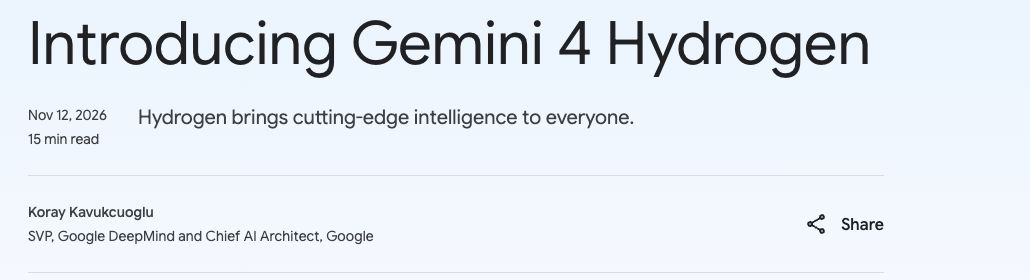
Official announcement captured on November 13, 2026. This establishes the release context; it is not a screenshot of an Ofox integration or a model test. Original announcement.
Shared capabilities are not reasons to pay for Carbon
All three accept multimodal material and generate text. Their model specifications list function calling, structured output and Computer Use, among other tools. Receiving an image or video does not mean the model generates an image or a video. If the deliverable is a generated picture, video or spoken audio, select the corresponding image, video or speech model rather than trying to unlock that output with a larger thinking setting.
Likewise, a larger model does not supply your application’s missing execution environment. A tool call proposes an operation; your program must execute it, return the result, handle errors and enforce the user’s permissions. For UI automation, distinguish model actions from the client that takes screenshots and performs clicks. Our Computer Use controller explanation covers that division of responsibility.
Check the exact route against the Hydrogen, Argon and Carbon specifications. A feature supported by Google’s native API is not automatically supported by a third-party gateway or every client SDK.
One million context tokens does not mean one million input plus one million output
Input, thinking and output share the 1,048,576-token window. A large input leaves less space for reasoning and the answer. The usual synchronous budget is also not the same thing as the model’s maximum long-decode capability.
Google documents a default 65,536-token thinking-and-output budget, with longer generation requiring the appropriate continuation or background-execution path. Raw HTTP hop limits and SDK continuation behavior differ; do not assume every non-streaming request returns 65K visible words or tokens. Consult the long-decode guide before choosing a model for book-length output.
For a source-grounded report, reduce irrelevant input and specify the deliverable first. Switching to Carbon will not repair a request that has left no usable output budget.
Choose by the work you need accepted
A feature implementation or an interactive web app
For a new workflow, evaluate Hydrogen first. A useful feature request has a bounded change, a runnable repository, clear tests and an explicit definition of completion. That makes it possible to see whether a model actually delivered the feature rather than simply produced convincing code.
For example, ask for a CSV upload screen that validates the header, displays invalid rows and exports a corrected file. Acceptance means the project starts, the invalid fixture is rejected correctly, export preserves the expected columns, and the interface works at a narrow viewport. A screenshot alone is insufficient: a beautiful upload form with a disconnected export button fails the task.
Keep Argon if that workflow already works with it and a migration offers no measured benefit. Escalate to Carbon when the failure involves a difficult underlying dependency or design conflict, not merely a missing package, unavailable browser or incorrectly configured test command.
A recurring bug across several components
Carbon is a reasonable candidate when the issue requires holding several competing explanations in mind: an intermittent retry race, inconsistent state across services, or a patch that fixes one case while breaking another. Its documented emphasis on deeper verification is relevant to that work, but it still needs evidence.
Give the model a failing test, a minimal reproduction, relevant logs and a constraint against unrelated rewrites. Require it to identify the failure mechanism, produce a focused patch and explain which regression test would fail without that patch. If the bug cannot be reproduced, the correct intermediate result may be a narrower diagnostic experiment rather than a confident fix.
An escalation packet should contain the current hypothesis and the failed checks. Do not just paste “try harder” into another model. If the first attempt never received the relevant file, supplying that file may matter more than changing models.
Comparing PDFs, spreadsheets and conflicting sources
Use Hydrogen for a first pass when the material and output schema are well defined: extract invoice totals, compare two specification sheets or assemble an evidence table. Evaluate Carbon when contradictions, ambiguous definitions or cross-document reasoning are the main difficulty. Argon remains a valid option if your established workflow already handles those cases reliably.
Define acceptance at the claim level. Every figure should have a source filename and page or cell reference. Missing information should remain explicitly missing. Totals should be recomputed outside the prose answer, and conflicting source values should be shown separately rather than silently averaged.
Here is a reusable brief for the same document task across models:
Compare the attached supplier specification documents.
Return a table with: requirement, supplier value, unit,
source filename, page or cell reference, and unresolved conflict.

Do not fill missing values from general knowledge.
Keep conflicting definitions separate.
After the table, list the minimum questions needed to resolve conflicts.
Success means each reported value can be traced to the supplied files.
This is a proposed evaluation prompt. It is not a claim that any model completed the task or that the table is automatically correct.
A multi-step tool workflow
Model choice and workflow design should be evaluated separately. A common sequence is “read sources → extract facts → call a tool → validate the result → save an artifact.” Hydrogen is a practical first candidate for the execution loop; Carbon can be evaluated for the difficult planning or review stage.
Split responsibilities only where the boundary is explicit. A planning model can return a specification and acceptance checks; an execution model can perform the bounded changes; a verifier can inspect the produced files. More agents introduce handoff tokens, duplicated context and coordination errors, so parallelism is not inherently cheaper.
Do not pass an incompatible conversation history unchanged between models or providers. Preserve the task state in an explicit artifact, then follow the destination API’s requirements for tool calls and results. If requests fail after a tool turn, investigate Gemini thought-signature handling before interpreting the failure as weak reasoning.
Compare total task cost, not just the headline token rate
The following are Google Gemini API Standard paid-tier rates in USD per one million tokens, checked on November 13, 2026. They are not Ofox prices, subscription prices, or Batch/Flex/Priority quotes. Output rates include thinking tokens. Google’s pricing page is the source for every rate and date below.
| Model | Uncached input through Nov 30 | Output including thinking through Nov 30 | Input from Dec 1, 2026 | Output from Dec 1, 2026 |
|---|---|---|---|---|
| Hydrogen | $1.50 | $7.50 | $1.50* | $7.50* |
| Argon | $2.00 | $10.00 | $4.00 | $20.00 |
| Carbon | $2.00 | $10.00 | $4.00 | $20.00 |
Hydrogen’s current published rates have no corresponding December 1 increase in the checked source. This is not a guarantee that prices will never change.
Carbon and Argon sharing a rate does not make them cost the same per task. The total can change with reasoning length, repeated input across turns, failed attempts, validation and tool charges. Google’s API uses implicit caching for these models; an old explicit-cache request is not a drop-in optimization.
For a basic uncached calculation:
Model cost = uncached input tokens / 1,000,000 × input rate
           + billable output tokens / 1,000,000 × output rate

Task cost = sum of model costs for every attempt
          + applicable tool, execution and other service charges
Do not count thinking twice if the usage field you selected already includes it. Read the accounting definitions for the API you actually call. Cached input, when reported, belongs in a separate term at the applicable cached rate.
A controlled example: identical usage
Suppose a completed task consumes 100,000 uncached input tokens and 10,000 billable output tokens, including thinking, with no paid tools. These are synthetic quantities, not a measured workload.
- Hydrogen:
0.1 × $1.50 + 0.01 × $7.50 = $0.225. - Argon or Carbon through November 30:
0.1 × $2 + 0.01 × $10 = $0.30. - Argon or Carbon from December 1:
0.1 × $4 + 0.01 × $20 = $0.60.
This isolates price. It says nothing about which model succeeds or how many tokens it will actually consume.
A second example: extra reasoning and retries
Hold input at 100,000 tokens but let one Carbon attempt consume 30,000 billable output tokens. That synthetic attempt costs $0.50 at the introductory rates, or $1.00 at the announced December rates.
Three Hydrogen attempts, each consuming the first example’s quantities, cost $0.675. In that constructed case, one successful Carbon attempt would cost less than three Hydrogen attempts during the introductory period, but more at the announced December rates. Actual retries may reuse cached input, consume different output lengths or fail for reasons unrelated to reasoning, so these are not predicted savings.
The lesson is to record cost per accepted task, including unsuccessful attempts. A low per-token rate is useful only alongside an acceptable completion rate and latency.
Run a small evaluation before changing your default
Use the downloadable evaluation CSV to record your own results. It contains blank rows, not benchmark scores. Choose representative cases from your actual workload, including at least one case where the current workflow fails.
| Test | Fixed input | Acceptance check | Failure worth recording |
|---|---|---|---|
| Code change | Same repository commit, issue and fixtures | Required tests pass; no unrelated behavior changes | Patch looks plausible but regression remains |
| Document comparison | Same files and extraction schema | Each value has a valid source; totals reconcile | Invented value, lost unit or unsupported citation |
| Tool workflow | Same tool definitions and starting state | Tool completes; result is verified; artifact opens | Invalid call, duplicate side effect or incomplete output |
Record the exact model ID, provider, client version, thinking setting, token limits, tool configuration, elapsed time, usage and result. For an initial usability comparison, use each model’s documented default. Label that as a default-configuration comparison, because Hydrogen starts at high while Carbon and Argon start at medium.
A second pass can use a common supported setting such as medium, but equal setting names do not imply equal internal compute. Never use xhigh for Carbon or Argon: it is not among their documented settings.
Decide the success criteria before reading the answers. If every model passes, select based on the latency and total cost your application needs. If one fails, inspect the failure class before escalating: missing evidence, invalid API request and broken execution environment need different fixes from a reasoning error. Repeat enough cases to understand variability; a single winning response is not a reliable overall ranking.
Check access and integration before blaming the model
Google’s API tier, a Gemini app subscription, an Antigravity subscription and a third-party API balance are different access mechanisms. A model appearing in a consumer product does not prove that your current API project can call it. Hydrogen’s free API tier also does not imply unlimited requests or identical tool access to the paid tier.
For access and request failures, use the existing Argon access guide and Gemini API error diagnosis as background, then verify the current model’s own conditions. Those articles describe specific versions and dates; their access details should not be copied blindly to Hydrogen or Carbon.
If using Ofox, start with the actual model and protocol shown for your account. This comparison does not establish that all three models or every Google-native feature are available through Ofox. Review the Ofox Gemini API documentation for the native integration route and the error-handling guide when validating requests. A successful text response alone does not validate streaming, structured output or a complete tool round trip.
For a new application, the concrete next step is a bounded Hydrogen task with a saved input and acceptance check. For an established Argon application, keep the working version as the baseline. Evaluate Carbon against the cases whose failure has been traced to reasoning difficulty, and retain it only where the accepted result justifies the additional time and expenditure.