How to change a Black Friday video price without regenerating the product shot
Change a Black Friday offer without regenerating the product shot. Compare two price overlays and reproduce the edit on a vertical fashion ad.
 Ofox
Your Black Friday cardigan ad is approved when the price drops from $48 to $42. Do you need to generate the product footage again? If the price sits in an editable layer below the shot, keep the approved footage, change the price and export the ad again. That is how we made the second version without another model call.
Compare the $48 and $42 exports. Look at the price below the cardigan: the first file shows $48 and the second shows $42. The same cardigan moves in both. If the price is printed on the garment or moves with it inside the footage, this template edit will not remove it.
Inspect the price change at full size
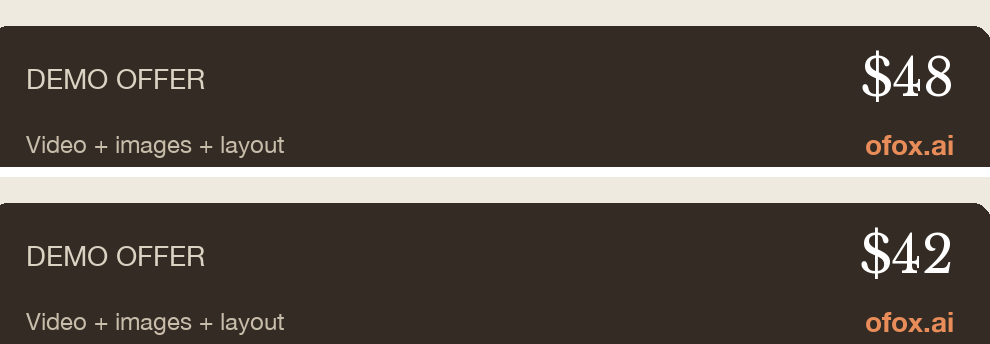
Top: first render. Bottom: revised price. Both crops come from the generated layout files, before video encoding.
Start with the asset your customer will actually see
The sample fashion project follows a cream cardigan from a full outfit shot down to a close-up of its button. The vertical example places footage inside a designed frame. Its price sits in that outer frame. That detail is why this edit works. A price printed inside generated footage would need a different repair.
The cardigan is an AI-generated concept. For a real SKU, use the merchant’s approved product photography to check the garment. Check the SKU specifications before carrying details like “wool” or “wooden buttons” from a prompt into your ad copy.
Generate the text-free product shot once using an Ofox video model. Put the offer on a separate design layer. When merchandising changes the price, you can reuse the approved shot and spend zero additional generation credits on that edit.
Where does the old price appear?
Pause the approved ad on a frame showing the old price. Then hide the offer layer in the editable project and check the same moment again.
| What you see | What to change | What to check before delivery |
|---|---|---|
| The old price disappears with the offer layer | Change the layer and export the placement again. The two cardigan exports above show this case. | Open the exported MP4 and compare the amount and currency with the storefront. |
| The old price stays visible on the product or packaging | Reopen the source shot. If you have a clean take, replace that shot before adding the new offer. | Scrub through the movement to catch frames where the old price becomes visible again. |
| Two prices were visible and hiding the layer removes only one | Correct the source shot and the offer layer separately. | Check the opening shot, moving product and end card for conflicting prices. |
Reproduce the edit on your own copy
- Download the source project and unpack it. Keep the supplied master clip in
project/output/ad_raw.mp4. - In
project/config.json, setprice_labelto the offer label andprice_valueto the approved display price, including currency. For our test, the label stayedDEMO OFFERthroughout. - From the unpacked
fashion-templatedirectory, runpython3 scripts/compose.py project. Openproject/build/vertical_bg.pngto inspect the price at phone size. The supplied script uses Pillow and a macOS Helvetica Neue font path; substitute an installed font if running elsewhere. - For the finished video, run
bash scripts/finish.sh projectwith FFmpeg installed. Reviewproject/output/shorts-9x16.mp4. The template also produces a vertical ad and a landscape showcase, but the price field is drawn on the Shorts background. Check every placement you plan to publish.
On the uncompressed layouts, the price edit occupied 90 × 52 pixels. We also decoded all 376 frames of each exported MP4. In every frame the price region matched its own layout more closely than the other offer. This checks that the revised price survived encoding throughout the clip.
One offer change, three placements to check
The config edit has a narrower reach than the word “campaign” suggests. The finishing script builds the vertical ad from the master and an end card. It then places that ad on two different backgrounds. Follow the price field through those layers before sending all three files to a media buyer.
| Placement in the kit | Where to look for the revised price | Delivery decision |
|---|---|---|
| Shorts, 9:16 | Price block on the vertical background | Inspect a frame from the final encode at phone size |
| Standalone vertical ad | The price block belongs to a different background | Add separately approved offer text if this placement must show a price |
| Landscape showcase | The showcase uses its own background | Check the final composition independently before marking it approved |
For a Friday-to-Monday handoff, keep a three-line manifest: file name, market and approved offer. Have the reviewer open the exported file alongside the target storefront. That catches a perfectly legible US price accidentally paired with a different market’s landing page, something a pixel-difference check cannot detect.
What should trigger a paid retake?
| What changed during review? | Cheapest useful next action | What to approve |
|---|---|---|
| Friday’s offer changed from $48 to $42 | Edit the price field and rebuild the layout | Price and currency match the storefront for that market |
| A long price or eligibility line touches the edge | Adjust typography or placement and export again | Read the full offer at the intended mobile size |
| The sleeve shape or button count changes during the shot | Mark the first failing timestamp and compare it with the approved SKU. Trim if enough usable footage remains; otherwise regenerate that shot | Watch the repaired sequence against the product reference |
| The ad looks correct but links to a different variant | Fix the destination and test the click | Landing page opens the pictured SKU with the advertised terms |
Keep the clean master, the editable offer and the approved export together. When merchandising changes a number, the person on duty can revise the right layer. Reserve the generation budget for changes that genuinely require new footage.