"Transparent Background Is Not Supported for This Model": 3 Fixes
gpt-image-2 returns this 400 while gpt-image-1.5 returns a real RGBA PNG. Five image models on one endpoint: one works, one errors, three return opaque.
 Ofox
Ofox 
The error is honest and the fix is a one-word model swap. background: "transparent" is a preview capability that some image model deployments have and others do not, and the one OpenAI’s own cookbook uses is not the one that works here.
Error:        400, "Transparent background is not supported for this model."
Type:         image_generation_user_error
Fires on:     openai/gpt-image-2  (1.1s, before any generation)
Works on:     openai/gpt-image-1.5  (200, RGBA PNG, 67.3% alpha-zero pixels)
Silent fail:  gemini-3-pro-image, qwen-image-3.0, mai-image-2.5-flash
              all 200, all colour type 2, no alpha channel
Format rule:  PNG only. jpeg is a 400, webp is a 400.
Prompt rule:  prompt beats parameter. Scene words put the scene back.
Measured:     2026-08-24, POST /v1/images/generations, 1024x1024, n=1
The three fixes, in the order they bite:
- Fix 1, switch the model. The capability is attached to the deployment, not to the request. One model ID away is a 200 with a real alpha channel.
- Fix 2, keep the output PNG.
jpegandwebpare both 400s here, for two different reasons. - Fix 3, rewrite the prompt. The prompt outranks the parameter, and a prompt that mentions a scene gets you a scene.
Last updated 2026-08-24. OpenAI describes transparent assets as being in preview, so which model IDs carry the capability can change. Re-run the probe in this post before you trust a model list, including ours.
Why Does gpt-image-2 Say Transparent Background Is Not Supported for This Model?
Because the deployment behind that model ID does not have the transparency preview turned on. The message is not a polite way of saying the parameter is wrong.
Here is the whole reply:
{
  "error": {
    "code": null,
    "message": "Transparent background is not supported for this model.",
    "param": null,
    "type": "image_generation_user_error"
  }
}
Two details rule out the boring explanations. It arrives in 1.1 seconds, so nothing was generated and thrown away. And the identical request with background: "opaque" returns 200 with a normal image, on the same model ID, through the same key. A gateway that filtered the field would not be able to produce a different outcome for two different values of it.
The reason people hit this while following instructions is that OpenAI’s cookbook on transparent image assets is written against gpt-image-2. Read its setup line again, though: it says you need access to a transparency-capable image model, and it calls the feature a preview. Model name and capability are two different things when a feature ships behind an access flag.
Which Image Models Actually Return a Transparent PNG?
One of the five we tested. Same prompt, same size, same endpoint, same day.
| Model | HTTP | Latency | PNG colour type | Pixels at alpha 0 |
|---|---|---|---|---|
openai/gpt-image-1.5 | 200 | 29.0s | 6, truecolour + alpha | 67.3% |
openai/gpt-image-2 | 400 | 1.1s | n/a | n/a |
google/gemini-3-pro-image | 200 | 25.8s | 2, no alpha | 0 |
bailian/qwen-image-3.0 | 200 | 49.7s | 2, no alpha | 0 |
microsoft/mai-image-2.5-flash | 200 | 15.4s | 2, no alpha | 0 |
The three 200s in the bottom half are the dangerous rows. A 400 costs you nothing and tells you what to change. A 200 that quietly hands back an opaque PNG costs a generation, passes every response.ok check you wrote, and shows up as a white box in a slide deck a week later.
We confirmed the drop rather than inferring it. Send background: "bogus" to gpt-image-1.5 and you get a 400 that names the legal values:
Invalid value: 'bogus'. Supported values are: 'transparent', 'opaque', and 'auto'.Send the same nonsense to gemini-3-pro-image and you get a 200 and an image. A route that validates the field rejects garbage. A route that accepts garbage was never going to honour transparent either.
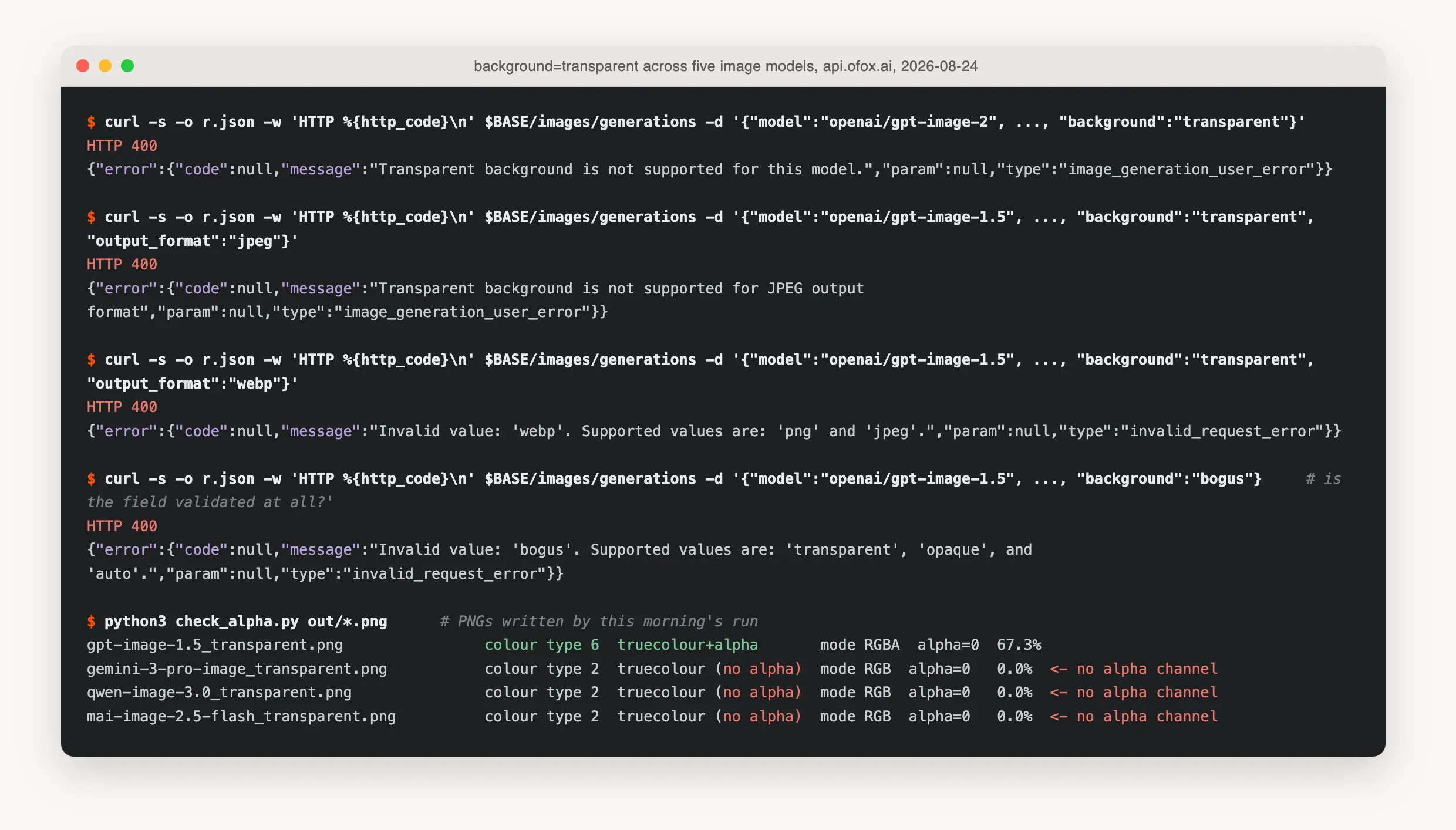
The four refusals are live calls; the last block reads the PNG headers of the files the model actually returned.
Fix 1: Which Model Do You Switch To?
openai/gpt-image-1.5, and nothing else in the request changes. The body that fails on gpt-image-2 succeeds unmodified:
from openai import OpenAI

client = OpenAI(base_url="https://api.ofox.io/v1", api_key="YOUR_OFOX_API_KEY")

resp = client.images.generate(
    model="openai/gpt-image-1.5",   # gpt-image-2 returns 400 here
    prompt=(
        "A single glossy red ceramic coffee mug, isolated product cutout, "
        "no backdrop, no scene, no shadow, no reflection, transparent background, "
        "no text, no letters, no logos, no watermarks"
    ),
    size="1024x1024",
    background="transparent",
)
If you are wiring this into a catalogue pipeline, pin the model ID explicitly and fail loudly when the response has no alpha, rather than letting a fallback model produce a thousand opaque cutouts overnight. Our notes on the failure modes of gpt-image-2 cover the other errors that show up in the same pipeline.
Fix 2: Which Output Formats Can Hold Alpha?
PNG, and only PNG. JPEG cannot store an alpha channel and the API says so before generating anything, and WebP, which can store alpha in general, is not offered here at all.
output_format: "jpeg"  ->  400  Transparent background is not supported for JPEG output format
output_format: "webp"  ->  400  Invalid value: 'webp'. Supported values are: 'png' and 'jpeg'.
Two different refusals, worth telling apart. The JPEG one is about the format’s capabilities. The WebP one is about what this endpoint accepts at all, which is a shorter list. That matters for storefront pipelines, where the instinct is to ask for WebP and skip a conversion step; here you generate PNG and convert downstream.
Fix 3: Why Is My Transparent Image Still Full of Background?
Because the prompt outranks the parameter, and by a wide margin. OpenAI’s cookbook states it as a note. We measured how much it costs you.
Same model, same background: "transparent", two prompts:
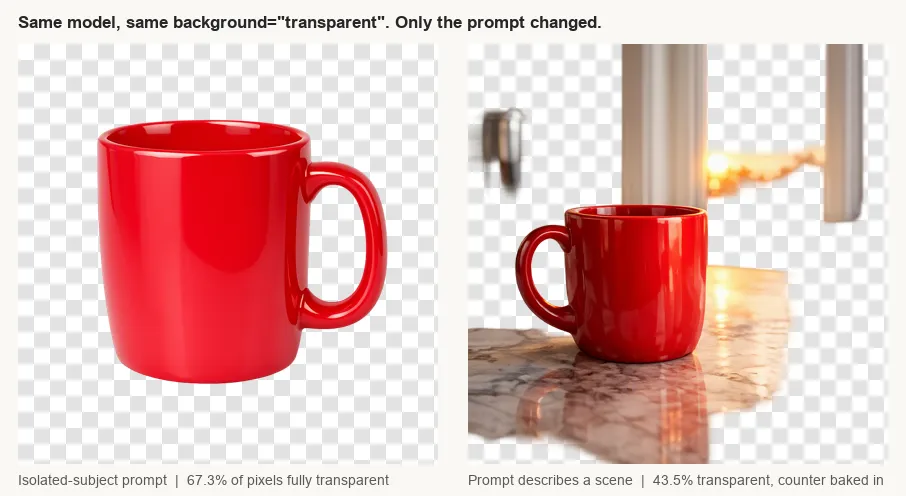
| Prompt | Alpha 0 (fully transparent) | Alpha 255 (fully opaque) | What came back |
|---|---|---|---|
| Isolated subject, “no backdrop, no scene, no shadow” | 67.3% | 24.1% | A clean cutout |
| ”on a marble kitchen counter at sunrise, soft window light” | 43.5% | 21.7% | Mug, counter, window frame and sunrise, with the empty sky knocked out |
The second image is not a failure of the transparency feature. It did produce alpha. It produced alpha around the scene it was asked to paint, which is useless for a product catalogue and worse than useless if nobody looks at the file before it ships.
Practical rule: describe the object and nothing else, then add the negatives. Words like counter, studio, gradient, table, sunset and shadow all invite a background back in. So does asking for a reflection.
How Do You Check Whether a PNG Really Has Transparency?
Read one byte. PNG stores the colour type in the IHDR chunk, at offset 25 in the file:
python3 -c "print('colour type', open('out.png','rb').read(26)[25])"
# 6 = truecolour + alpha   4 = greyscale + alpha
# 2 = truecolour, no alpha 3 = indexed (transparency may live in a tRNS chunk)
Colour type is necessary but not sufficient. An RGBA file whose alpha channel is 255 everywhere is an opaque image with an extra channel, and that is exactly what a badly worded prompt returns. Count the pixels:
from PIL import Image

im = Image.open("out.png")
print(im.mode)                                     # RGBA if an alpha channel exists
if im.mode == "RGBA":
    hist = im.getchannel("A").histogram()
    px = im.width * im.height
    print(f"{100 * hist[0] / px:.1f}% fully transparent")
    print(f"{100 * hist[255] / px:.1f}% fully opaque")
Every number in this post came out of those two checks. Pillow’s image reference has the rest of the channel API, and the PNG specification has the colour type table if you would rather parse the header yourself.
Put the alpha check in CI. A generation service that silently changes which deployment serves a model ID will not tell you; a test that asserts “more than 30% of pixels are fully transparent” will.
How Do You Test Five Image Models Without Five Accounts?
The awkward part of this whole exercise is not the code. It is that finding out which model honours background: "transparent" today means having credentials at OpenAI, Google, Alibaba and Microsoft at the same time, in four SDKs, with four billing relationships, to run one 20-line script. Nobody signs up for three extra vendors to answer a yes-or-no question about a parameter.
Every model in the table above answers on the same POST /v1/images/generations with the same key, because they are all exposed through the OpenAI-compatible shape. That is the only reason the matrix in this post exists: swapping model= was the entire diff between rows. ofox is where we ran it, and any gateway that passes the field through rather than normalising it away will do the same job. The passthrough is the part to verify before you trust the result: if background: "bogus" does not come back as a 400, the route is not telling you the truth about the parameter.
What If the Model You Need Has No Transparency?
If you are locked to a model that drops the field, you have two honest options and one bad one.
- Generate on a plain background and cut it out. A flat, unnatural background colour that does not appear in the subject makes downstream matting far easier. Slower and lossier at the edges, but predictable.
- Generate the asset once on a capable model and reuse it. Transparency is a property of the file, not of the pipeline. One good cutout beats a hundred re-renders.
- Do not ship the 200 that came back opaque. It will surface as a white rectangle on a coloured slide, and by then the batch is a thousand files deep.
For the wider picture on the image endpoints themselves, our gpt-image-2 release guide covers the editing controls, and the Qwen Image 3.0 Pro walkthrough and the Seedream 4.5 guide cover the two other families in the table. Google’s image generation docs list what the Gemini image models do expose, which is worth reading before assuming a missing feature is a routing problem.
What Does One Transparent Image Cost?
Our successful generation billed 46 input tokens and 4,415 output tokens, of which 4,160 were image tokens and 255 were text. At the rates published on the model page, $5 per million input, $32 per million output image and $10 per million output text, that is about $0.136 for a 1024x1024 cutout.
One caveat we did not chase down: the same size on gpt-image-2 with background: "opaque" reported only 196 image output tokens. Two models reporting image tokens on wildly different scales means you should price each model from its own measured usage rather than assuming tokens per megapixel is a constant. Our piece on what actually shows up on the bill makes the same argument for text models.
References
Frequently Asked Questions
- Why does gpt-image-2 say transparent background is not supported for this model?
- Because transparent image assets are a preview feature gated per model deployment, and the gpt-image-2 route we tested does not have it. The same request body with background set to opaque or auto returns 200 on the same model, so the parameter is reaching the provider. Only the transparent value is refused, and it is refused in about 1.1 seconds, which is far too fast for a rejection that happened after generation.
- Which OpenAI image model supports background transparent?
- On the route we tested, openai/gpt-image-1.5. It returned a PNG with IHDR colour type 6 and 67.3% of pixels at alpha zero. OpenAI's own cookbook example is written against gpt-image-2, which is why the error surprises people, but the cookbook also states you need access to a transparency-capable image model. Access, not model name, is what decides it.
- Can I get a transparent JPEG?
- No. JPEG has no alpha channel, and the API rejects the combination up front with 'Transparent background is not supported for JPEG output format'. PNG is the only option on this endpoint: output_format webp comes back as 'Invalid value: webp. Supported values are: png and jpeg.'
- My call returned 200 but the PNG has a white background. What happened?
- The model probably never saw the parameter. We sent background transparent to three non-OpenAI image models and all three returned 200 with colour type 2 PNGs, no alpha channel at all. One of them also accepted background set to the literal string bogus and still returned 200, which is the tell: a route that validates the field rejects an invalid value, and a route that drops it accepts anything.
- Why is there still a background in my transparent image?
- Your prompt outranks the parameter. OpenAI's cookbook says so directly, and we measured it: the same model and the same background setting produced 67.3% transparent pixels for an isolated-subject prompt and 43.5% for a prompt that mentioned a marble counter and a sunrise, with the counter rendered into the image. Describe the subject alone, and say no backdrop, no scene, no shadow.
- How do I check whether a PNG really has transparency?
- Read byte 25 of the file: 6 means truecolour with alpha, 2 means no alpha at all. Colour type 3 is indexed and can carry transparency in a separate tRNS chunk, so treat that one as a maybe. Then count how many pixels sit at alpha zero, because an RGBA file whose alpha channel is entirely 255 is an opaque image wearing an alpha channel.
- Does an image generation gateway strip the background parameter?
- Not on the route we tested. gpt-image-2 accepted background opaque and background auto with a 200 and refused only transparent, and gpt-image-1.5 rejected the invalid value bogus with a 400 that listed the legal set. Both behaviours require the field to survive the trip to the provider.
- How much does one transparent image cost?
- Our 1024x1024 transparent generation on gpt-image-1.5 billed 46 input tokens and 4,415 output tokens, of which 4,160 were image tokens. At the rates on the ofox model page, $5 per million input, $32 per million output image and $10 per million output text, that is about $0.136 for the image.