GPT Image 2.6 GIF tutorial: prompts, tools and troubleshooting
Make GIFs with ChatGPT, the Image 2.6 API or sprite sheets. Copy motion prompts, compare GitHub tools, and follow a verified conversion and export example.
 Ofox
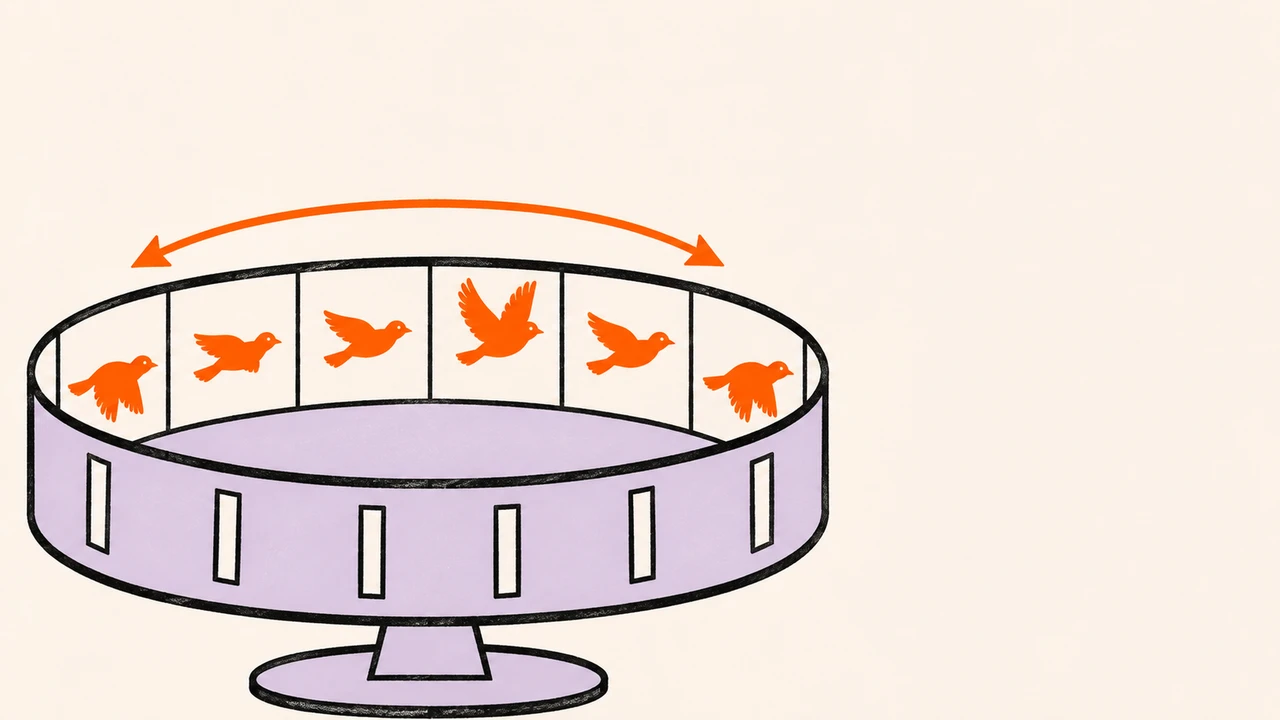
To make an animated GIF with GPT Image 2.6, choose a route first: ask ChatGPT for a downloadable animation, request native GIF output from the Images API, or generate a sprite sheet and assemble its frames. These routes have different controls. A six-panel picture is not yet a GIF, and a GIF assembled by a coding tool does not prove that the underlying model returned native animation.
This guide covers all three routes, reusable prompts, relevant GitHub projects, file checks and smaller exports. Start with one subject, one reversible movement and a fixed camera. The first useful deliverable is a file that actually animates and repeats correctly—not simply a successful chat response.
Evidence and access, checked November 5, 2026: We generated one native GIF through Ofox’s Image 2.6 Flare API and inspected its nine frames, timing and file size. We also tested browser conversion and local exports using an openly licensed third-party sprite sheet. Both downloadable results appear below. Image 2.6 is also available in Ofox Chat. The measured generation below was an API test, not a Chat-interface test; the six additional prompt templates remain untested.
Choose ChatGPT, the API or a sprite-sheet workflow
OpenAI’s Images 2.6 announcement introduces GIF creation across its products and shows examples involving characters, reactions and work-assistant animation. Its model documentation identifies the API models. Neither announcement alone establishes the exact controls currently visible in your account.
| Route | Best starting point | What you control | What to verify |
|---|---|---|---|
| ChatGPT | A quick reaction or mascot animation without API code | The task, movement and revision instructions | A downloadable moving file; controls available in your session |
| Native Images API | A repeatable request with recorded parameters | Model, supported GIF settings and request logging | API access, actual frame timing, returned usage |
| Sprite sheet → GIF | You can generate a still sheet but need deterministic assembly | Grid, frame order, delay, palette and export dimensions | Equal cells, matching subject alignment and a coherent action |
A photo/reference workflow needs particular care. An interface accepting an uploaded image does not mean every API endpoint or wrapper forwards that image. In a repository reviewed below, --image is used by the Codex route, while the API route constructs a text prompt. Check the selected route before assuming that your mascot or product photo was supplied to the model.
For a longer product story, multiple camera shots or sound, use a product-video storyboard workflow. A short GIF is a different deliverable.
Make a first GIF in ChatGPT
Open a conversation in an account with image creation available. If you have an original character or product image you are entitled to use, attach it and say which features must remain unchanged. Otherwise, begin with a simple text-described character. There is no need to invent a button name or assume that every app version exposes the same GIF editor.
Use this original starting prompt:
Create a downloadable animated GIF of a small orange bird standing on a
branch against a plain cream background. The bird lifts both wings,
briefly holds the pose, then lowers them to the starting position.
Keep the camera, branch, body proportions and colors fixed. Use one
continuous reversible action. No text, extra objects or camera cuts.
Deliver the animated GIF file, not a still image or a grid of frames.
You can also try this bird prompt in Ofox Chat. Ask for Image 2.6 and a downloadable animated GIF; the link opens Chat, so copy the prompt into your conversation.
After the response, open the delivered file and watch several repetitions. If you only receive a still image, ask: “Is there an animated file attached? Please provide the GIF download, or state that this session cannot produce one.” This clarifies the output; it is not a guaranteed way to unlock an unavailable feature.
If the animation exists but feels wrong, describe one observed problem: “Keep the scene unchanged and make the wing motion slower,” or “The bird changes shape in the third pose; preserve its original silhouette.” Recheck the complete loop after a revision. Fixing one pose can create a mismatch with its neighbors.
If you receive a sprite sheet, use the conversion route below. If the session cannot generate an animated file, use an available API route or another tool rather than repeatedly requesting the same unsupported action. Do not infer the exact backend model from the assistant’s self-description. Preserve the original file and the visible generation context; a filename containing “2.6” is not model evidence.
When you start from a photo
Keep the motion small enough that the source image remains a useful reference. A blink, gentle nod or small product tilt is easier to evaluate than a full turn that exposes unseen surfaces. Identify invariants explicitly: face shape, clothing, product label, lighting and background. Ask for the intended file, then inspect whether those details survive every frame.
This is a proposed prompting workflow, not a claim that we tested photo-to-GIF generation in ChatGPT. Do not transfer the API limits below to the ChatGPT interface or assume that a ChatGPT subscription supplies API credits.
Build prompts around motion and invariants
The official prompting guide provides a looping-character example with a return to the starting pose and a stationary camera. The useful principle is to describe both what changes and what stays fixed. A style description alone does not specify an animation.
A reusable prompt has six parts:
OUTPUT: a downloadable animated GIF, or a single sprite sheet for assembly
SUBJECT: one clearly described character/object and its visual identity
MOTION: starting pose → small action → return toward the starting pose
INVARIANTS: camera, background, scale, colors and details that must not change
STYLE: one coherent material/rendering style and lighting setup
ACCEPTANCE: visible motion, no unwanted cuts, no extra text, a clean loop
Do not paste both output formats into the same request. For native GIF generation, request the animation. For the sheet route, specify the grid. A “three-column, two-row sprite sheet” instruction can reasonably produce a static grid even when the same prompt also mentions GIFs.
Six original prompts to adapt
These are Ofox-authored templates, not copied community prompts or verified Image 2.6 results. Replace the subject and brand details, keep a small action, and evaluate the stated failure risk.
1. A waving mascot — check silhouette and accessories
Create a looping animated GIF of an original rounded orange fox mascot,
wearing a small blue scarf, on a plain off-white background. Start with
both paws down. Raise one paw, make one small wave, then lower it back.
Keep the ears, muzzle, scarf, scale and camera unchanged in every frame.
Use flat illustrated shapes and consistent soft lighting. No text or
new props. Return smoothly toward the starting pose. Deliver a GIF file.
2. A product highlight — check the label, not just the motion
Using the attached product image where this interface supports references,
create a looping GIF with a small left-to-right tilt and return to rest.
Keep the product shape, approved label text, colors, lighting and background
unchanged. Fixed camera, no full rotation, no new packaging or reflections
that obscure the label. Deliver the animated file. If the reference cannot
be used in this route, say so instead of inventing a replacement product.
3. A reaction character — keep the emotion readable at small size
Create a looping GIF of an original round robot receiving good news.
It starts neutral, opens its eyes slightly wider, lifts both short arms
in a small celebration, then returns to neutral. Fixed front camera,
plain pale-blue background, same face and body proportions throughout.
Use simple high-contrast shapes. No captions, numbers or extra characters.
Deliver a GIF whose expression remains readable as a small reaction image.
4. A typing indicator — move one part, not the whole interface
Create a short looping GIF of three small orange dots on a cream background.
One dot rises slightly, then the next, then the third, with each returning
to the same baseline before the cycle repeats. Keep dot size, spacing,
color and camera fixed. No glow, text, shadow changes or additional dots.
Use clean flat shapes and a calm rhythm. Deliver the GIF file.
5. A gentle illustrated scene — isolate the moving element
Create a looping GIF of an illustrated mug on a wooden desk. Only one thin
curl of steam moves upward and reforms gently; the mug, handle, desk,
window light and camera stay still. Warm muted colors, simple ink lines,
no lettering, hands or added objects. Avoid a visible reset at the loop
boundary. Deliver an animated GIF, not a video or a sprite sheet.
6. A six-frame sprite sheet — explicit assembly input
Create one still sprite sheet of an original small orange bird raising
and lowering its wings. Exactly six equal cells in three columns and two
rows, read left-to-right then top-to-bottom. Start at rest, raise the
wings, reach the high pose, lower them, and approach rest again. Same bird,
branch, scale, framing and plain cream background in all cells. Leave
safe space around the wings. No borders, gutters, captions or cell labels.
Use flat illustration. This output is a sprite sheet for later GIF assembly.
The fourth example is also a useful reality check: if the task is a strict geometric loading indicator, a deterministic animation may be easier to maintain than repeatedly generating it. Use the model where illustration contributes value. For readable marketing text, keep important copy outside the moving artwork or validate it frame by frame; our image-text workflow covers a separate part of that task.
Generate a native GIF through the API
You need API access and billing, Python 3 and curl. The direct OpenAI example below follows the official documentation; our live test used the Ofox-compatible route shown immediately afterward. The Images API guide documents GIF output on the generation endpoint.
Download the GIF workflow pack, extract it into a new directory and set OPENAI_API_KEY securely in your shell. Never paste the key into a prompt or save it in the request JSON.
The included gif-request.json contains the bird request and these settings:
{
  "model": "gpt-image-2.6-flare",
  "prompt": "Create a looping animation of a small orange bird on a stationary branch against a plain cream background. The bird raises its wings, pauses, then lowers them to its starting pose. Keep the camera fixed, the branch still, and the bird shape and colors consistent. No text. Make the transition back to the start smooth.",
  "quality": "low",
  "complexity": "low",
  "size": "auto",
  "n": 1,
  "output_format": "gif",
  "frame_count": 9,
  "frame_duration_ms": 200
}
curl --fail-with-body --max-time 240 \
https://api.openai.com/v1/images/generations \
-H "Authorization: Bearer $OPENAI_API_KEY" \
-H "Content-Type: application/json" \
--data-binary @gif-request.json \
--output gif-response.json
# Run only after a successful API response:
python3 decode_image.py gif-response.json bird.gifThe decoder validates the base64 payload and GIF signature, refuses to overwrite an existing file, and prints returned usage when present. If curl fails, inspect the error response first. A timeout does not establish that the server did no work; check account/request activity before paying for a retry.
| Setting | Documented behavior |
|---|---|
frame_count | 2–64; default 9 |
frame_duration_ms | 20–2000 ms, rounded to 10 ms; default 200 |
size | auto or supported dimensions divisible by 16, subject to the total pixel budget |
| Unsupported GIF options | Streaming, partial images, output compression and prompt_rewriter |
| Image-edit endpoint | Does not output GIFs |
Nine frames at 200 ms request a 1.8-second playback cycle, not a 1.8-second generation. Dimensions, frames and output count must fit the request’s pixel budget; divisibility by 16 alone is insufficient. Reduce the workload if the service rejects it. A longer delay changes playback timing, not the number of image pixels requested.
Flare and Sunburst should be selected against your actual task, not a promise that one always produces a better loop. Keep the request and usage beside the result. The Image 2.6 pricing guide explains why a still-image estimate is not a universal GIF price. Our single-request usage is reported below; it is not a universal price or a reconciled invoice.
Our real Ofox API result
Our refreshed catalog and authenticated model list contained openai/gpt-image-2.6-flare and openai/gpt-image-2.6-sunburst. We tested Flare once, using the same bird prompt and settings above, with the model changed to openai/gpt-image-2.6-flare. Catalog presence alone was not our evidence of GIF support: the generation request returned an actual GIF.
Set your own OFOX_API_KEY securely and use the included ofox-request.json. The inspector needs Pillow; create a virtual environment and install it if you have not already done so:
curl --fail-with-body --max-time 240 \
  https://api.ofox.io/v1/images/generations \
  -H "Authorization: Bearer $OFOX_API_KEY" \
  -H "Content-Type: application/json" \
  --data-binary @ofox-request.json \
  --output ofox-response.json

python3 -m venv .venv
source .venv/bin/activate
python3 -m pip install Pillow
python3 decode_image.py ofox-response.json ofox-bird.gif
python3 inspect_gif.py ofox-bird.gif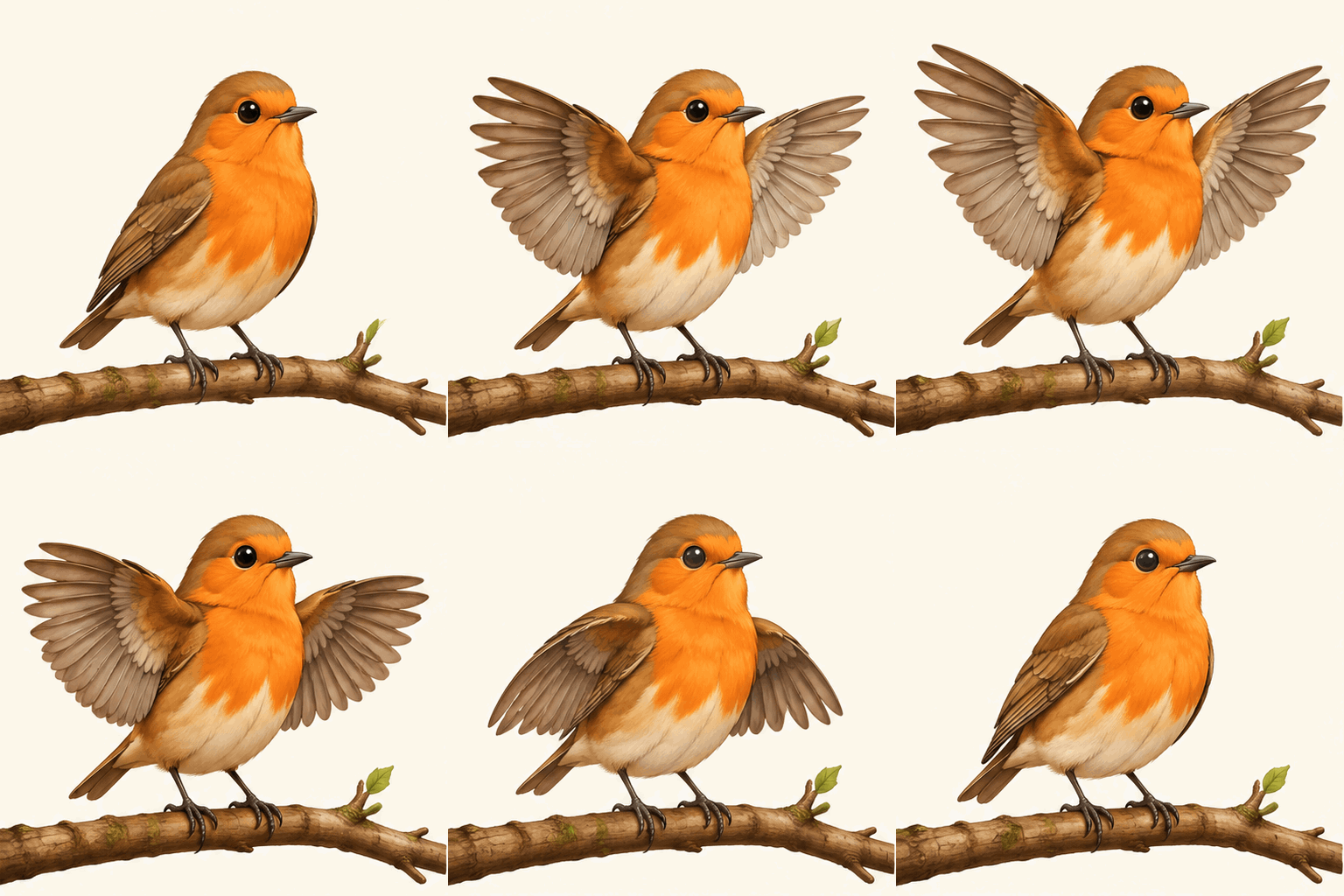
Download the original native GIF and the credential-free request. This is a generated illustration, not a product screenshot.
| Observed result | This one request |
|---|---|
| Returned file | GIF, 512 × 512 pixels, 677,030 bytes |
| Animation | Nine frames, each 200 ms; 1,800 ms per cycle |
| Loop metadata | 0, indicating indefinite repetition |
| Client-observed request time | 14.426 seconds, including network time |
| Returned usage | 92 input text tokens; 1,172 output image tokens |
The bird raises and lowers its wings, and the first and last poses are close. However, the branch and leaf shapes shift slightly between frames despite the fixed-branch instruction. This is a usable short illustration, not perfect background locking. For a logo or precise product animation, compare every frame and reject unintended shape changes. One successful Flare request does not establish Sunburst performance, a typical latency, or access in every account. Returned usage is not an independently reconciled charge.
Prefer working in a conversation? Bring the bird prompt to Ofox Chat and ask for an Image 2.6 GIF. Describe the subject, movement and details that must stay fixed, then download the result and check the loop. The example above shows why that final visual check matters even when the file has the right frame count.
Turn a sprite sheet into a GIF: a verified example
A sprite sheet is a still image containing ordered animation cells. You need to cut the correct cells, play them in order and encode their timing. It is a useful fallback when your image tool returns PNGs but exposes no native GIF controls.
For this example we used the public cat_sheet.png from jkf87/gif-maker-skill, pinned to the linked revision. The author labels it as a Codex sheet-route example. The source artwork is the author’s; Ofox performed the conversion, download and file inspection. We did not independently establish the model behind that artwork. The MIT notice is included with the redistributed result.
Browser route: no local code required
Open Sprite Sheet to GIF Converter and load the sheet. In our actual test:
- Set Number of rows to
2and Number of columns to3. - Set Frame delay (ms) to
180. - Leave offsets at
0because this sheet is an equal-cell grid without gutters. - Select Generate GIF, inspect the extracted frames, then use Download GIF.
- Inspect the downloaded file separately. The preview alone is not evidence that the export retained its timing.
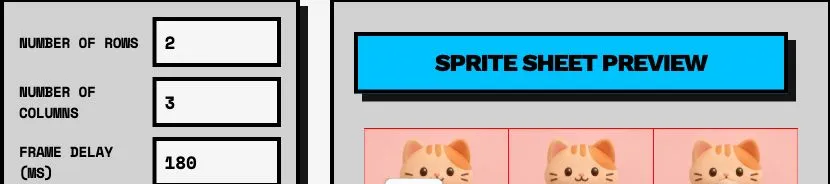
Real browser screenshot from the conversion test. Cropped to the English parameter panel and sheet preview; it is not an Image 2.6 product interface.

Third-party artwork, Ofox-verified assembly. Download the result and license notice. This is not an Ofox model-generation sample.
The exported file was 512 × 512 pixels, six frames, 180 ms per frame, 1,080 ms per cycle and 920,053 bytes. Its loop extension was 0, indicating indefinite repetition under the decoder’s convention. These measurements verify file structure and timing, not perfect character consistency or a seamless visual transition. The hosted tool displayed advertising during our test; distinguish its export controls from ads.
If the grid cuts through a face or wing, first check row/column order, borders, gutters and unequal cells. Do not compensate for a badly generated sheet by pretending every tile is aligned. A 3×2 layout must mean three columns, two rows in your chosen tool.
Local route: reproducible assembly with Pillow
The workflow pack also includes our sheet_to_gif.py. It accepts a gutter-free, evenly divided still sheet, processes cells in reading order and uses a shared palette. It makes opaque output on white, not a transparency-preserving GIF. It performs no model or network calls.
python3 -m venv .venv
source .venv/bin/activate
python -m pip install Pillow

python3 sheet_to_gif.py sheet.png local-loop.gif \
  --cols 3 --rows 2 --ms 180 --width 512
python3 inspect_gif.py local-loop.gif
On Windows, activate the environment with .venv\Scripts\Activate.ps1. Obtain the author’s example from the pinned repository, or use your own sheet, and name it sheet.png. Choose a fresh output filename. The script rejects uneven grid dimensions and unsuitable timing values; it will not repair misplaced subjects or create missing intermediate poses.
On the same source sheet, our local converter produced six 512 × 512 frames with the same 1.08-second cycle and 656,867 bytes. That is a result for this input and encoding method, not a universal quality or compression advantage. A GIF encoder may combine identical neighboring cells, so compare both decoded frame count and total timing.
Inspect the result before calling it finished
Run the included inspector on either a native result or an assembled GIF:
python3 inspect_gif.py bird.gifIt reports dimensions, frame count, individual delays, total duration and loop information. It also reports a first/last-frame RGB difference as a diagnostic. That number is not a quality score. Similar endpoint frames can hide jerky motion in between; different endpoint frames can be correct if the next step is the first frame of the next cycle.
Check three layers separately:
| Layer | Acceptance check | A misleading shortcut |
|---|---|---|
| File | Opens as GIF, contains animation, has expected dimensions/timing | Renaming a PNG to .gif |
| Motion | Subject stays recognizable; camera and intended fixed details remain stable; cycle restarts acceptably | Declaring success from one still preview |
| Destination | Plays at the intended size in the actual page, message or app | Assuming every upload preserves animation |
For a product, inspect the label across every frame. For a mascot, check eyes, hands, accessories and silhouette. For a loop, watch several cycles including the reset. Save the source request, original result and revised export as separate files so that you can identify which step introduced a defect.
An absent loop extension is not proof of repetition. A one-frame GIF is a valid image file but fails an animation task. OpenAI’s published lantern animation is another useful visual reference, explicitly an official example rather than an Ofox result.
Make a smaller GIF or export MP4
First decide the actual display dimensions. A large original displayed as a small reaction image wastes bytes. Preserve the original, then change one export variable at a time: dimensions, frame rate or palette. A smaller file can lose edge detail, color gradients or timing accuracy.
FFmpeg’s palette filters support a palette-generation/export workflow. With FFmpeg installed, this command resizes to 384 pixels wide and resamples to 10 fps:
ffmpeg -n -i input.gif \
  -filter_complex "[0:v]fps=10,scale=384:-1:flags=lanczos,split[a][b];[a]palettegen=stats_mode=diff[p];[b][p]paletteuse=dither=bayer:bayer_scale=3" \
  -loop 0 smaller.gif
The resampling does not invent smoother intermediate motion. It changes frame timing and can duplicate frames. On our browser-converted example it produced 384 × 384 pixels, 11 encoded frames, a 1.10-second cycle and 573,847 bytes. The cycle changed from 1.08 seconds, so this is not timing-preserving compression.
If the destination supports video, try an MP4 export:
ffmpeg -n -i input.gif -movflags +faststart -pix_fmt yuv420p \
  -vf "scale=trunc(iw/2)*2:trunc(ih/2)*2" output.mp4
Our example produced a 56,121-byte MP4 with a 1.08-second duration. MP4 does not store the GIF loop instruction: repetition must be configured in the player or destination. This command also is not an alpha-transparency-preserving workflow. Inspect the video after conversion rather than choosing the smallest file automatically.
Gifsicle is another focused tool for GIF inspection and optimization. For an installed copy, gifsicle -O3 input.gif -o optimized.gif is a starting command to compare against the original. We reviewed its manual but did not run Gifsicle in this test. Unlike our FFmpeg examples, it has no measured result in this article.
GitHub projects worth using—and what they actually do
The following counts were retrieved from GitHub on November 5, 2026 at approximately 11:19 China Standard Time. They describe attention to the entire repository, not Image 2.6 adoption, reliability or a complete ranking of the web. A mature post-processing tool can have many more stars than a model-specific project created around launch day.
| Project | Stars at retrieval | Where it helps | Important boundary |
|---|---|---|---|
| FFmpeg | 66,513 | Resize, change timing, create palettes and export video | General media tool; not an Image 2.6 generator |
| freestylefly/awesome-gpt-image-2 | 35,470 | Study image briefs, style and constraint patterns | A broader Image 2/2.5 collection, not proof that every prompt works as a 2.6 GIF |
| Pillow | 13,969 | Read frames, inspect timing and assemble a sheet | Local processing library; no image model is included |
| YouMind-OpenLab/awesome-gpt-image-2 | 10,242 | Browse a large, multilingual image-prompt collection | Still-image examples need motion and loop instructions; check each item’s attribution |
| agent-sprite-forge | 5,052 | More involved character, sprite and game-export workflows | Its reviewed 0.4 workflow includes image-to-video routes; not simply a native 2.6 GIF client |
| Gifsicle | 4,343 | GIF-specific inspection and optimization | Separate from model generation |
| spritesheet-to-gif | 36 | Visual grid cutting and browser GIF export | Browser conversion tested here; it cannot repair bad source drawings |
| jkf87/gif-maker-skill | 1 | New 2.6-related API and Codex/sheet workflow | Source-reviewed, not installed or run end-to-end by Ofox |
| awesome-gpt-images-2.6 | 0 | New unofficial index of 2.6 features and official examples | Fresh reference collection, not an established popularity leader |
The most task-specific repository is not necessarily the most starred. In the pinned gif-maker-skill revision, the default --via auto chooses a route according to whether OPENAI_API_KEY exists. That can change both the workflow and whether an API charge is possible. Its --image argument is connected to the Codex path, not the native API payload. Read the current code and select the intended route explicitly instead of assuming that a successful command proves your reference was used.
We reviewed project descriptions and relevant source, and tested the hosted browser converter plus our own local tools. We did not install every agent skill or verify the maintainers’ generation-speed claims. Repository licenses and individual example rights should be checked separately before redistributing assets; a prompt-gallery description is not blanket permission to reuse every depicted brand or character.
Which launch pages and prompt resources are useful?
“Most popular” needs an observable measure. The Hacker News launch discussion had 147 points and 98 comments in our November 5 snapshot. That is a discussion signal, not search volume or tutorial traffic. We found no comparable public visit figures for the tutorial pages below, so they are grouped by usefulness rather than assigned an invented traffic ranking.
| Resource | Use it for | How to read it |
|---|---|---|
| OpenAI launch article | Official examples and product scope | The OpenArt examples demonstrate a sheet-oriented prompt structure; do not confuse that with an API payload |
| OpenAI prompting guide | A concrete looping-character prompt and model guidance | Compare motion, camera and return-pose instructions |
| OpenAI generation guide | Native request settings and restrictions | API behavior, not a specification for every ChatGPT interface |
| Hacker News discussion | User questions and linked experiments | User reports are not controlled comparisons or a universal access diagnosis |
| FindSkill’s GIF tutorial | An additional launch-day walkthrough to compare | The author explicitly says it was not hands-on tested; treat it as secondary reading |
| Kingy.ai’s reported GIF test | A third-party test account and reported files/usage | Its measurements belong to that author’s requests, not Ofox or all users |
Use the official references to resolve technical disagreements. Use community material to identify cases worth testing. When adapting a gallery prompt, keep the desired style but add the actual motion, fixed details, end pose and output format. Do not simply replace “image” with “GIF” and assume a still-image showcase has become an animation recipe.
Troubleshoot static, broken or oversized results
For No supported sheet fits GIF frames, frame_count or frame_duration_ms errors, use the Image 2.6 GIF parameter troubleshooting guide to check the exact route and response. A documented range and a particular endpoint’s observed acceptance can differ; a frame-count ceiling alone does not guarantee that every image size will work.
| What happened | Check first | Next action |
|---|---|---|
| ChatGPT returned a still picture | Is an animated download attached? Is it actually a sheet? | Ask for the file once; use the sheet route if that is the output available |
| API rejects GIF output | Exact model, generation endpoint and project access | Use the documented route; do not send GIF output to image edits |
| Pixel-budget or parameter error | Frames, dimensions, output count and unsupported options | Simplify the payload; changing playback delay alone does not reduce pixels |
| Existing product/character is ignored | Was the reference actually passed in this route? | Inspect the wrapper; a text-only request cannot preserve an unseen attachment |
| The loop jumps | End pose, camera, object alignment and intermediate poses | Use one reversible action; fix the sheet or regenerate rather than just changing delay |
| Subject drifts between cells | Framing, scale, identity details and grid quality | Simplify motion and regenerate a consistent sheet before cutting |
| Colors flicker after encoding | Per-frame palettes, dithering and source variation | Compare a shared palette; keep the original for diagnosis |
| GIF becomes static after upload | Original frame count versus destination behavior | Test the destination’s animation support or use an accepted video format |
| File is too large | Actual display size, palette and timing needs | Resize/export a copy and inspect the tradeoffs |
| Timeout, 401 or 429 | Error body, credentials, project limits and account activity | Diagnose before retrying; avoid unbounded paid retries |
For a professional handoff, keep the editable source or sheet, original generated file, final GIF/video, prompt/request without secrets, and a short acceptance note. State what was checked: dimensions, cycle duration, visual consistency and target-platform playback. If the next task is editable vector artwork, use the Image 2.6 SVG guide. For Ofox integration, verify the current image-model documentation first; Image 2.6 is available in Ofox Chat, and the Flare API route above was tested separately. Chat controls and other model variants are outside this test.