Build an AI fashion ad and lookbook with an OfoxAI template
Rebuild a fictional cardigan creative kit: a 15-second ad, five images, a lookbook and horizontal or vertical exports, with prompts and a downloadable template.
 Ofox
Ofox 
To build a coordinated AI fashion creative kit, prepare a short ad and five complementary images, then assemble the typography and layouts separately. This OfoxAI template turns those inputs into a vertical ad, a product detail board, and landscape and vertical showcases. You can reproduce the local composition with the supplied files before generating anything new.
The example is Oat Cloud Cardigan, a fictional cream cardigan worn by an AI-generated character. It is a creative demonstration, not a real clothing listing or virtual fitting. This guide is for ecommerce content operators and creators who want a reusable production format and are comfortable running a few local commands, or can work with a technical teammate.
Watch the result and download the inputs
Download the reconstruction template. It includes the existing ad footage, five generated image panels, reference images, original prompts, a configuration file and local composition scripts. The archive contains no API credentials or generation job responses.
| Output | File | What it demonstrates |
|---|---|---|
| Vertical ad | ad-9x16.mp4 | Existing ad footage with an editable end-card layer |
| Detail board | lookbook-board.jpg | Hero, profile, close-up, macro and still-life images |
| Landscape showcase | showcase-16x9.mp4 | Ad beside the image board, with workflow information |
| Vertical showcase | shorts-9x16.mp4 | Ad, supporting images and a concise production summary |
The source folder identifies Seedance 2.5 for the ad and Nano Banana Pro for the image panels. Its saved generation scripts use bytedance/seedance-2.5 and google/gemini-3-pro-image. Original generation job responses were not supplied with this folder, so this article does not independently verify model attribution, historical billing or first-attempt success. The reproducible scope of this guide is local composition using the supplied assets, not a repeat of the paid generation stage.
The supplied local composition was rerun on macOS, and all three exported videos passed a full decode check. This verifies the local assembly, not a new AI generation run.
1. Define what the clothing example can show
The creative contrast is an elegant, quiet-looking character who suddenly dances energetically. The cardigan participates in the action rather than remaining a background detail. Supporting stills show the silhouette, collar, knit-like texture and a still-life arrangement.
That is a presentation concept. Generated texture cannot establish wool content, and generated motion cannot demonstrate durability or how an actual garment fits. The original internal configuration included fictional material percentages, dimensions and sizes. The downloadable publication version replaces those fields with workflow information and explicitly identifies the garment as fictional.
For a real SKU, collect authorized product photographs and verified product facts first. Keep original front, back, button, seam and label views available for comparison. Use actual measurement and material records for any specifications. A reference picture of a cream cardigan is not enough to infer a back panel, hidden pocket or care instruction.
If your task is only replacing a background while preserving a real item, start with the narrower product photo background workflow. A fictional fashion concept should not substitute for that preservation task.
2. Inspect the package before rendering
The included reconstruction scripts run locally. You need macOS, Python 3 with Pillow, and FFmpeg. The composition script uses the macOS Helvetica Neue font and the bundled SIL-OFL Libre Baskerville font. Windows and Linux were not tested; change the HEL font path in scripts/compose.py to a locally available licensed font before adapting the script there.
After extracting the ZIP, open a terminal in its top-level folder:
python3 --version
ffmpeg -version
python3 -m venv .venv
source .venv/bin/activate
python3 -m pip install Pillow
The first two commands confirm that the programs are installed; they do not install FFmpeg. Use your normal trusted package manager if it is missing. Keep a copy of the extracted folder because rendering replaces files in project/output.
scripts/compose.py
scripts/finish.sh
assets/fonts/
project/config.json
project/panels/{hero,profile,close,macro,still}.png
project/refs/{ref_full,ref_face}.png
project/output/ad_raw.mp4
prompts/
The five panel filenames are part of the template interface. Renaming close.png to detail.png without changing the script will cause a missing-file error. The source ad is also an input: deleting ad_raw.mp4 prevents the final video assembly even if every image renders correctly.
3. Understand the five-image plan
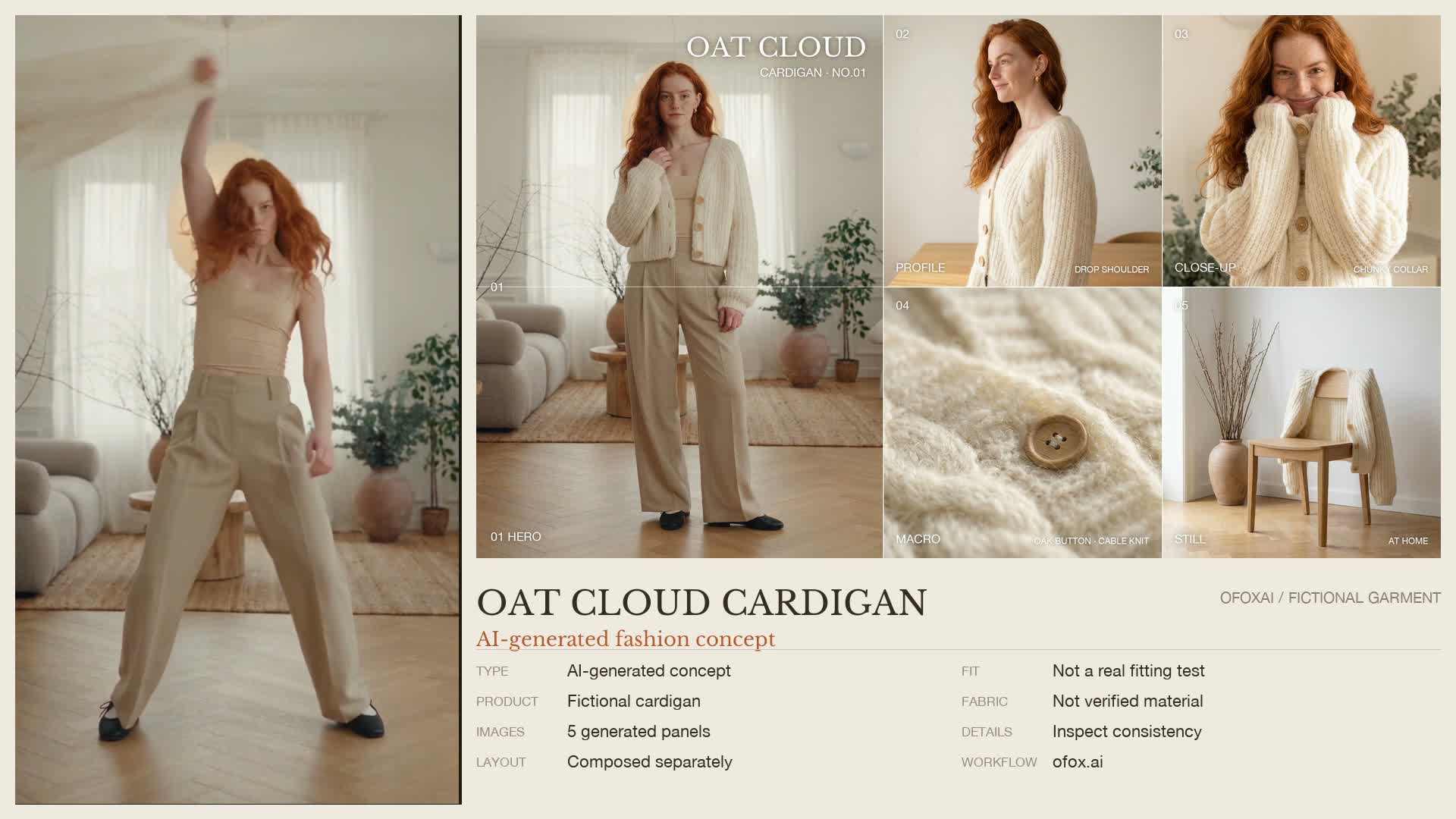
An actual frame from the locally assembled showcase. The underlying garment and person are generated, not photographed inventory.
| Panel | Purpose | Inspect before accepting |
|---|---|---|
| Hero | Establish the outfit and room | Cardigan length, face, hands and overall proportions |
| Profile | Show the side silhouette | Shoulder shape, hem and sleeve continuity |
| Close | Make collar and upper garment readable | Buttons, neckline and consistency with the hero |
| Macro | Supply a texture-like detail | Invented stitches, inconsistent button shape or false material implications |
| Still | Isolate the garment in the setting | Structural differences from the worn garment |
The historical template takes a full-body frame and a face crop from its base video, then uses those references when generating the panels. Its image instructions request a 3:4 hero and 4:3 supporting panels. The resulting files are evidence of an example, not proof that references guarantee an identical face or garment across generations.
All original panel prompts are included under prompts/. For a new concept, replace the garment, outfit, room and palette descriptions together. If the video describes wooden buttons while an image prompt asks for metal fasteners, the template cannot resolve that contradiction at composition time.
For real merchandise, do not simply replace the product name in these fictional prompts. Replace the reference inputs and inspect every generated detail against the actual SKU. When accuracy is essential, use real product photography for the information-bearing panels and reserve generated imagery for clearly identified creative context.
4. Plan the ad as actions, not style adjectives
The complete original Chinese ad prompt is provided unchanged as a historical input. Its fabric descriptions and requested lack of deformation are creative instructions, not verified garment properties. An English translation would be a new prompt variant, not the prompt that produced the supplied footage.
The original plan has four beats:
| Requested time | Action | Production question |
|---|---|---|
| 0–1 seconds | Quiet full-body pose | Can viewers identify the outfit before the movement? |
| 1–9 seconds | Energetic dance, remove and swing the cardigan | Do the hands, cloth and body remain plausible? |
| 9–12 seconds | Put the cardigan back on and settle | Does the garment return with consistent structure? |
| 12–15 seconds | Closer collar and button view | Is the product readable at the finish? |
These timings describe the prompt, not an independently measured shot list. Play the whole output to see what the model actually did. A pleasing first frame is not a pass for the transition where the garment leaves the shoulders or returns to the body.
The saved template’s video request specifies 15 seconds, 9:16, 720p and audio, with hero, macro and still-life references. For a new generation, verify the currently available model and accepted parameters in Ofox documentation and your account before submitting. This download deliberately does not include a one-command paid generation launcher.
Record the returned job ID immediately. If submission times out before an ID is returned, the job may still have been accepted: inspect request history instead of blindly resubmitting. If you have the ID, query that existing task. A failed or stalled attempt is not automatically free. The video polling guide explains the separation between submission, waiting and retrieving results; its historical timings are not a current completion promise.
5. Rebuild the layouts locally
Run these commands from the extracted template folder:
python3 scripts/compose.py project
bash scripts/finish.sh project
The first command renders the image board, transparent end-card and two background layouts. Text is drawn by code, so a spelling change does not require the image model to draw letters again. The second command overlays the end-card on the existing ad and combines that ad with the landscape and vertical backgrounds. It encodes video as H.264; it preserves or re-encodes an existing audio track, and permits a silent source without inventing audio.
Expected outputs are a 720×1280 ad, a 1920×1080 landscape showcase, a 1080×1920 vertical showcase and a 2400×1350 detail board. The source is approximately 15 seconds. Exporting a larger canvas does not restore detail missing from a lower-resolution input.
The finishing script is built around this 720×1280, approximately 15-second source: its end-card is 720×1280 and starts fading in at 12.3 seconds. Keep those input dimensions and duration for the first reconstruction. For a different source size or length, update the end-card canvas, fade timing and overlay/scaling settings together; simply replacing the video can misplace the text or cut the end of a longer clip.
To change the copy, edit project/config.json, not the generated PNG layers. full_name changes the product heading; tagline changes the secondary line; spec and spec_vertical supply the information rows. The internal names price_label and price_value remain for compatibility, but in this publication version they display “Production template” and “AI DEMO”, not a quoted price.
The layout uses fixed coordinates. Keep replacements short, rerender both orientations, and inspect for overflow. Replacing eight short rows with long paragraphs will not automatically reflow them. If you need a different visual hierarchy, change the layout deliberately rather than shrinking all text until it is unreadable.
6. Validate the exported files and the creative
Check the file rather than trusting a preview:
ffprobe -v error -show_entries format=duration:stream=codec_name,width,height \
  -of json project/output/showcase-16x9.mp4
ffmpeg -v error -i project/output/showcase-16x9.mp4 -f null -
The first command reports dimensions, codecs and duration. The second decodes the whole video; no error output is a technical check, not an aesthetic review. Repeat for the two vertical versions.
Watch the source once at normal speed with sound, then pause around the removal and re-dressing transitions. Check finger count, arm continuity, body/cloth intersections, feet sliding, cardigan length, button layout and face continuity. Compare the five still panels separately. The pack does not certify every frame as anatomically or commercially accurate.
Check composition on a phone-sized preview: can you read the intended message without zooming, and does a platform’s interface obscure it? A landscape showcase communicates the full kit; the clean vertical ad emphasizes motion. Neither is a substitute for a real garment specification sheet.
| Failure | What to do |
|---|---|
cannot open resource while composing | Check both font paths; confirm the bundled font exists and use the documented macOS environment |
| Missing panel or source video | Restore the exact filenames shown above before rerunning |
| Text extends beyond a panel | Shorten the configuration value or adjust that panel’s layout; render again |
| No audio stream | The supplied finishing script permits it; inspect whether silence is intended rather than adding an unverified track |
| A garment detail changes during motion | Reject the affected shot, simplify the action or use real footage where product fidelity matters |
| A generated file URL has expired | Check the same job’s result-retrieval options; do not create a new paid job simply to replace a URL |
7. Adapt the kit to your own product
Make a new project copy, retain the input/output naming convention, and replace the five panels and source ad with assets you have rights to use. Check the audio separately before external publication; the original prompt’s request for original music is not itself a music-rights record. Replace fictional labels with verified information only when the assets actually depict that product. Remove unsupported material or fit claims rather than making them sound more cautious in small print.
For a first publication, choose one audience and one destination. A fashion operator needs the template and production steps; a shopper needs accurate product information and a real purchasing page. This example is aimed at the former. It is not a claim about sales lift, avoided photography costs or total generation cost.
Download the template, reproduce the supplied local example, then decide which part of the workflow fits your product. For a simpler story-led example, the coffee ad walkthrough shows how explicit actions connect a product to a scene.
Frequently Asked Questions
- Does the download generate new images or video?
- No. It includes existing fictional example assets and local composition scripts. Rendering them requires no API request. New image or video generation is a separate, potentially billable step.
- Is this a virtual try-on workflow?
- No. The example combines an AI-generated character and fictional garment. It does not verify fit, fabric composition, sizing or accuracy against a real product.
- Can I reproduce the layout without an API key?
- Yes. The supplied local assets, Python with Pillow, and FFmpeg are sufficient on the documented macOS setup. An API key is only relevant to a separate generation workflow.