MoneyPrinterTurbo Setup
MoneyPrinterTurbo turns a topic or keyword into a finished short video: it writes a script, sources or generates matching footage, adds subtitles and a soundtrack, then renders the clip. OfoxAI is an official sponsor of the project and ships as a built-in option for two of its stages — AI-generated video material and script writing — both reachable with one OfoxAI API key.
This guide only covers pointing MoneyPrinterTurbo at OfoxAI. For installing the tool itself — via uv, Docker, the Windows one-click package or Google Colab — see the official README .
Prerequisites
- An OfoxAI account with an API Key (Get one here )
- MoneyPrinterTurbo installed, with
config.tomlpresent in the project root — the app copies it fromconfig.example.tomlon first run
The one-prompt agent path
MoneyPrinterTurbo publishes an official agent skill. Any AI agent that can run terminal commands — Claude Code among them — installs, configures and renders from a single prompt:
Use this skill: https://raw.githubusercontent.com/harry0703/MoneyPrinterTurbo/main/docs/skill/SKILL.md
Make me a video about how AI is changing everyday life, and generate the footage with OfoxAI.
The agent reuses whatever is already in config.toml and asks only for the credentials it still needs — MPT_OFOX_API_KEY for OfoxAI.
Mind the MPT_ prefix: MPT_OFOX_API_KEY belongs to the agent path only. It is not the OFOX_API_KEY that config.toml falls back to in Step 1 below — setting the wrong one leaves the agent asking for a key you think you already provided.
The skill defaults to free Pexels stock footage, so ask for OfoxAI footage explicitly as above; otherwise the clip is cut from stock video and no OfoxAI video call is made. It runs on macOS and Windows and uses uv.
Configuration steps
Step 1: Set OfoxAI as the video source
Open config.toml and point video_source at ofox:
video_source = "ofox"

ofox_api_key = "<your_OFOXAI_API_KEY>"
ofox_base_url = "https://api.ofox.io/v1"
ofox_text_to_video_model = "bytedance/seedance-2.0-fast"
ofox_resolution = "720p"
ofox_min_duration = 4
ofox_max_duration = 15
ofox_provider = "byteplus"ofox_resolution, ofox_min_duration, and ofox_max_duration are only valid for the model set in ofox_text_to_video_model — every model has its own accepted range. Switching models without updating these three fields gets the request rejected before any task is created. Check each model’s real limits in Video models, and what ofox_provider accepts in Provider routing.
Leave ofox_api_key empty and export OFOX_API_KEY in the environment instead if you’d rather not store the key in the file — MoneyPrinterTurbo falls back to that variable.
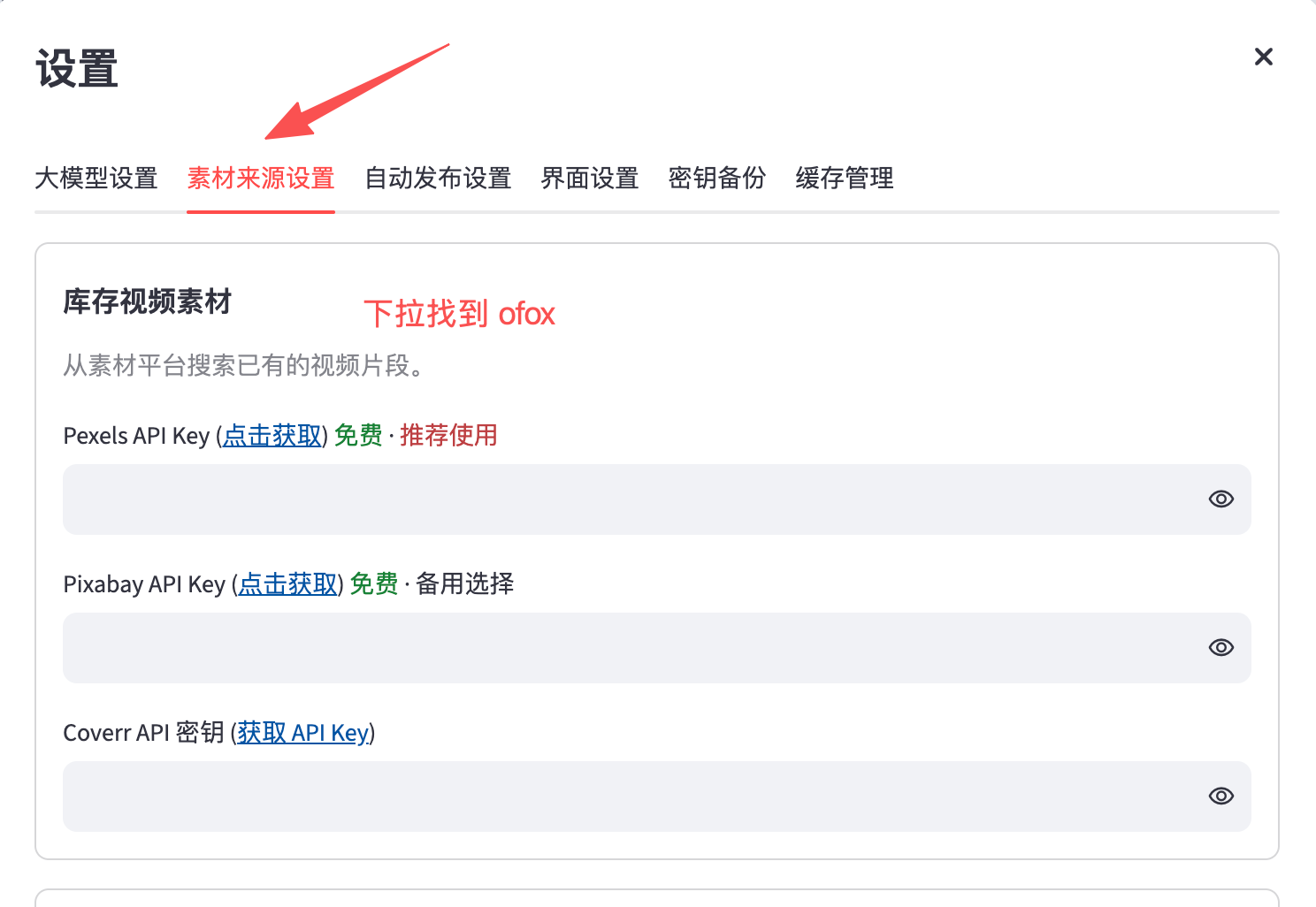
Or do it from the WebUI: pick OFox AI Video as the source on the main screen, then open Settings → Material sources and scroll down to the OfoxAI block:
Fill in the OFox API Key, OFox text-to-video model, OFox Base URL, and OFox upstream provider:
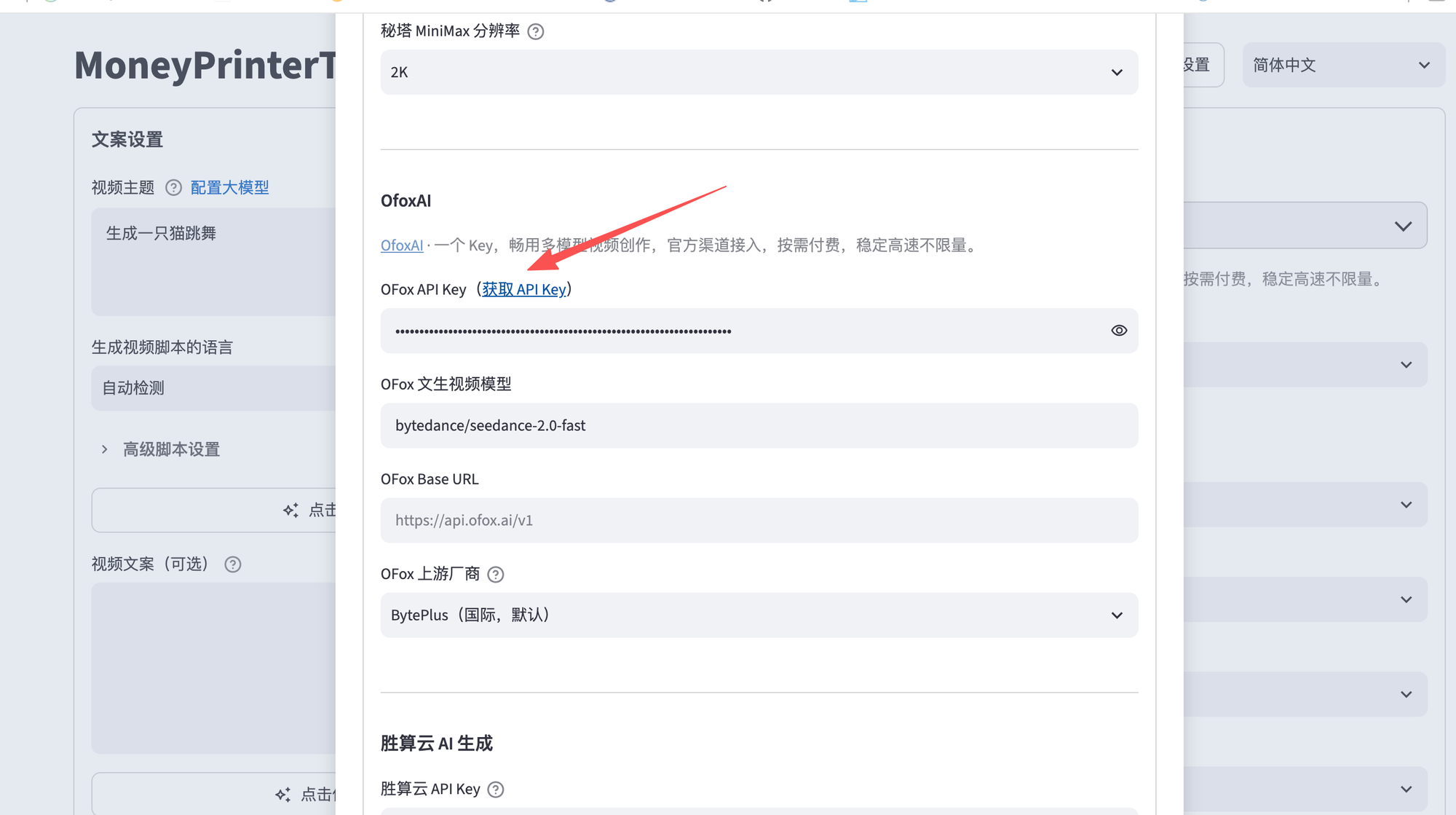
The WebUI exposes only four of these fields — ofox_api_key, ofox_text_to_video_model, ofox_base_url and ofox_provider. ofox_resolution, ofox_min_duration and ofox_max_duration have no UI control at all; set them in config.toml.
Step 2: Set OfoxAI as the script-writing model (optional)
MoneyPrinterTurbo’s built-in openai_* fields work with any OpenAI Chat Completions-compatible endpoint — including OfoxAI’s, reusing the same API key:
llm_provider = "openai"

openai_api_key = "<your_OFOXAI_API_KEY>"
openai_base_url = "https://api.ofox.io/v1"
openai_model_name = "openai/gpt-5.5"
Unlike ofox_api_key, openai_api_key has no environment-variable fallback — paste the key directly into the file.
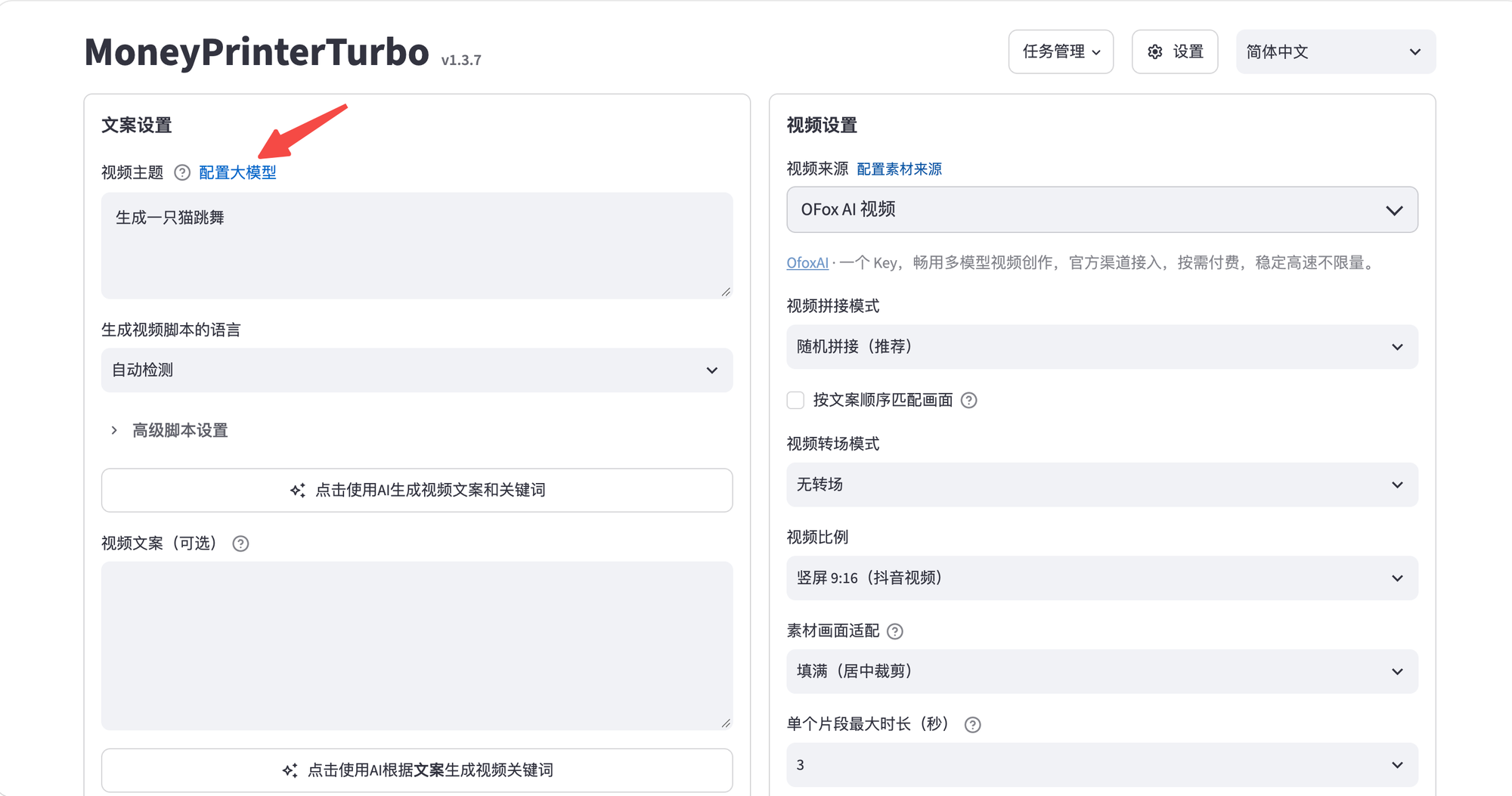
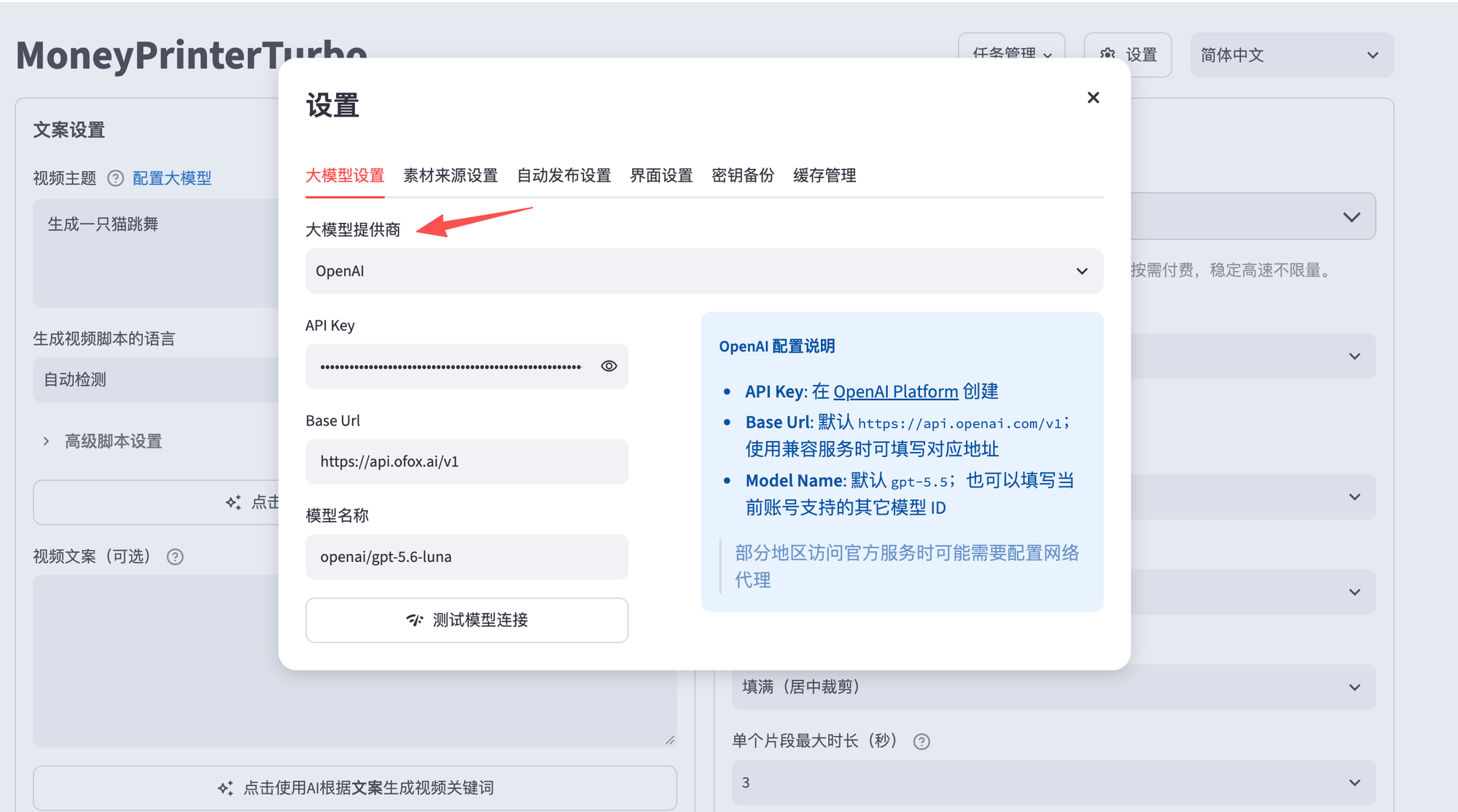
The same three values live under Settings → Models in the WebUI — click Configure LLM next to the video topic field on the main screen to open it:
There’s a Test model connection button on that page:
Model IDs need the vendor prefix — openai/gpt-5.5, not the bare gpt-5.5. Browse the full catalog in the Model Marketplace .
Step 3: Start MoneyPrinterTurbo
Restart the app (or the container, under Docker) so it picks up the edited config.toml. Generate a short test video from the WebUI or CLI; a completed render confirms both stages are reaching OfoxAI.
Docker deployments read config.toml at container start, not from a live-reloaded mount — edit the file and copy it into place before docker compose up, then restart the container after any later change.
What it costs
OfoxAI footage is billed per clip submitted, not per finished video — and one video is normally cut from several clips, so a single render can create several paid tasks. Budget against the clip count, not the video count.
Both paths gate the spend. The WebUI estimates how many paid tasks your script will submit, then blocks rendering until you tick I understand that OFox video generation creates paid tasks. The agent skill halts on OFOX_CHARGE_CONFIRMATION_REQUIRED and only proceeds once you approve, by rerunning with --confirm-ofox-charge; a well-behaved agent never adds that flag on its own.
Per-second rates differ by model, from bytedance/seedance-2.0-mini upward; see Video models. Script writing is billed as ordinary chat tokens, which is negligible next to the footage.
Recommended models
- Video — any of the 12 OfoxAI video models works in
ofox_text_to_video_model;bytedance/seedance-2.0-fast(the default above) is the cheapest starting point, andalibaba/wan-3.0orbytedance/seedance-2.5extend to 30-second clips. - Script writing — any chat model in the Model Marketplace works in
openai_model_name.
Troubleshooting
Task creation fails immediately, before any billing — ofox_resolution, ofox_min_duration/ofox_max_duration, or ofox_provider don’t match the model set in ofox_text_to_video_model. The API validates these against the model’s own limits and rejects a mismatch with provider_type_unavailable or a resolution/duration error before creating a task — nothing is billed. Check the model’s real limits in Video models.
The agent keeps asking for a key you already set — you set OFOX_API_KEY where the agent path wants MPT_OFOX_API_KEY, or the reverse. The two are separate: MPT_OFOX_API_KEY for the skill, OFOX_API_KEY as the config.toml fallback.
Connection failing in mainland China — switch ofox_base_url to the mirror https://api.ofox.io/v1; it mirrors the same service under the same API key.
Script generation silently uses the wrong provider — llm_provider must be exactly "openai" to activate the openai_* block; any other value routes script generation to a different provider’s fields instead, even with openai_api_key filled in.
MoneyPrinterTurbo iterates quickly and its configuration fields may change between versions. Cross-check against the official config.example.toml .