DeepSeek V4.1 Flash 1017: What Changed and What to Check Before Upgrading
Compare DeepSeek V4.1 Flash 1017 with the September release, distinguish model pricing from Search/Fetch charges, and verify your API route before switching.
 Ofox
Ofox 
DeepSeek V4.1 Flash 1017 is the October 17 update to V4.1 Flash. The official API still uses deepseek-flash, and the release announcement says its calling method and model pricing are unchanged. The practical question is whether the updated model improves your existing task without breaking its output, tools or budget.
This article is for API developers and coding-agent users deciding what to verify after the update. It compares published results, separates model charges from search-tool charges, and gives you a small acceptance exercise. This is a documentation-based analysis, checked October 19, 2026, not an independent model benchmark. Ofox publishes this article and is one of the access options discussed. We have not run paid inference for this article.
What changed in 1017?
The official change log says the web and mobile applications were updated alongside the API. DeepSeek reports shorter task runtimes and outputs, and recommends DeepSeek Harness 0.2.1-rc.1 or later for the new model. These are vendor claims and a client-version recommendation, not a measured speed or savings guarantee for your workload.
The official model card provides the following coding and agent benchmark subset, compared with the earlier V4.1 Flash release:
| Published benchmark | Earlier V4.1 Flash | 1017 | Difference in score points |
|---|---|---|---|
| Terminal-Bench 4.0 | 31.2 | 42.3 | +11.1 |
| ProgramBench | 20.3 | 29.1 | +8.8 |
| DeepSWE v1.1 | 74.2 | 77.0 | +2.8 |
| Automation-Bench v1.0.6 | 54.8 | 60.5 | +5.7 |
The card identifies Claude Code as the harness for Terminal-Bench 4.0 and Mini-SWE-V2 for DeepSWE v1.1. These results support investigating coding and agent workloads; they do not show that every client improves equally. A score difference is not a percentage reduction in your error rate. Do not compare Terminal-Bench 4.0 here with a different benchmark version in an older review.
For an application owner, the useful follow-up is concrete: does the model finish the same repair, preserve a required field, or call the correct tool with fewer attempts? A shorter answer that omits a requirement is not an efficiency improvement. Conversely, a longer valid answer can be preferable if it avoids another full run.
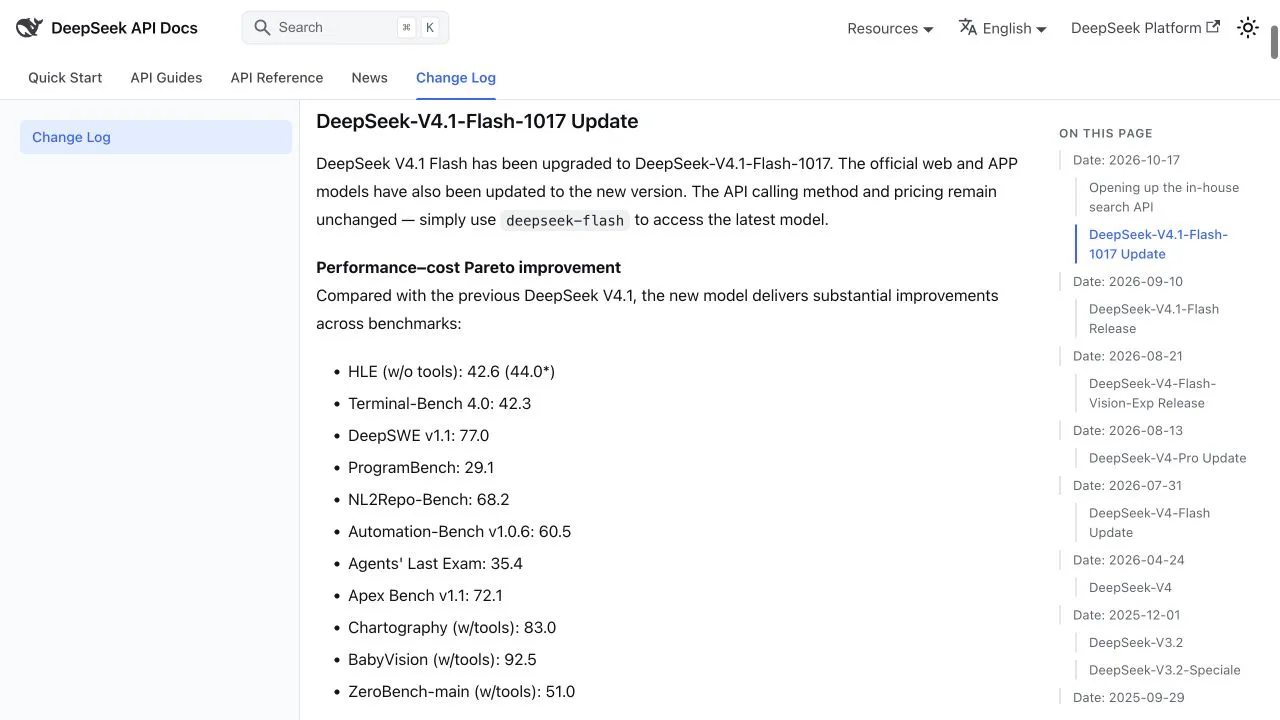
Official English change log, captured October 19, 2026. This documents the release announcement, not an inference test.
Do you need to change the model name?
On the official DeepSeek API, the update announcement tells callers to keep using deepseek-flash. A stable alias can therefore refer to a newer model without a configuration change. Keeping the same request does not preserve an old baseline. An older log without a dated model revision cannot, by itself, prove which checkpoint produced the result.
Different names belong to different systems:
| Name | Where it belongs | What to verify |
|---|---|---|
deepseek-flash | Official DeepSeek API alias | Current official mapping and the actual endpoint your client calls |
deepseek-ai/DeepSeek-V4.1-Flash-1017 | Official Hugging Face repository | The weight revision and serving implementation if deploying yourself |
| A provider-specific dated ID | A third-party catalog | Availability, served version, protocol, tools and your account’s access |
Do not paste the Hugging Face repository name into a hosted API merely because both refer to the same model family. Nor should you append -1017 to an official API alias without documentation saying it is accepted.
For an existing client, inspect its saved base URL and model selection, including subagent defaults. Then inspect a request record to verify that these are the values actually sent. A connection test or a model dropdown is not a completed task. Our Claude Code configuration guide and Codex configuration guide cover those client-specific paths; this update does not make their protocols interchangeable.
Did the price increase? Separate two bills
The October 17 release states that model pricing is unchanged. This statement does not mean all tools used by an agent are free, and it does not establish a third-party provider’s price.
DeepSeek also opened Search and Fetch APIs. According to its Search & Fetch guide, Search returns search results, while Fetch retrieves a page as Markdown. Each is listed at US$0.75 per 1,000 successful requests, when HTTP 200 is returned with a non-empty search result or fetched page content. Failed requests, empty searches and timeouts are not billed. For server-side tool calls through DeepSeek Harness, Claude Code or Codex, the guide says charging starts at 00:00 Beijing time on November 1, 2026; those calls are currently free. That transition must not be generalized into a promise that every direct API request is free until November.
Here is an illustrative calculation, not an observed bill: 100 completed tasks, each using two billable Search requests and three billable Fetch requests, produce 500 tool requests. At the stated rates, the tool component is 500 × $0.75 / 1,000 = $0.375. Add model usage separately. If an agent repeats a search and each repeat is billable, count each request.
A useful comparison sheet has separate columns for model usage, tool requests, retries and accepted results. Compute total spend divided by accepted tasks; also keep the number of rejected tasks visible. Otherwise a cheap run that fails repeatedly can look better than a more expensive successful run. Before forecasting, use the prices and cache categories of the actual provider and account, not a rate copied from another route.
What should existing users verify first?
The following is our proposed acceptance method, not a DeepSeek requirement or a completed test. It uses a small synthetic task so that you can check correctness without sharing customer data.
Input and instruction:
Return JSON only, with exactly these keys:
request_id, category, amount, currency, action.

Ticket: REF-1017. A customer asks for a refund of USD 19.50
for a duplicate payment. They have not provided a payment ID.

Allowed categories: billing, technical, other.
Allowed actions: request_payment_id, escalate, no_action.
Use the ticket ID as request_id and the ISO currency code as currency.
A missing payment ID requires action request_payment_id.
Use a JSON number for amount. Do not issue a refund or invent an ID.
The acceptance target is the JSON object below. This is an authored expected result, not a captured model response.
{"request_id":"REF-1017","category":"billing","amount":19.5,"currency":"USD","action":"request_payment_id"}Parse the output as JSON, compare the exact key set and values, and reject extra prose or fabricated payment details. This tests only a narrow extraction task; it does not validate repository repair or tool use. If your real workflow uses tools, add a read-only fixture tool returning a known payment status and check that the agent passes the correct argument and incorporates the returned result. Keep any refund or email action disabled during this check.
For coding, use a small issue in an isolated copy of your repository with a pre-existing failing test. Acceptance requires that the relevant test passes, unrelated tests still pass, and the diff stays within the permitted files. Do not substitute a plausible explanation for an executed test.
Record the same fields for each run:
| Record | Why it matters |
|---|---|
| Time, endpoint, requested model and returned model label | Helps distinguish a route change from a model update; an alias alone is not checkpoint proof |
| Client version, prompt, reasoning settings and tool definitions | Prevents attributing a client or prompt change to the model |
| Final output, test result and tool arguments | Establishes whether the task was completed correctly |
| End-to-end duration, usage and billable tool calls | Measures the whole task rather than just the first token |
| Retries and all failed attempts | Keeps cost and reliability comparisons honest |
Run repeated trials with the same setup before making a performance claim. A single successful request proves only that request succeeded. If the old checkpoint is no longer accessible and you have no matched historical records, report current acceptance results; do not manufacture a before-and-after comparison.
How to evaluate an Ofox route
Start at the Ofox model directory and inspect the current DeepSeek entry. Match its exact model ID, provider, supported protocol and account price to the workflow you intend to run. The DeepSeek fallback guide explains the dated candidate recorded on October 19 and the limits of catalog evidence.
If the route meets your requirements, create your own key in API Keys and follow the authentication documentation. Keep the key in your client’s credential store or environment, never in an exported workflow or screenshot. Complete the acceptance task before connecting it to a production action.
An OpenAI-compatible text endpoint does not, by itself, include DeepSeek’s official Search and Fetch service. Check tool support separately. Likewise, a dated catalog label is not evidence of identical latency, quantization, output quality or uptime across providers. This article quotes no Ofox rates and does not claim that an Ofox call was tested.
Upgrade decision
If you already use the official deepseek-flash alias, prioritize regression checks: the service may already be serving the update. If you use a third-party route, establish its actual version and capabilities before changing configuration. If you depend on search tools, forecast the separate tool bill and its applicable start date.
1017 is worth evaluating for coding and agent tasks because the official comparison shows gains in those areas. The decision to keep it in your workflow should rest on valid outputs, completed tools, accepted task cost and a usable failure path. For recurring errors, use the API diagnosis and fallback procedure rather than interpreting every failure as a model-quality regression.