Connect Codex to DeepSeek V4.1 Flash: setup and checks
Connect Codex to deepseek-flash using DeepSeek's Responses API, complete model catalog and official setup script. Check configuration before running paid tasks.
 Ofox
Ofox 
To use DeepSeek V4.1 Flash in Codex, select deepseek-flash, configure DeepSeek as a Responses API provider and install its complete model catalog. DeepSeek publishes both a setup script and a manual configuration in its official Codex integration guide.
Checked September 10, 2026. This tutorial describes the direct DeepSeek service; we have not executed paid inference or confirmed a successful Codex coding session. See the release overview for the model announcement and the API setup guide for direct API requests.
Use the official setup with an existing Codex installation
Start with Codex installed and launched at least once. DeepSeek’s script expects the ~/.codex directory to exist. Check your installed version with codex --version; the current official catalog declares 0.144.0 as its minimum client version, not as a requirement to install that exact release.
On macOS or Linux, download the official script so you can inspect it before running it:
curl -fsSL https://cdn.deepseek.com/api-docs/codex-deepseek-setup-en.sh \
  -o /tmp/codex-deepseek-setup-en.sh
less /tmp/codex-deepseek-setup-en.sh
bash /tmp/codex-deepseek-setup-en.sh
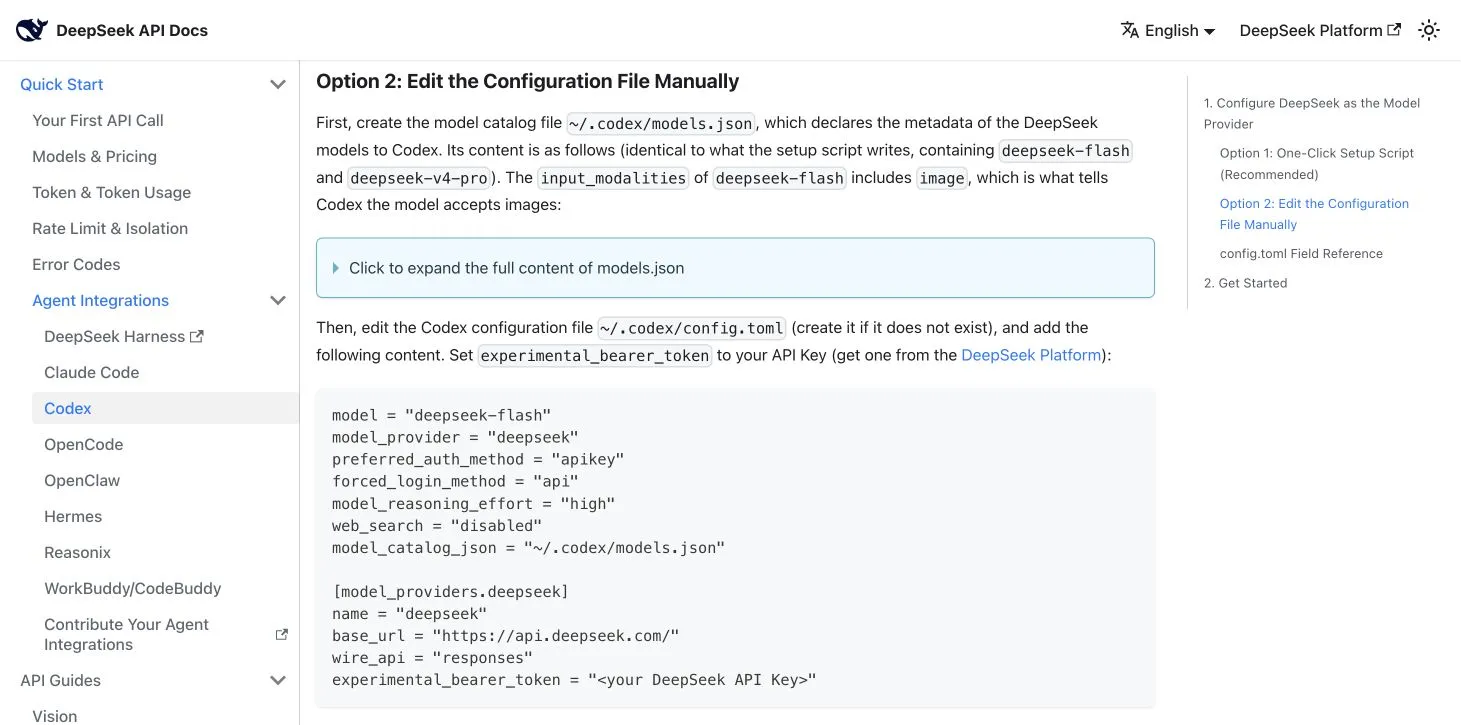
Choose menu option 1 for deepseek-flash and supply a key from the DeepSeek Platform. The documented script backs up config.toml under ~/.codex/backup-deepseek/, writes the model catalog and adjusts the necessary provider settings. Review its reported changes before starting work. The official guide also provides a PowerShell script for Windows.
If you installed the earlier DeepSeek configuration, rerunning the current script updates its old Flash entries. Option 2 selects V4 Pro, which has a scheduled September 14 migration; choose Flash explicitly for a new V4.1 setup.
Manual setup needs the complete catalog
The catalog is more than a list of model names. It declares context, reasoning levels, input modalities and tool behavior. Open the manual section of the official guide and copy its full models.json content into ~/.codex/models.json. Do not replace it with a small invented JSON snippet.
Then merge the guide’s provider configuration into ~/.codex/config.toml, preserving your unrelated settings. These are the important values to verify; this table is not a replacement configuration file:
| Field | Documented value |
|---|---|
model | deepseek-flash |
model_provider | deepseek |
model_catalog_json | ~/.codex/models.json |
model_reasoning_effort | high |
Provider base_url | https://api.deepseek.com/ |
Provider wire_api | responses |
The full example also sets API authentication, disables built-in web search and places the key in experimental_bearer_token. Treat that configuration and its backups as credentials; omit them from shared repository commits. A Chat Completions endpoint or a models-only JSON file does not reproduce this documented setup.
Verify the selected model and a real task
Run codex from a small test project. DeepSeek’s guide identifies model: deepseek-flash in the CLI startup banner as the configuration check. Inspect any configuration error before sending a task; JSON syntax, catalog location and provider selection are separate failure points.
Then use a bounded coding task with a known outcome: ask for an explanation of one file, followed by a small change and its relevant test. Review the diff and test result. If image input matters, include a representative screenshot. Successful model selection alone does not establish tool or image compatibility in your environment.
Budget that test using the current Flash pricing. For the Anthropic-protocol route, use the separate Claude Code tutorial.
Considering Ofox? First check the model catalog, exact model ID and Responses support. This direct-provider configuration does not establish an Ofox route, price or availability.
Frequently Asked Questions
- Which API protocol does Codex use with DeepSeek V4.1 Flash?
- DeepSeek's Codex integration uses the Responses API with wire_api set to responses. The official provider base URL is https://api.deepseek.com/ and the model ID is deepseek-flash.
- Is changing the Codex model name enough?
- No. DeepSeek's documented setup also configures the provider and authentication and installs a complete models.json catalog. Use the official script or the full manual configuration rather than an abbreviated catalog.
- Does this guide confirm a successful paid Codex session?
- No. It checks the documented configuration as of September 10, 2026. You still need to validate authentication, model selection and a representative coding task in your own environment.