LLM API Rate Limits Compared (2026): 5 Vendors, 5 Rulebooks
Five LLM APIs, five rate-limit rules: Anthropic caps tokens/min (10M, cache free), DeepSeek caps concurrency (500), OpenAI/Google went dashboard-only.
 Ofox
Ofox 
TL;DR. There is no single table that ranks LLM API rate limits, because the five biggest vendors do not measure the same thing. Anthropic caps requests, input tokens, and output tokens per minute, and cache reads do not count against you. Moonshot and OpenAI raise your ceiling as you spend more. DeepSeek ignores per-minute rate entirely and caps how many requests you can have running at once. Google and OpenAI have both pulled their per-model numbers off the public docs and into a dashboard. The useful question is not “who has the highest RPM.” It is which limit design matches the way your app actually calls the API, and how you route around whichever one hits first.
A rate limit is not one number you can rank. Anthropic counts tokens per minute, DeepSeek counts requests in flight, OpenAI counts how much you have paid. Lining them up in one column is a category error.
Here is which limit tends to bite which kind of workload, so you can jump to the vendor design that fits.
| Your workload | The limit that bites first | Design that fits |
|---|---|---|
| Many small, fast calls (chat UI, autocomplete) | RPM (requests/min) | Anthropic Scale, OpenAI Tier 4-5 |
| A few huge-context calls (RAG, long docs) | Input tokens/min (ITPM / TPM) | Anthropic (cache reads free of ITPM) |
| Bursty parallel agents | Concurrency | DeepSeek (caps in-flight directly, 2,500 on Flash) |
| Steady production at real scale | Monthly spend cap | Anthropic Scale or OpenAI Tier 5 ($200k) |
| Just starting, tight budget | Entry-tier ceiling | Moonshot T0-T1, Gemini Free |
The One Table Everyone Wants (and Why It Won’t Line Up)
Every “rate limits compared” post promises a grid where you scan a column and pick the winner. The grid falls apart on contact, because the vendors disagree about what a limit even is. Here is the honest version: the same five columns, filled with the fact that the columns don’t match.
| Vendor | Tier is set by | What it actually caps | 429 signal | Per-model numbers public? |
|---|---|---|---|---|
| Anthropic | Usage history (Start / Build / Scale / Custom) | RPM + input tokens/min + output tokens/min, per model class | 429 + retry-after | Yes, full table per tier |
| Moonshot / Kimi | Cumulative top-up ($1 to $3,000) | Concurrency + RPM + TPM + tokens/day | 429 | Yes, full T0-T5 table |
| DeepSeek | Flat (account level) | Concurrency only (in-flight requests) | 429 | Yes, per model |
| OpenAI | Cumulative paid ($5 to $1,000) | RPM + RPD + TPM + TPD + images/min | 429 + x-ratelimit-* | No, moved to dashboard |
| Google Gemini | Billing + spend + time | RPM + TPM + RPD, plus a 10-min spend gate | 429 RESOURCE_EXHAUSTED | No, in AI Studio panel |
Read across any row and the shape changes. Three vendors will show you exact per-model numbers; two will not. Two gate on tokens, one gates on requests in flight, two gate mostly on how much money you have moved through the account. That mismatch is the real finding, and the rest of this post is what each cell means when you are the one getting the 429.
All numbers below were pulled from each vendor’s official rate-limit documentation on 2026-07-22. Where a vendor no longer publishes per-model figures, this post says so rather than guessing.
Anthropic: Three Axes, and Cache Reads Are Free
Anthropic is the most transparent of the five and also the most multi-dimensional. Every model class is limited on three axes at once: requests per minute (RPM), input tokens per minute (ITPM), and output tokens per minute (OTPM). Exceed any one and you get a 429 with a retry-after header telling you exactly how long to wait. The bucket refills continuously (token bucket), so you are not waiting for a fixed reset.
Tiers are Start, Build, Scale, and Custom. You do not buy your way onto a tier directly; organizations move up automatically based on usage history and account standing. Each tier carries a monthly spend cap:
| Tier | Monthly spend cap |
|---|---|
| Start | $500 |
| Build | $1,000 |
| Scale | $200,000 |
| Custom | None (arranged with account team) |
The per-model numbers are where Anthropic actually publishes detail. For Claude Opus 4.x, which shares one combined bucket across Opus 4.8, 4.7, 4.6, and 4.5:
| Tier | RPM | Input tokens/min (ITPM) | Output tokens/min (OTPM) |
|---|---|---|---|
| Start | 1,000 | 2,000,000 | 400,000 |
| Build | 5,000 | 5,000,000 | 1,000,000 |
| Scale | 10,000 | 10,000,000 | 2,000,000 |
The standout, and the reason Anthropic’s ceiling is higher than it looks, is the cache-aware ITPM rule. For most Claude models, cache_read_input_tokens do not count toward ITPM. Tokens written to cache and normal input tokens still count, but tokens read back from cache are free of the rate limit. Anthropic’s own worked example: a 2,000,000 ITPM limit with an 80% cache hit rate lets you push about 10,000,000 total input tokens per minute, because the 8M cached tokens don’t register against the limit. Claude Haiku 3.5 is the one exception that still counts cache reads.
If a big share of your input is a stable system prompt or a long document you send on every call, that rule changes your effective throughput more than a tier bump would. We worked through the money side of this in the prompt-caching cost math; the rate-limit side is the same lever pointed at throughput instead of the bill.
Two footnotes that catch teams off guard: the Message Batches API has its own separate limits, and so do Managed Agents (300 RPM for create endpoints, 1,200 RPM for read). Hitting a wall on batch traffic does not mean your Messages API limit is spent.
Moonshot / Kimi: Pay to Climb, Four Dimensions at Once
Moonshot is the most explicit pay-to-tier ladder of the group. Your tier is set purely by cumulative top-up, from $1 to $3,000, and each tier moves four dials together: concurrency, RPM, TPM, and tokens per day (TPD).
Tiers on the international platform (platform.kimi.ai), billed in USD:
| Tier | Cumulative top-up | Concurrency | RPM | TPM | TPD |
|---|---|---|---|---|---|
| Tier 0 | $1 | 1 | 3 | 500,000 | 1,500,000 |
| Tier 1 | $10 | 50 | 200 | 2,000,000 | Unlimited |
| Tier 2 | $20 | 100 | 500 | 3,000,000 | Unlimited |
| Tier 3 | $100 | 200 | 5,000 | 3,000,000 | Unlimited |
| Tier 4 | $1,000 | 400 | 5,000 | 4,000,000 | Unlimited |
| Tier 5 | $3,000 | 1,000 | 10,000 | 5,000,000 | Unlimited |
One trap worth knowing before you compare these numbers against anything else: Moonshot runs two separate platforms with two separate ladders. The international platform (platform.kimi.ai, also reachable as platform.moonshot.ai) meters in USD and requires a $1 top-up before you can call anything. The mainland platform (platform.moonshot.cn) has its own RMB ladder that starts at ¥0 and steps through ¥50 / ¥100 / ¥500 / ¥5,000 / ¥20,000. Those are not currency conversions of each other, and the entry conditions differ: one gates you behind a first payment, the other does not. Check which platform your key belongs to before assuming a tier.
The jump from Tier 0 to Tier 1 is the one to notice: $9 of extra top-up takes you from 3 RPM and a single concurrent request to 200 RPM and 50 concurrent, and removes the daily token ceiling entirely. Tier 0 is really just a “prove you are real” floor, not a place to build anything.
One thing the tier table does not show: individual models can be capacity-constrained on top of your tier. A freshly launched model such as Kimi K3 can return 429 from upstream capacity even when you are nowhere near your tier limits, because the constraint is the provider’s total headroom for that model rather than your account’s rate. When that happens, buying a higher tier does not help; the fix is a fallback to a different model, which is the routing pattern later in this post.
DeepSeek: No RPM at All, Just Concurrency
DeepSeek is the outlier that breaks every comparison grid. It does not publish RPM or TPM limits. It caps concurrency, the number of requests you can have in flight at one time, at the account level:
| Model | Concurrency cap |
|---|---|
| deepseek-v4-pro | 500 |
| deepseek-v4-flash | 2,500 |
Stay under the cap and you can fire requests as fast as the model returns them. Cross it and you get a 429. There is no per-minute budget to pace against, which is genuinely easier to reason about for parallel workloads: you size your worker pool to the concurrency cap and stop worrying about tokens per minute.
DeepSeek also handles overload differently. Instead of rejecting a request when the servers are busy, it keeps the connection alive, sending empty lines for non-streaming calls or SSE : keep-alive comments for streaming ones, and only closes the connection if inference has not started after 10 minutes. Accounts with expanded quotas can also use the user_id parameter to isolate concurrency per end user, which matters if you are multiplexing many customers through one key. If you run DeepSeek in an agent loop, our DeepSeek V4 Pro real-cost breakdown covers how the concurrency model interacts with cache misses and thinking tokens on the bill.
OpenAI: Tier by Spend, Numbers Behind Glass
OpenAI still gates by cumulative amount paid, across six tiers:
| Tier | Qualifies at | Monthly usage cap |
|---|---|---|
| Free | Allowed geography | $100 |
| Tier 1 | $5 paid | $100 |
| Tier 2 | $50 paid | $500 |
| Tier 3 | $100 paid | $1,000 |
| Tier 4 | $250 paid | $5,000 |
| Tier 5 | $1,000 paid | $200,000 |
The dimensions are broad: RPM, RPD, TPM, TPD, images per minute, and audio minutes per minute for some streaming models. When you are inside the limit, responses carry x-ratelimit-limit-requests, x-ratelimit-remaining-requests, and their token equivalents, so you can watch your headroom in real time.
Here is the catch that breaks the grid: OpenAI’s rate-limit docs no longer list the specific RPM or TPM numbers per model. The page sends you to the models page or your account dashboard for the actual figures. That is not an oversight to complain about; it is a data point. OpenAI has decided per-model rate limits move often enough that a static table would mislead, so the numbers live in a dashboard tied to your account and tier. Any post that prints exact OpenAI per-model RPM as if it were fixed is quoting a snapshot that may already be stale.
Google Gemini: Tiers, Time Gates, and a 10-Minute Spend Window
Gemini’s tiers combine billing status, spend, and elapsed time:
| Tier | Qualifies at | Spend cap |
|---|---|---|
| Free | Active project or free trial | None |
| Tier 1 | Billing account linked | $250 |
| Tier 2 | $100 paid + 3 days since first payment | $2,000 |
| Tier 3 | $1,000 paid + 30 days since first payment | $20,000 to $100,000+ |
The three-days and thirty-days requirements are unusual: even if you pay the money, you cannot skip the waiting period to reach Tier 2 or Tier 3. Gemini also layers a spend-based control on top of the usual RPM / TPM / RPD, enforced per rolling 10-minute window ($10 for Tier 1, $200 for Tiers 2 and 3), so a sudden burst of spend can throttle you even when your per-minute token rate is fine. Exceed a limit and you get 429 RESOURCE_EXHAUSTED.
Like OpenAI, Gemini keeps the per-model RPM / TPM / RPD numbers off the static docs and inside AI Studio, where you view your active limits. And the whole page applies only to the Gemini Developer API, not to Vertex AI, which runs its own quota system entirely.
Why the Units Don’t Line Up (the Part Nobody Tables)
Step back and the incompatibility is the story. Here is what a single “unit” of headroom actually buys you at each vendor, and where that unit pinches.
| Unit | Used by | What one unit of headroom buys | Where it pinches |
|---|---|---|---|
| RPM (requests/min) | All five, as one axis | N calls/min regardless of size | Many small calls |
| Input tokens/min (ITPM / TPM) | Anthropic, Moonshot, OpenAI, Google | N input tokens/min | Large context, RAG |
| Output tokens/min (OTPM) | Anthropic | N generated tokens/min | Long generations |
| Concurrency (in-flight) | DeepSeek, Moonshot | N requests running at once, any size | Parallel fan-out |
| Monthly spend cap | All five | A hard dollar ceiling per month | Sustained scale |
| 10-min rolling spend | Dollars per rolling 10 minutes | Spiky spend |
A team that sends thousands of tiny classification calls hits RPM first and could not care less about ITPM. A team that pastes a 200k-token document into every request hits token-per-minute walls while its RPM sits near zero. A team running fifty parallel agents hits concurrency. These three teams cannot use the same “best rate limits” recommendation, because they are constrained by three different units, and no single ranking can serve all three.
A worked example makes the trap concrete. Say you run 50 workers, each sending a 30,000-token RAG request. On DeepSeek’s deepseek-v4-pro that is 50 in-flight against a 500 concurrency cap, so you have ten times the headroom and never see a 429. Move the exact same workload to a vendor with a 2,000,000 input-tokens-per-minute limit and, if those 50 requests land inside the same minute, that is 1,500,000 input tokens in one burst, plus whatever else you are sending. You are suddenly at 75% of a limit you were not even tracking on DeepSeek, and a small traffic bump tips you over. Same concurrency, same request size, completely different wall.
This is why cross-vendor migration surprises people. The limit you were never watching becomes the one that bites, and the code path that ran clean for months starts throwing 429s the day you switch providers.
Which Limit Will Bite You First (Decision Frame)
Before you upgrade a tier or re-architect anything, figure out which wall you are actually hitting.
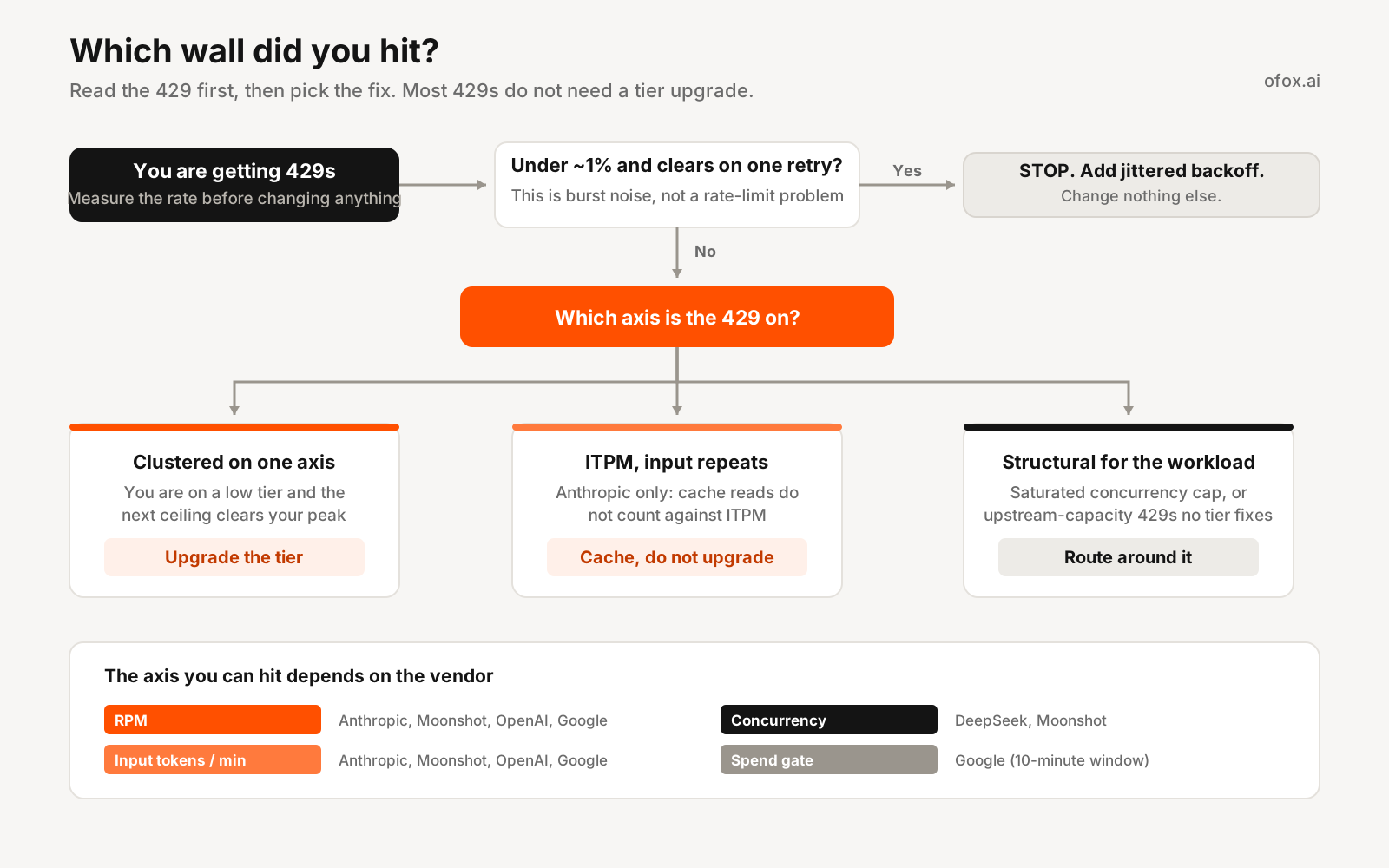
- When to just upgrade the tier. Your 429s cluster on one axis (say, RPM), you are on a low tier, and the next tier’s ceiling clears your peak with room to spare. Paying up is the cheapest fix. This is the common case for Moonshot and OpenAI, where tier is a spend dial.
- When to cache instead of upgrade. You are on Anthropic, hitting ITPM, and a large slice of your input repeats across calls. Turning on prompt caching can lift effective throughput without a tier change, because cache reads do not count against ITPM. Try this before you request a limit increase.
- When to route around it. Your limit is structural for the workload (a concurrency cap you keep saturating, or a model returning upstream-capacity 429s that no tier fixes). The fix is failover to a comparable model on a different provider, so a throttle degrades to a hop instead of an error. This is where the general 429 handling patterns and a multi-model router earn their keep.
- Stop rule. If your 429 rate is under about 1% and clears on a single retry, you do not have a rate-limit problem, you have normal burst noise. Add jittered backoff and move on. Do not re-architect for a wall you are barely touching.
How to Read a 429 (Which Wall Did You Hit?)
A 429 is not self-explanatory, and the vendors tell you which wall you hit in different ways. Reading the response before you retry saves you from waiting out a limit you did not actually break.
| Vendor | Signal to read | What it tells you |
|---|---|---|
| Anthropic | retry-after + anthropic-ratelimit-requests-remaining / -input-tokens-remaining / -output-tokens-remaining | Exactly which axis hit zero (requests, input, or output tokens) and how many seconds to wait |
| OpenAI | x-ratelimit-remaining-requests / x-ratelimit-remaining-tokens | Whether you ran out of requests or tokens for the window |
| DeepSeek | 429 with no documented retry-after | You are over your concurrency cap; reduce in-flight requests rather than just waiting |
| Google Gemini | 429 RESOURCE_EXHAUSTED | Check whether it is the per-minute limit or the 10-minute spend gate |
| Moonshot / Kimi | 429 | Check which tier axis you crossed: concurrency, RPM, or TPM |
The practical split is between “wait” limits and “slow down” limits. Anthropic, OpenAI, and Google give you a per-minute budget, so a retry-after or a remaining-tokens header near zero means back off for a few seconds and the bucket refills. DeepSeek’s concurrency cap is a “slow down” limit: waiting does nothing if you keep the same number of requests in flight, because the wall is parallelism, not time. Retrying a concurrency 429 without shrinking your worker pool just re-hits the same wall. Get this distinction wrong and your backoff logic either sleeps when it should shed load, or sheds load when a one-second wait would have cleared it.
One Endpoint, Five Rulebooks
You cannot make Anthropic’s ITPM or DeepSeek’s concurrency cap disappear. What you can do is stop letting any one vendor’s limit be a single point of failure. When five vendors each enforce a different rule, the practical defense is to put them behind one endpoint and fail a throttled request over to another vendor automatically. A gateway like ofox exposes all of them on one OpenAI-compatible API and one key, so “hit vendor A’s limit” becomes “answered by vendor B” instead of a failed call. This is also the argument in why an LLM API gateway earns its place, applied specifically to rate limits.
The pattern is a short retry-then-hop loop. A 429 from any vendor triggers a couple of jittered retries, then a switch to the next model in a cross-vendor chain.
Python
import os, time, random, httpx

OFOX = "https://api.ofox.io/v1/chat/completions"
HEADERS = {"Authorization": f"Bearer {os.environ['OFOX_API_KEY']}"}

# Same endpoint, different vendors. If one throttles, hop to the next.
CHAIN = ["deepseek/deepseek-v4-pro-0813", "z-ai/glm-5.2", "moonshotai/kimi-k3"]

def ask(messages):
    for model in CHAIN:
        for attempt in range(3):
            r = httpx.post(OFOX, headers=HEADERS,
                           json={"model": model, "messages": messages}, timeout=60)
            if r.status_code == 429:              # any vendor's rate limit
                if attempt == 2:
                    break                         # give up on this vendor, try the next
                base = 2 ** attempt               # 1s, 2s, 4s
                time.sleep(base + random.uniform(0, base * 0.3))
                continue
            r.raise_for_status()
            return model, r.json()
    raise RuntimeError("every vendor in the chain is rate-limited right now")
Node
import OpenAI from "openai";

const client = new OpenAI({ baseURL: "https://api.ofox.io/v1", apiKey: process.env.OFOX_API_KEY });
const chain = ["deepseek/deepseek-v4-pro-0813", "z-ai/glm-5.2", "moonshotai/kimi-k3"];
const sleep = (ms) => new Promise((r) => setTimeout(r, ms));

export async function ask(messages) {
  for (const model of chain) {
    for (let attempt = 0; attempt < 3; attempt++) {
      try {
        return { model, res: await client.chat.completions.create({ model, messages }) };
      } catch (e) {
        if (e.status !== 429) throw e;
        if (attempt === 2) break;                // hop to the next vendor
        const base = 2 ** attempt;               // 1s, 2s, 4s
        await sleep((base + Math.random() * base * 0.3) * 1000);
      }
    }
  }
  throw new Error("every vendor in the chain is rate-limited right now");
}
Swap the model string and everything else stays the same. That is the whole point: five vendors, five rulebooks, one code path. The gateway does not raise anyone’s ceiling, and it will still return 429 when every vendor in the chain is full at once. It just turns “the vendor I picked is throttled” into a problem the loop solves instead of one your users see.
Alternatives: Ways to Handle Five Different Limits
- ofox (unified endpoint + cross-vendor failover). One OpenAI-compatible API over Anthropic, DeepSeek, Moonshot, Google, and more, with model IDs like
deepseek/deepseek-v4-pro-0813andmoonshotai/kimi-k3. Best when your real risk is any single vendor’s limit stalling a request and you want the failover to be a config line, not a rewrite. It does not increase a vendor’s ceiling. - Direct vendor keys, one per provider. The most control and the lowest per-token price, at the cost of integrating and monitoring each vendor’s limit shape yourself. Reasonable if you are committed to one provider and its limit design fits your workload cleanly.
- OpenRouter and similar aggregators. Also unify many models behind one endpoint. Compare on fee model and on how they handle provider-level versus model-level failover, since a single-provider model has nothing to route to. Match on your actual bottleneck rather than model count.
- Roll your own router. A retry-and-failover layer like the loop above, maintained in-house. Full control, but you own every vendor’s quirks: DeepSeek’s keep-alive, Anthropic’s separate batch limits, Google’s 10-minute spend gate.
Whichever you pick, the rule holds: nothing deletes a vendor’s rate limit. The choice is how gracefully you route around the one that hits first.
The limits are one half of this; the errors they produce are the other. LLM API error codes covers what each vendor returns when you cross one.
Sources Checked for This Refresh
- Anthropic API rate limits (verified 2026-07-22)
- Moonshot / Kimi API rate limits, international platform (verified 2026-07-22)
- Moonshot / Kimi rate limits, archived copy
- Moonshot mainland platform rate limits, RMB ladder (verified 2026-07-23)
- DeepSeek API rate limits (verified 2026-07-22)
- OpenAI API rate limits (verified 2026-07-22)
- Google Gemini API rate limits (verified 2026-07-22)
Frequently Asked Questions
- Which LLM API has the highest rate limits?
- There is no clean winner, because the vendors don't measure the same thing. On raw ceilings, Anthropic's Scale tier and OpenAI's Tier 5 both top out at a $200,000 monthly spend cap, and Anthropic's Scale tier gives Claude Opus 4.x 10,000 RPM / 10M input tokens per minute / 2M output tokens per minute. DeepSeek allows 2,500 concurrent requests on deepseek-v4-flash, which is a huge ceiling but measured in a completely different unit (in-flight requests, not per-minute rate). The honest answer is that 'highest' depends on whether your bottleneck is requests per minute, tokens per minute, or concurrency.
- What does a 429 error mean on an LLM API?
- 429 Too Many Requests means you crossed a rate limit, but which one depends on the vendor. On Anthropic it means you exceeded RPM, ITPM, or OTPM for that model class, and the response carries a retry-after header. On DeepSeek it means you exceeded your concurrency cap (too many requests in flight), not a per-minute rate. On Google it appears as 429 RESOURCE_EXHAUSTED. A 429 is not always your fault: it can also be upstream capacity (a launch-constrained model returning 429 regardless of your tier). Read the error body and any retry-after header before you retry.
- Does prompt caching increase your rate limit?
- On Anthropic, effectively yes. For most Claude models, cache_read_input_tokens do not count toward your ITPM (input tokens per minute) rate limit. Anthropic's own example: with a 2,000,000 ITPM limit and an 80% cache hit rate you can process about 10,000,000 total input tokens per minute, because the 8M cached tokens are free of the rate limit. Claude Haiku 3.5 is the exception and does count cache reads. Most other vendors use a combined TPM that counts all input tokens, cached or not, so caching cuts your bill but not your rate-limit pressure.
- Why does DeepSeek not have RPM limits?
- DeepSeek limits concurrency instead of per-minute rate. Its docs cap deepseek-v4-pro at 500 concurrent requests and deepseek-v4-flash at 2,500, at the account level. If you go over, you get a 429; if you stay under, you can send as fast as the model answers. Under high load DeepSeek keeps the connection alive rather than rejecting it (empty lines for non-streaming, SSE keep-alive comments for streaming), and closes the connection only if inference has not started after 10 minutes. It is a fundamentally different model from a token bucket.
- How do I increase my OpenAI or Anthropic rate limit?
- Both raise limits as your account matures. OpenAI moves you up tiers by cumulative amount paid ($5 for Tier 1, up to $1,000 for Tier 5), and Anthropic moves organizations up Start to Build to Scale automatically based on usage history and account standing. On Anthropic you can also file a Request rate limit increase from the Limits page in the Console, or contact support for urgent needs. Neither lets you jump straight to the top ceiling on day one; the ramp is deliberate anti-abuse design.
- Can an API gateway remove rate limits?
- No. A gateway cannot raise a vendor's ceiling, and any gateway that claims to is misleading you. When you hit Anthropic's ITPM or DeepSeek's concurrency cap through a gateway, the 429 still comes from the vendor. What a gateway changes is recovery: with one endpoint and one key you can fail a throttled request over to a different vendor automatically, so a limit on one provider degrades to a comparable model instead of a failed call. The value is routing around the limit, not deleting it.