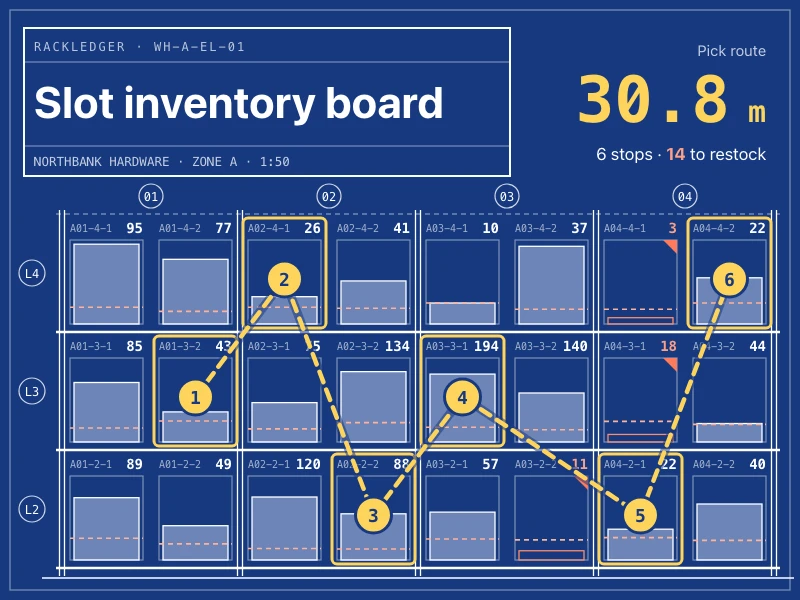
Slot inventory board
See stock, safety lines and restock alerts for every slot on a rack elevation, tune safety stock, plan the shortest pick route, and import or export CSV / Excel.
提示詞
Build a slot inventory board for zones A and B of the Northbank Hardware parts depot. Draw each rack as an elevation — bays, levels and positions — and show the product, quantity, a stock / capacity bar and a safety line in every slot, flagging slots below safety stock for restock. Let me switch between a "blueprint" drawing (white lines on blue) and a product-illustration view, and filter by zone or level. The key features are opening slot details, adjusting safety stock and planning the shortest pick route. Put total units, SKUs in stock, space utilization and slots to restock at the top, with stock by category, two weeks of in / out movements and a movement log below. Support importing and exporting CSV and Excel. Style: clean, light industrial — off-white with deep green accents and monospaced numbers, working well on phones and large screens.
- 來源
- Ofox
如何使用
- 1
點擊「做同款」
進入 Ofox Chat,這個需求已經替你寫好。未登入時請先登入。
- 2
改成你想要的
提示詞裡高亮的部分可以直接改,換成你自己的內容。
- 3
送出並生成
傳送後 Ofox Chat 撰寫程式碼並執行驗證,完成後可以預覽或下載;不滿意可以繼續對話修改。
常見問題
做出來的是什麼?
一個可以直接開啟的網頁。Ofox Chat 寫好程式碼後會在沙箱裡執行驗證,結果可以在對話裡預覽,程式碼檔案可以下載。
需要會寫程式嗎?
不需要。用平常的話說清楚要做什麼,需要處理檔案就一併上傳;程式碼由 Ofox Chat 來寫和執行。
可以修改提示詞嗎?
可以。提示詞會填進 Ofox Chat 的輸入框,傳送前可以換成你自己的主題、補充要求,或刪掉不需要的部分。
提示詞可以直接複製使用嗎?
可以。點提示詞卡片右上角的「複製」即可取得純文字,也能用在其他 AI 程式設計工具裡。
更多同類
更多數據提示詞






有自己的想法?直接開始創作
在 Ofox Chat 裡用一句話描述你想要的畫面,從零生成屬於你的作品。