Food gift shop
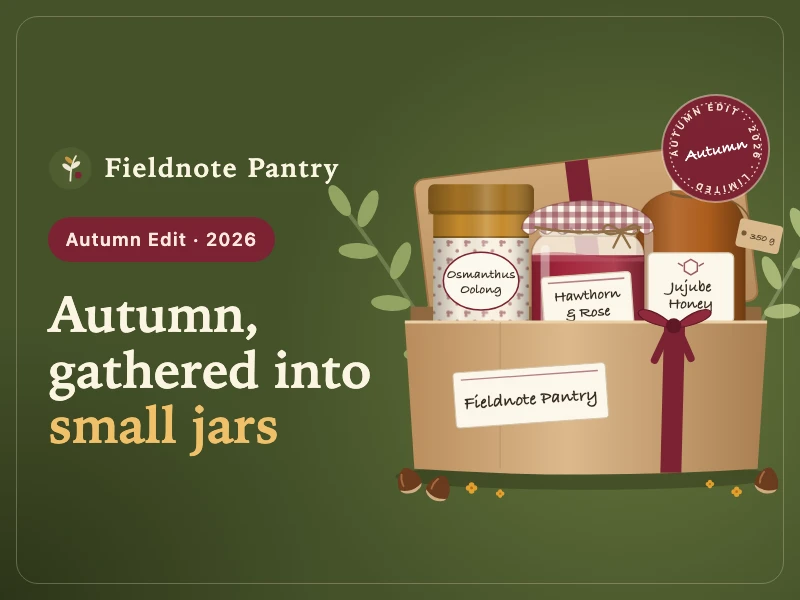
An online shop for a handmade food brand: a seasonal homepage, dietary filters, product pages with origin stories, a build-your-own gift box and a slide-out cart.
提示詞
Build an online shop for Fieldnote Pantry, a handmade food brand that works with small farms and sells jams, honey, tea, nuts and biscuits, designed to drive sales through seasonal editions, brand storytelling and custom gift boxes. The homepage hero features the limited Autumn Edit; the shop can be filtered by category and dietary preference (vegan, gluten-free, low sugar); product pages cover the region, the grower’s story and pairing ideas; a gift box builder lets shoppers choose a box, fill the slots, watch the total update live, write a card message and add it to the cart; the cart opens as a side drawer, and the footer links to recipes and grower stories. Style: elegant, in olive green, warm beige and burgundy, with hand-drawn-style jars, honey bottles and kraft gift boxes as product images. Make it work well on phones.
- 來源
- Ofox
如何使用
- 1
點擊「做同款」
進入 Ofox Chat,這個需求已經替你寫好。未登入時請先登入。
- 2
改成你想要的
提示詞裡高亮的部分可以直接改,換成你自己的內容。
- 3
送出並生成
傳送後 Ofox Chat 撰寫程式碼並執行驗證,完成後可以預覽或下載;不滿意可以繼續對話修改。
常見問題
做出來的是什麼?
一個可以直接開啟的網頁。Ofox Chat 寫好程式碼後會在沙箱裡執行驗證,結果可以在對話裡預覽,程式碼檔案可以下載。
需要會寫程式嗎?
不需要。用平常的話說清楚要做什麼,需要處理檔案就一併上傳;程式碼由 Ofox Chat 來寫和執行。
可以修改提示詞嗎?
可以。提示詞會填進 Ofox Chat 的輸入框,傳送前可以換成你自己的主題、補充要求,或刪掉不需要的部分。
提示詞可以直接複製使用嗎?
可以。點提示詞卡片右上角的「複製」即可取得純文字,也能用在其他 AI 程式設計工具裡。
更多同類
更多網頁提示詞







有自己的想法?直接開始創作
在 Ofox Chat 裡用一句話描述你想要的畫面,從零生成屬於你的作品。