Seedance 2.5 Image-to-Video: First and Last Frame Control (2026)
Send both ends and Seedance 2.5 lands on them: closing-frame error 5.4 against 35.9 for 2.0 Mini. Setting aspect_ratio is a 400. Billed $0.11/s at 480p.
 Ofox
Ofox 
Seedance 2.5 treats the last frame as a destination, not a hint. Give it both ends of a shot and it arrives at the one you asked for, which is the thing 2.0 Mini would not do.
Endpoint:     POST /v1/videos  ->  202 + polling_url
Field:        frame_images[] with frame_type first_frame / last_frame
Ratio rule:   aspect_ratio is a 400 on 2.5 frame jobs. Omit it, or send adaptive.
Same on 2.0:  no. 2.0-mini accepts aspect_ratio with frames.
Closing frame error, 0-255 mean absolute difference, lower is closer:
              Seedance 2.5 at 720p    2.0
              Seedance 2.5 at 480p    5.4
              Seedance 2.0 Mini       35.9
              two unrelated images    39.0  (the ceiling)
Billed:       $0.11/s at 480p, $0.24/s at 720p, at the text-to-video row
Measured:     2026-08-24, one 5s clip per configuration
Last updated 2026-08-24. Every number below came from POST /v1/videos through ofox on that date. Video model routing changes; re-run the four error cases before copying the validation table into your own code.
How Do You Send a First and Last Frame to Seedance 2.5?
Two elements in frame_images, each tagged with a frame_type. There is no mode switch; the endpoint infers image-to-video from the body.
import base64, json, requests

def data_uri(path):
    return "data:image/jpeg;base64," + base64.b64encode(open(path, "rb").read()).decode()

body = {
    "model": "bytedance/seedance-2.5",
    "prompt": "The woman stops walking on the rain-slicked street, turns toward the "
              "camera, and the shot pushes in to her face. Hand-painted 2D animation style.",
    "duration": 5,
    "resolution": "480p",
    # no aspect_ratio here on purpose: see the next section
    "frame_images": [
        {"type": "image_url", "image_url": {"url": data_uri("wide.jpg")},  "frame_type": "first_frame"},
        {"type": "image_url", "image_url": {"url": data_uri("close.jpg")}, "frame_type": "last_frame"},
    ],
}

r = requests.post("https://api.ofox.io/v1/videos", json=body,
                  headers={"Authorization": "Bearer YOUR_OFOX_API_KEY"})
print(r.status_code, r.json())   # 202 {'id': ..., 'status': 'queued', 'polling_url': ...}
Data URIs work, which matters more than it sounds: it means you can test first-last-frame generation without standing up a public image host first. Then poll polling_url until the status is terminal, which is its own set of traps worth reading before you write the loop.
The prompt still does work here. It is not decoration between two fixed images: it decides what happens on the way, and how many camera moves get spent doing it.
Does Seedance 2.5 Actually Land on the Last Frame?
Yes, and the gap against 2.0 Mini is not subtle. Same two images, same prompt, same duration, same day.
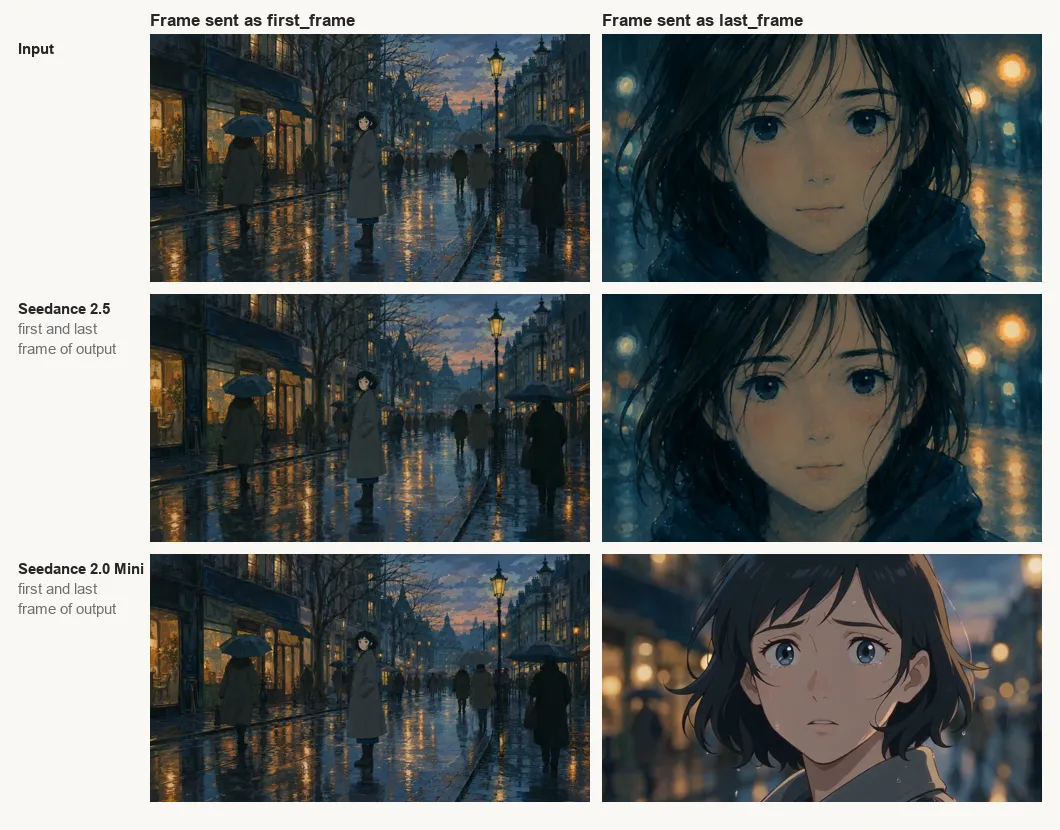
To put a number on it, we pulled frame 0 and the final frame out of each clip, resized both the frame and the source image to 256x144, and took the mean absolute per-channel difference on a 0 to 255 scale. Low is close.
| Run | Opening frame error | Closing frame error | Billed |
|---|---|---|---|
| Seedance 2.5, 720p | 1.8 | 2.0 | $1.20 |
| Seedance 2.5, 1080p | 1.8 | 3.1 | $2.40 |
| Seedance 2.5, 480p | 3.0 | 5.4 | $0.55 |
| Seedance 2.0 Mini, 480p | 9.5 | 35.9 | $0.10 |
| Seedance 2.0 Mini, 480p, no ratio field | 9.6 | 37.1 | $0.10 |
| Reference: two unrelated images | 38.6 | 39.0 | n/a |
Read the bottom row first. Two images that have nothing to do with each other score about 39. Mini’s closing frame scores 35.9, which is to say it ended somewhere of its own choosing: same rainy palette, different character, different framing. The opening frame is a different story, and both models hold it tightly, which fits the older behaviour we saw on the 2.0 line where the first frame is honoured and the last frame drifts.
Two caveats before you build on this. Each configuration is one run, not a distribution, so treat the ordering as the finding and the exact decimals as one sample. And the difference metric is deliberately crude: it will punish a correct composition that is two frames early. That crudeness is also why the 35.9 is convincing. Nothing that mild could produce a number that close to unrelated.
Why Does aspect_ratio Return 400 on a 2.5 Frame Job?
Because the ratio is derived from the first-frame image, so sending it is an error rather than a redundancy.
POST /v1/videos  {model: bytedance/seedance-2.5, resolution: 480p,
                  aspect_ratio: "16:9", frame_images: [first, last]}

400 invalid_request
"The parameter ratio specified in the request is not valid. For first-frame or
 first-last-frame generation, the output ratio follows the first-frame image."
The part that catches people: our first-frame image is exactly 1280x720, so the 16:9 we sent was correct. It is still refused. The API is not comparing your value against the image, it is refusing to accept a value at all in this mode.
Three things follow, and all three are measured rather than assumed:
| Request | Result |
|---|---|
2.5 + frame_images + aspect_ratio: "16:9" | 400, ratio not valid |
2.5 + frame_images + aspect_ratio: "adaptive" | 202, output 854x480 |
2.5 + frame_images, field omitted | 202, output 1280x720 at 720p |
2.5 text-to-video + aspect_ratio: "16:9", no frames | 202 |
2.0 Mini + frame_images + aspect_ratio: "16:9" | 202, output 864x496 |
So the restriction belongs to 2.5’s frame-based tasks specifically. It is not a rule about video generation, it is not a rule about the whole model, and it is not a rule about the gateway. Code that has worked for months against Seedance 2.0 will start returning 400 on the day someone edits the model ID to 2.5, and the error message will talk about a parameter nobody changed. ByteDance documents this directly. The Seedance 2.5 prompt guide splits tasks into locked and unlocked, puts “Editing, first and last frames, and extension” in the locked group, and describes locked as “the output video’s aspect ratio, and in some cases its duration, are locked”. The same page adds the line that explains our 2.0 result: “Seedance 2.0 does not make this distinction.”
What Else Does the frame_images Validator Reject?
Four shapes, all caught before the request goes upstream. Each came back in roughly a second and cost nothing.
| What you send | HTTP | Message |
|---|---|---|
Two elements both first_frame | 400 | frame_images: at most one first_frame and one last_frame |
Only a last_frame | 400 | frame_images: last_frame requires a first_frame |
frame_type: "start_frame" | 400 | frame_images[0]: frame_type must be first_frame or last_frame |
frame_images and input_references together | 400 | frame_images and input_references are mutually exclusive |
Notice the indexed path in the third one. When you are generating request bodies in a loop, frame_images[0] tells you which element to look at, which is more than most video APIs give you.
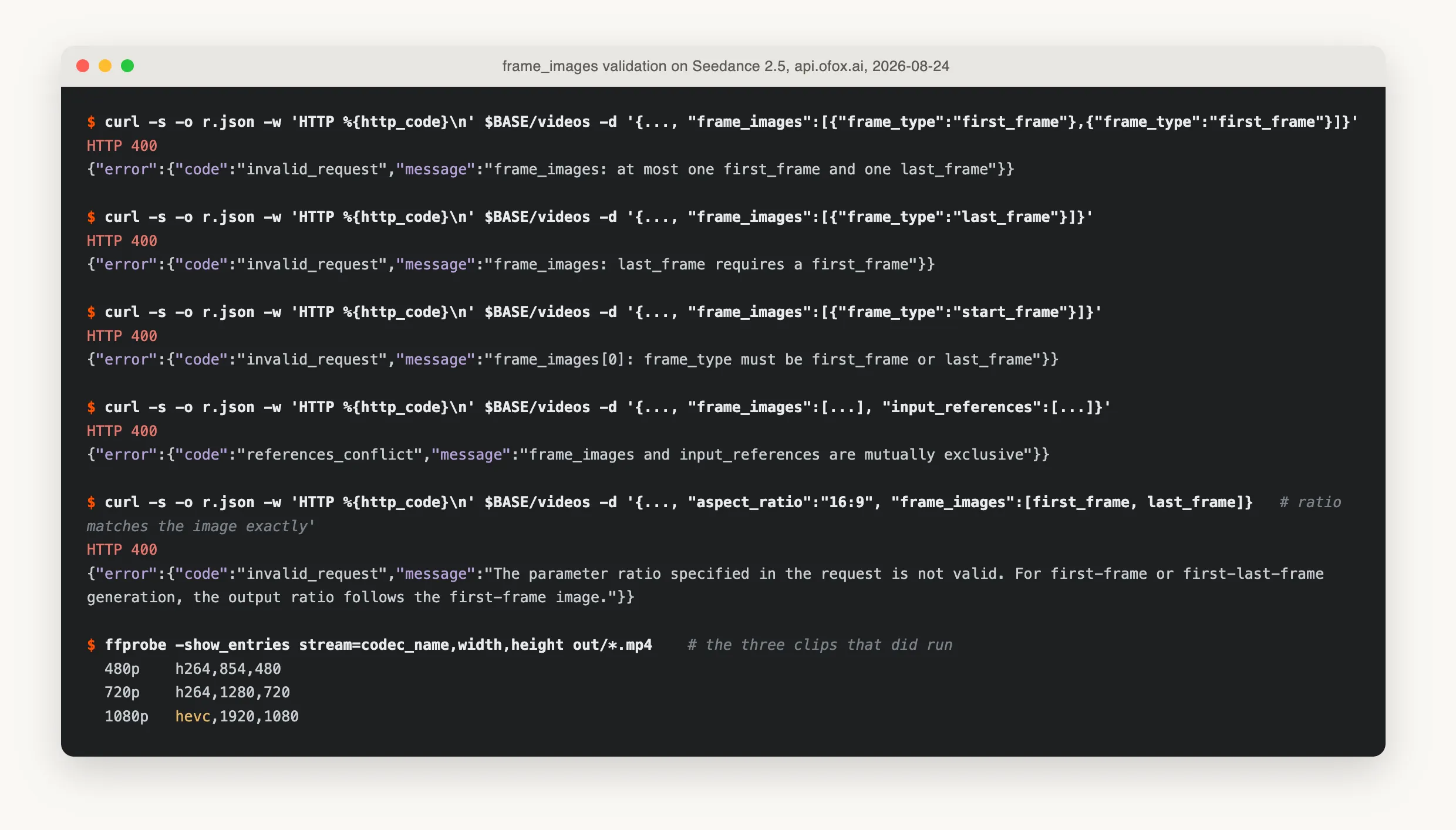
All five rejections are live calls against Seedance 2.5. The ffprobe line at the bottom is the three clips that did run, and it is where the 1080p codec change shows up.
The second rule is the one worth designing around. There is no last-frame-only mode, so a pipeline that wants to end on a known image has to also decide where it starts. If you only care about the ending, generate a plausible opening still first and pass both.
What Does an Image-to-Video Clip Actually Cost?
It bills at the text-to-video row for that resolution. The model page prices Seedance 2.5 by resolution and mode, and there is no image-to-video row, so the natural fear is that you land on the “all other combinations” line at $0.568/s. You do not.
| Resolution | Model page, text-to-video | Our 5s frame job billed | Implied |
|---|---|---|---|
| 480p | $0.11/s | $0.55 | $0.11/s |
| 720p | $0.24/s | $1.20 | $0.24/s |
| 1080p | $0.48/s | $2.40 | $0.48/s |
Three resolutions, three exact matches. The files came back at 854x480, 1280x720 and 1920x1080, all 24 fps with an AAC track at 32 kHz. Duration lands at 5.04s rather than exactly 5, so bill on the usage.video_seconds field rather than on your own arithmetic.
For comparison, the same request on bytedance/seedance-2.0-mini at 480p billed $0.10 for the clip, which is why Mini stays the right tool for throughput work where nobody is checking the closing frame. It is five and a half times cheaper and, on this task, the difference shows.
Which Resolutions Does Seedance 2.5 Accept?
Ask the pricing table, not the description. The model page currently prints a prose summary saying 480p or 720p, while the pricing table on the same page lists 1080p rows for text-to-video and video-to-video, and a 1080p first-last-frame job ran to completion for us.
That kind of disagreement is normal in the weeks after a resolution tier opens, and the resolution field is the cheapest possible thing to test: send the request, read the status code. A rejection is instant and free.
| Source | Says |
|---|---|
| Model page prose | 480p or 720p, 720p by default |
| Model page pricing table | 480p, 720p, 1080p rows, 1080p at $0.48/s text-to-video |
| Live API, first-last-frame at 1080p | Accepted, finished in 176.2s, billed $2.40 |
One thing changes at 1080p that nothing on the page mentions: the file came back as HEVC, where the 480p and 720p outputs were H.264. If you concatenate clips with stream copy, or serve them straight to a browser, a mixed-codec batch will bite. Check the codec on the file rather than assuming it from the model.
Duration is the other axis that changed between generations: 2.5 takes 4 to 30 seconds where the 2.0 line stops at 15, and a 30-second clip needs roughly ten beats of action in the prompt or the model will stretch one moment across ten seconds. We covered that pacing problem in the 2.5 prompting guide, and the 2.5 against 2.0 comparison has the rest of the capability deltas.
How Do You Compare Two Video Models Without Two Consoles?
The comparison in this post required exactly one thing that is annoying to arrange: running the same body against seedance-2.5 and seedance-2.0-mini with nothing else changed. Two model IDs, one key, one endpoint shape. Done natively, that is two provider consoles, two credit balances and two request schemas, at which point most people compare one model against their memory of another one and call it a benchmark.
Both models here answer on the same POST /v1/videos because the video endpoint is model-agnostic; the diff between the two runs in this article was the model field and nothing else. We used ofox’s video endpoint for it, and the same trick works on any gateway that keeps the request shape stable across vendors. The thing to check before trusting a cross-model comparison is that the gateway is not normalising fields on the way through: if aspect_ratio behaved identically on 2.5 and 2.0, that would be the smell. It did not, which is the evidence the field is reaching each model untouched.
The Seedance API guide collects the request-shape errors like this one alongside the price table.
References
Frequently Asked Questions
- How do I send a first and last frame to Seedance 2.5?
- Put both images in the frame_images array on POST /v1/videos, each element carrying an image_url and a frame_type of first_frame or last_frame. The mode is inferred from the body, so there is no mode parameter to set. Images can be public URLs or data URIs; base64 data URIs work, which saves standing up an image host for a test.
- Does Seedance 2.5 actually land on the last frame you give it?
- Yes, closely. We compared the closing frame of the output against the requested last frame and got a mean absolute pixel error of 5.4 at 480p and 2.0 at 720p, on a 0 to 255 scale. The same request on Seedance 2.0 Mini scored 35.9, against a 39.0 baseline for two unrelated images. On Mini the last frame reads as a suggestion; on 2.5 it is a target.
- Why does aspect_ratio return 400 on a Seedance 2.5 first-last-frame job?
- Because the output ratio is taken from the first-frame image, so the field is refused rather than ignored. The error reads 'The parameter ratio specified in the request is not valid. For first-frame or first-last-frame generation, the output ratio follows the first-frame image.' It fires even when the ratio you send matches the image exactly. Omit aspect_ratio, or send adaptive.
- Does the same aspect_ratio rule apply to Seedance 2.0?
- No. The identical body with frame_images and aspect_ratio 16:9 was accepted on bytedance/seedance-2.0-mini and returned an 864x496 clip. The restriction is specific to 2.5's locked task types, not to frame-based generation in general, which is why code that works on 2.0 breaks the day you switch the model ID.
- Can I send only a last frame?
- No. It returns 400 with 'frame_images: last_frame requires a first_frame'. You also cannot send two first frames: that is 400 with 'at most one first_frame and one last_frame'. Both of those are validated before the request goes upstream, so they cost nothing and come back in about a second.
- How much does a Seedance 2.5 image-to-video clip cost?
- It bills at the text-to-video rate for that resolution, not at the 'all other combinations' row. Our 5-second 480p job billed $0.55 and the 720p job billed $1.20, which is exactly $0.11/s and $0.24/s from the model page. Failed jobs return usage null and are not billed.
- Does Seedance 2.5 support 1080p?
- The pricing table on the model page lists 1080p rows for both text-to-video and video-to-video, and our 1080p first-last-frame job completed in 176.2 seconds and billed $2.40, which is the $0.48/s text-to-video rate. The prose description on the same page still says 480p or 720p. Trust the pricing table and a live request over the description.
- Does the output have audio?
- Yes, by default. Every clip we pulled back carried an AAC track at 32 kHz alongside H.264 video at 24 fps. If you are stitching clips later, that matters: the audio streams have to match too, or ffmpeg concat with stream copy will refuse.