How to Use Seedance 2.0 (2026): Prompts, 6 Fixes, and Cost
Seedance 2.0 clips drifting or sprouting subtitles? ByteDance's own prompt spec, 6 documented fixes, and 720p at $0.16/s through one ofox key.
 Ofox
Ofox 
Seedance 2.0 takes text, images, video, and audio and returns 4 to 15 second clips with synced sound, billed per output second from $0.04/s. ByteDance publishes an actual prompt specification for it: a formula, four punctuation symbols the model is trained to read, an asset budget it wants you to stay under, and a list of failure modes with fixes. Most English guides tell you to write a “detailed, vivid prompt” and never mention any of that.
This page is that spec, verified 2026-08-06, checked against what people building with the model actually report, plus what a clip costs on each surface.
| What you can do | Text, image, video, and audio to video, 4 to 15 seconds, up to 4K, synced audio by default |
| Time to first clip | About 2 minutes in Dreamina, about 5 minutes through the API |
| What you need | A ByteDance consumer account, or one API key |
| Cheapest real clip | $0.16 for 4 seconds at 480p on bytedance/seedance-2.0-mini |
| Cheapest 720p second | $0.08/s on Mini, $0.16/s on the flagship |
| Biggest failure mode | Character face drifting mid-clip, fixed with a separate headshot |
| Snapshot | 2026-08-06 |
Where Can I Use Seedance 2.0?
Five surfaces, and only one of them gives you a per-second rate you can audit without a ByteDance consumer account.
| Surface | What it is | Practical catch |
|---|---|---|
| Dreamina | ByteDance’s international web app | Credit amounts are not published; face-heavy prompts get filtered hard |
| Jimeng | The China-facing app | Wants a Chinese phone number and a Douyin account, Chinese-only UI |
| Doubao | ByteDance’s consumer assistant app | Same China-side account requirement |
| ComfyUI | Local node graph, API-backed nodes | Still bills against a hosted API, nothing runs on your GPU |
| API | Any aggregator or hosting provider | Model weights are closed, so every route is somebody’s hosted endpoint |
The thing people get wrong: Seedance 2.0 is not open weights. There is no local install, no GGUF, no “run it on a 4090”. Every path in that table terminates at a ByteDance-hosted model, and the only real choice is who bills you for it.
If you want the programmatic route, all three tiers sit behind one endpoint on ofox: bytedance/seedance-2.0, bytedance/seedance-2.0-fast, and bytedance/seedance-2.0-mini. The full request and polling shape lives in the Seedance 2.0 API access guide.
Is Seedance 2.0 Free?
No, and the people quoting you a credit number are making it up.
Dreamina’s own Seedance page says only that Dreamina “may provide free trial credits for eligible users” and that “exact credit amounts and access can vary. Sign in to Dreamina to check your current options.” That is the vendor declining to publish a figure. Every English guide confidently listing “260 credits, refreshing daily” is quoting another blog, not ByteDance.
What is actually knowable:
- Consumer surfaces give new accounts some trial credits. The amount is account-dependent and ByteDance does not commit to it in writing.
- There is no free API tier anywhere. Every programmatic route bills per output second.
- The genuine floor is $0.04/s on Mini at 480p. A 4-second test clip is $0.16, which is close enough to free for evaluating whether the model can do what you need.
If your goal is to try the model before spending real money, generate at 480p on Mini rather than hunting for a free tier that does not exist. Ten test clips cost less than two dollars.
The free-and-access question has its own page, with the six routes side by side, the prepaid minimum ByteDance’s own API charges before it will activate the model, and what each “unlimited” plan actually delivers: Is Seedance 2.0 free?
Should You Use the App or the API?
Use the app if you are making one video. Use the API the moment you are making the same video twice.
Use the app when:
- You are exploring what the model can do and want a preview before committing.
- Your workflow is one clip at a time with a human judging each result.
- You want the built-in editing surface rather than downloading files.
Use the API when:
- You are generating variants at volume, where a per-second rate beats a credit bundle you cannot audit.
- You need results in a pipeline, with a
callback_urlinstead of a person watching a progress bar. - You want to A/B the three tiers on the same prompt, which is a one-string change.
Stop rule: if you are generating fewer than roughly twenty clips a month and you do not need the files in a pipeline, the consumer app is fine and the rest of this page is optional reading. Everything below assumes you care about output quality enough to control it.
How Do You Write a Seedance 2.0 Prompt?
Write an instruction, not a description. ByteDance’s official prompt guide is explicit that the model splits your input into a spatial layer, what is in the frame, and a temporal layer, how it changes. A prompt that reads like ad copy gives the temporal layer nothing to work with.
The published advanced formula, in order:
precise subject + action details + scene/environment + lighting & color tone
+ camera movement + visual style + image quality + constraints
For reference-based work there are three shorter patterns, and the difference between them matters more than it looks:
| Task | Pattern |
|---|---|
| Multimodal reference | Reference <Subject_N> in <Image_N> to generate... |
| Video editing | Strictly edit <Video_N>, and modify <Original> to <New> |
| Video extension | Extend <Video_N> forward/backward to generate... |
The trap is in the docs as a note, and it is easy to walk into. For edit and extend tasks you refer to the clip as <Video_1> directly. Write “reference <Video_1>” and the model classifies the whole job as a reference task instead, and you get a new video rather than an edited one.
Three more rules from the same guide that contradict how people usually prompt video models:
- Prefer small, slow, continuous movement. The guide asks you to avoid sprinting, big jumps, and violent rolls, and to favour “walk slowly, gently raise a hand, slightly lower the head.” Ambitious action prompts are the ones that fall apart.
- One camera move per shot. Asking for push, pull, pan, and track in the same shot increases image instability. Pick one.
- Do not pin exact timings. Support for instructions like “0 to 3 seconds” is described as unstable, and forcing it “may lead to abnormal generation results.” Order your shots, do not stopwatch them.
For anything with more than one beat, storyboard it. Label the segments Shot 1, Shot 2, Shot 3 in the order events happen, and for each one give camera movement, then subject action, then position, then audio. The guide’s own negative example is “A man runs nervously down the street, and the scene feels very cinematic,” which is exactly the kind of sentence that reads well and generates badly.
Which Symbols Does Seedance 2.0 Actually Read?
Four, and they are not decorative. ByteDance trained the model on a punctuation convention that separates audio types from each other and from the visual description. Using plain prose for dialogue is why so many clips come back with the words baked in as on-screen text.
| Information | Symbol | Example |
|---|---|---|
| Music | () | (fast-paced rock music is playing in the background) |
| Sound effect | <> | <dog barking can be heard in the distance> |
| Dialogue | {} | {Hello, world} |
| Subtitles | 【】 | 【Chapter One: Departure】 |
Two conditions attached. Dialogue in a language other than Chinese or English has to be marked, as in says in Japanese {こんにちは}. And the guide asks you to keep the dialogue language consistent across a clip rather than mixing Chinese and English, proper nouns excepted.
How Many Reference Images Should You Attach?
Four or five. Not fifteen.
Seedance 2.0 accepts up to 9 images, 3 video clips, and 3 audio files in a single generation. That number appears in every marketing page about the model, usually as the headline feature. ByteDance’s own guide then tells you not to use it: “It is not recommended to use the full asset limit. Too many assets will make it difficult for the model to judge feature priorities,” producing style conflicts, blurry subject identification, and drift from what you asked for.
The recommended configuration assigns each asset a job:
- 1 to 2 character images, one facial close-up and one full body, to anchor appearance
- 1 scene image to set environment and style
- 1 camera movement video to fix the shot language and rhythm
- 1 audio clip to control emotion and timbre
Order matters too. The more precisely an asset needs to be followed, the earlier it goes in the prompt.
Why Does My Character Change Face Halfway Through?
Because the face reference is diluted, not because the model is bad at faces.
The documented root cause is a mixed reference image: one picture carrying the face, the pose, the outfit, and the detail references at once. The face ends up occupying a small share of the frame, the model assigns its features low weight, and the background wins. Halfway through the clip the character quietly becomes somebody else.
The fix has three parts:
- Prepare a separate headshot with only the head in it. No shoulders, no neck, minimal background, and a neutral expression works best.
- Name the roles in the prompt and bind them to assets, in the form “define the woman in a red dress and straw hat in Image 1 as Subject 1”, then use that same label every single time you mention her.
- Put the face reference first among your assets.
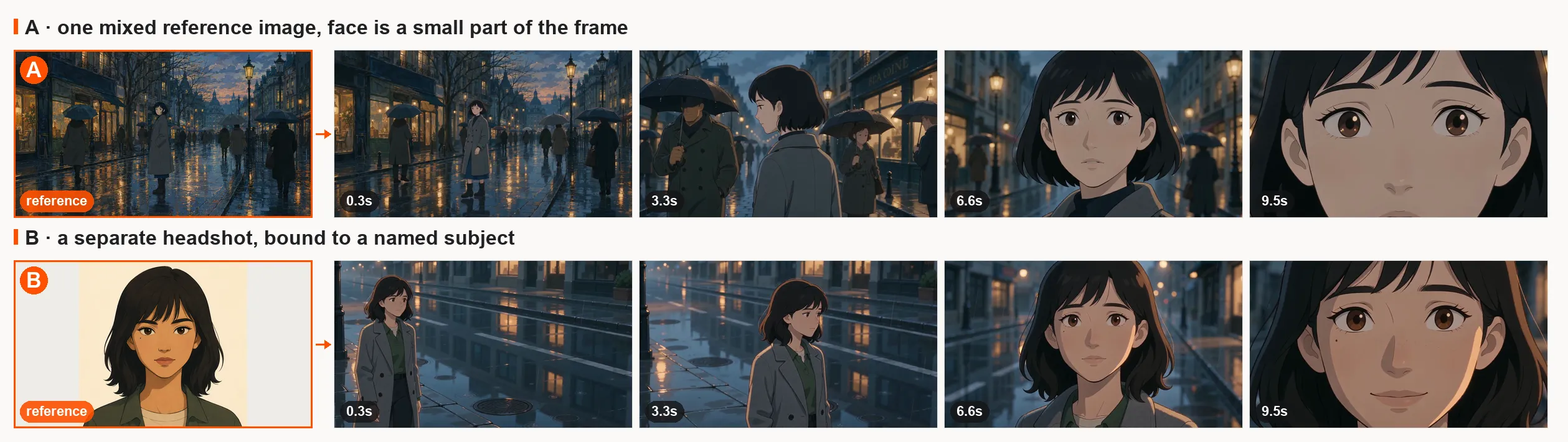
One run each on bytedance/seedance-2.0-mini, same prompt, same seed, 720p, 10 seconds, generated 2026-08-09. Row A got a single mixed reference, the wide street shot on the left. Row B got a dedicated headshot bound to a named subject. Watch the fringe and the mole under her left eye: both are gone by 6.6s in A, both survive to 9.5s in B.
One thing that only shows up when you try it: a photorealistic headshot can be rejected before generation even starts, with input_moderation_failed and a message that the image “may contain real person”, while the same character in a wide shot goes through. An illustrated or stylised reference passes, which is why the frames above are drawn rather than photographic.
One counterintuitive instruction: do not use multi-view or three-view character sheets. They look like the obvious way to give a model a consistent character, and they are the documented cause of the “twin” bug, where the same person shows up twice in one frame because the model read the different angles as different people.
Why Does Seedance Add Subtitles I Never Asked For?
Because it is trained on captioned video, and the guide admits it cannot be fully suppressed. ByteDance’s wording is that “it is not possible to directly avoid generating subtitles 100%.” What you get are three probability levers:
- Put an explicit constraint in the prompt, “keep it subtitle-free” and “avoid generating any text or subtitles.”
- Strip text out of your reference images before you feed them in, rather than hoping the model ignores it.
- Generate landscape if your delivery format allows, then crop. The guide states the probability of spurious subtitles is significantly lower in landscape than in portrait, which is a genuinely useful thing to know if you are producing vertical social video.
That last one is the sort of detail that only shows up in vendor documentation. It is also the opposite of what a vertical-first workflow would do by default.
What Else Breaks, and How Do You Fix It?
Six failure modes are documented with fixes. All of them are model behaviour, not user error, so none of them are fixed by writing a longer prompt.
| # | Symptom | Fix |
|---|---|---|
| 1 | Character face changes mid-clip | Separate headshot, explicit subject labels, most important asset first, no multi-view sheets |
| 2 | Subtitles you did not ask for | Explicit constraint words, text-free reference assets, generate landscape and crop |
| 3 | Another platform’s logo or watermark appears | Add “do not generate watermarks” and “do not generate logos” as constraint words |
| 4 | Anime style drifts to live action | Name the style explicitly, and convert the reference image to the target style before generating |
| 5 | Jump cut at the join when extending a clip | Trim 6 frames off the end of the earlier segment and 1 frame off the start of the next, at every join |
| 6 | The same character appears twice in frame | Bind each role to its own image, add a no-duplicate-characters constraint, use single-person references |
Number 5 is the one worth memorising, because it is a precise number rather than advice. Six frames and one frame, per join, in whatever editor you use. Repeated extensions also compound image degradation, with colour blotching showing up first in faces, so the guide suggests converting the source to a plain white 3D model pass before continuing, and keeping the number of extensions down.
How Much Does a Seedance 2.0 Clip Cost?
Per output second, scaled by resolution. The “from $0.04” and “from $0.07” figures on catalog pages are 480p floors, and hardly anyone ships 480p. Here is the full rate card verified 2026-08-06:
| Resolution | Mini | Fast | Flagship |
|---|---|---|---|
| 480p | $0.04/s | $0.06/s | $0.07/s |
| 720p | $0.08/s | $0.13/s | $0.16/s |
| 1080p | not available | not available | $0.34/s |
| 4K | not available | not available | $1.37/s |
Video-to-video runs a little higher on every row, $0.10/s on Mini at 720p against $0.08/s for text-to-video, $0.45/s on the flagship at 1080p against $0.34/s.
A 5-second clip, which is the length most people actually generate:
| Tier and resolution | 5 seconds |
|---|---|
| Mini, 720p | $0.40 |
| Fast, 720p | $0.65 |
| Flagship, 720p | $0.80 |
| Flagship, 1080p | $1.70 |
| Flagship, 4K | $6.85 |
The spread between hosts is wider than the spread between tiers. In July a practitioner in r/Seedance_AI posted a rate table (as seen 2026-08-06) while shopping for short-drama capacity, listing 720p at $0.152/s on BytePlus, $0.16/s on SeeGen, $0.18/s on Replicate, $0.194/s on AtlasCloud, $0.20/s on PiAPI, and $0.302/s on fal. fal’s published rate today is $0.3034/s at 720p with audio and $0.682/s at 1080p, so that table has held up. Same model, same weights, and roughly a 2x range depending on who you buy it from.
For a small shop generating 200 clips a month at 5 seconds and 720p, that is $160 a month at $0.16/s against $303 at fal’s current $0.3034/s. The picking-a-tier question is covered separately in the Mini vs Fast vs flagship comparison, and if you have not settled on Seedance at all, the Seedance versus Wan numbers come first.
One constraint that shows up in every provider thread: character references work, but copyrighted characters and public figures are filtered on essentially every route. Build with your own assets and original characters.
Two Community Workflows Worth Stealing
Neither of these is in the official docs. Both come from people posting results, and both map onto ordinary API parameters.
In-between frames. Instead of prompting a clip from nothing, generate a first frame and a last frame, hand the model both, and ask it to fill the gap. The prompt pattern that circulated keeps two parts fixed, “Show what happens in between” and “5 different camera angles”, and varies only the sentence describing the action. Then the last frame becomes the next first frame and you walk the story forward a shot at a time. In API terms that is frame_images with a first and last frame. It trades one-shot convenience for control over pacing, which is usually the right trade.
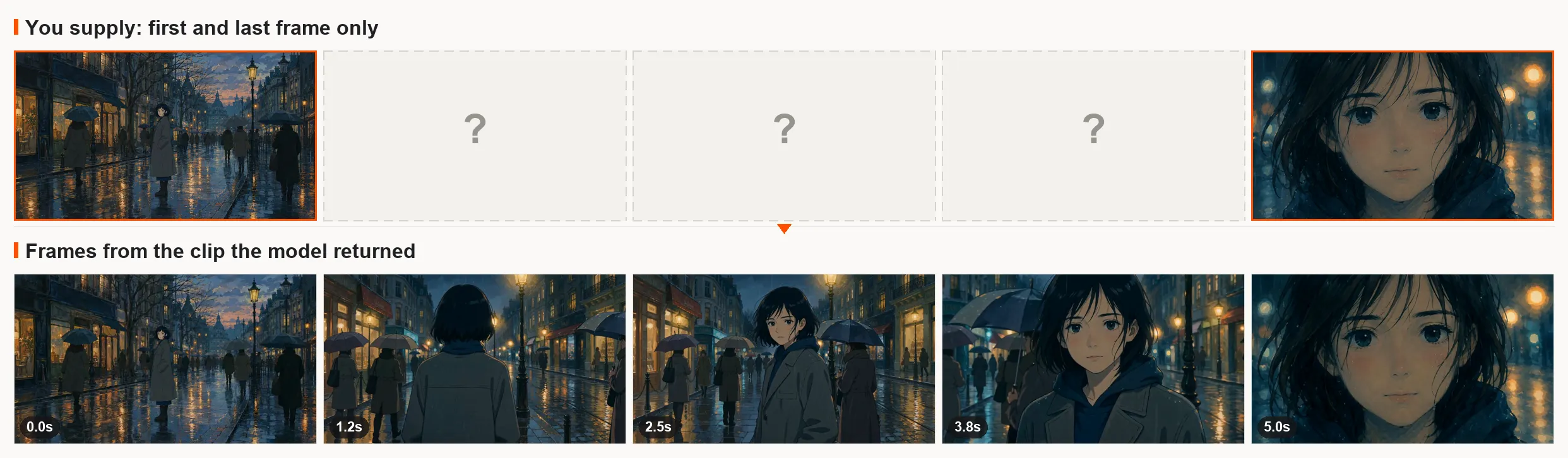
The same technique through frame_images: you supply the two ends (top row, orange), the model fills the middle (bottom row). bytedance/seedance-2.0, 720p, 5 seconds, billed $0.75 on 2026-08-09. The first frame lands exactly. The last one is a target the model moves toward rather than a pinned frame, and the identical request on -mini finished on a much tighter close-up than the one supplied.
Path control. Draw the camera route by hand on a still image, in a colour that stands out, then feed the marked image as a reference and tell the model to follow the drawn path and erase the markings from the output. Reported results are good enough that the technique is worth knowing, with the honest caveat the thread’s own top reply supplies: the generated flight path visibly diverges from the drawn one. Treat it as strong steering, not as keyframe animation.
How Do I Call Seedance 2.0 from Code?
One POST, then poll. The endpoint is async, so nothing streams and nothing blocks.
import os, time, requests

BASE = "https://api.ofox.io/v1"
H = {"Authorization": f"Bearer {os.environ['OFOX_API_KEY']}"}

job = requests.post(f"{BASE}/videos", headers=H, json={
    "model": "bytedance/seedance-2.0-mini",
    "prompt": (
        "Shot 1: fixed medium shot, a woman in a grey coat walks slowly to a "
        "rain-streaked window and stops. Shot 2: slow push-in to a close-up, "
        "she gently lowers her head. (soft piano) <rain on glass> "
        "Cinematic texture, natural colours, soft lighting. "
        "Keep it subtitle-free, do not generate a watermark."
    ),
    "duration": 5,
    "resolution": "720p",
    "aspect_ratio": "16:9",
}).json()

while True:
    r = requests.get(f"{BASE}/videos/{job['id']}", headers=H).json()
    if r["status"] in ("completed", "failed", "cancelled", "expired"):
        break
    time.sleep(2)

print(r["status"], r.get("usage", {}).get("video_cost"))
Swapping bytedance/seedance-2.0-mini for -fast or the flagship is the whole tier change. Pass callback_url instead of polling if you have somewhere to receive a webhook. The full field reference, including frame_images and input_references, is in the access guide; the wider question of which video model to reach for is in the use-case picker.
What About Seedance 2.5?
It launched on 2026-07-31 and its API opened on 2026-08-07, as scheduled. Prompting it is a different job from prompting 2.0; how to use Seedance 2.5 covers timestamps and cost. The consumer rollout through Jimeng and Doubao started first, which is the usual ByteDance order. It is now on ofox as bytedance/seedance-2.5 at $0.11/s for 480p and $0.24/s for 720p, so a 720p second costs half again what the 2.0 flagship charges, and 480p and 720p are the only resolutions on that route today (checked 2026-08-09).
| Seedance 2.0 | Seedance 2.5 | |
|---|---|---|
| Single-pass length | 15s | 30s |
| Reference inputs | 9 images, 3 video, 3 audio | 30 images, 10 video, 10 audio |
| Resolution ceiling | 4K | 4K |
| API status on 2026-08-09 | Live across providers | Live, opened 2026-08-07 |
Worth waiting for if you need continuous clips longer than 15 seconds, since stitching is where most of the visible seams come from. Not worth waiting for otherwise: Seedance 2.0 was upgraded to 4K in parallel, and everything in this page, the prompt formula, the symbols, the asset budget, the six fixes, is written against the 2.0 series and carries forward.
The more useful part of that announcement is what ByteDance’s Seed team chose to admit about its own new model. Writing collectively, with no individual byline, they close the Seedance 2.5 post by saying:
“There is still room for improvement, particularly regarding the physical plausibility of complex motions and the stability of scenes involving interactions among multiple subjects.”
Read that next to the prompt guide and the advice lines up. Complex motion is unreliable, which is why the guide asks for slow, small, continuous movement. Multiple interacting subjects are unstable, which is why single-person reference images beat character sheets and why the duplicate-character bug exists at all. The vendor is telling you where the model is thin, in the same week it is selling you the upgrade. Plan shots around that rather than against it, and check ByteDance Seed for the current status rather than trusting a date in a blog post, this one included.
For which tier to send these prompts to, the Seedance API guide has the model and price map.
FAQ
How long does a Seedance 2.0 generation take?
Anywhere from under a minute to several minutes, depending on tier, resolution, duration, and host load. The API is async for that reason: you submit, get a job id back, and poll every one to two seconds, or pass a callback_url and let the result come to you.
What is the maximum length of a Seedance 2.0 video? 15 seconds in a single generation, with a 4-second minimum. Longer pieces are built by extending a clip or stitching separate generations. Seedance 2.5, launched 2026-07-31, raises the single-pass ceiling to 30 seconds.
Can I use Seedance 2.0 offline or self-host it? No. The weights are closed, so there is no local install and no GGUF build. Local tools such as ComfyUI reach Seedance through API nodes, which means generation still happens on a hosted endpoint and still bills per second.
Does Seedance 2.0 generate audio? Yes, natively, and it is on by default across all three tiers. You steer it with the symbols the model is trained to read: parentheses for music, angle brackets for sound effects, curly braces for dialogue.
Does Seedance 2.0 support video-to-video? Yes, on all three tiers, and it bills higher than text-to-video: $0.20/s against $0.16/s at 720p on the flagship, and $0.45/s against $0.34/s at 1080p. Extending a clip and editing one are both video-to-video jobs.
Why did my Seedance 2.0 prompt get rejected? Most rejections come from the content filter reading either the prompt text or a reference asset. Copyrighted characters and recognisable public figures are the common triggers, and enforcement is stricter on some routes than others. Rebuilding the shot around your own original assets is the reliable fix.
What aspect ratios does Seedance 2.0 support? 16:9, 9:16, 1:1, and adaptive. ByteDance notes that portrait output carries a measurably higher chance of unwanted subtitles, so generating 16:9 and cropping is sometimes the cheaper route to a clean vertical clip.
Sources Checked for This Refresh
- ByteDance Seedance 2.0 series prompt guide, official, updated 2026-07-31
- ByteDance Seedance 2.0 series tutorial, official, updated 2026-08-03
- ByteDance Seed, Seedance 2.5 model page
- ByteDance Seed announcement post for Seedance 2.5, 2026-07-31
- Dreamina Seedance page, free-credit wording
- ofox Seedance 2.0 model detail, per-resolution rates
- ofox Seedance 2.0 Fast model detail
- ofox Seedance 2.0 Mini model detail
- ofox Seedance 2.5 model detail, per-resolution rates
- ofox video API reference, endpoint and status enum
- r/Seedance_AI provider rate thread, 2026-07-21
- r/seedance2pro in-between frame workflow, 2026-05-24
- r/seedance2pro path control workflow, 2026-06-04
- Seedance 2.0, Wikipedia
Frequently Asked Questions
- How long does a Seedance 2.0 generation take?
- Anywhere from under a minute to several minutes, depending on tier, resolution, duration, and host load. The API is async for that reason: you submit, get a job id back, and poll every one to two seconds, or pass a callback_url and let the result come to you.
- What is the maximum length of a Seedance 2.0 video?
- 15 seconds in a single generation, with a 4-second minimum. Longer pieces are built by extending a clip or stitching separate generations. Seedance 2.5, launched 2026-07-31, raises the single-pass ceiling to 30 seconds.
- Can I use Seedance 2.0 offline or self-host it?
- No. The weights are closed, so there is no local install and no GGUF build. Local tools such as ComfyUI reach Seedance through API nodes, which means generation still happens on a hosted endpoint and still bills per second.
- Does Seedance 2.0 generate audio?
- Yes, natively, and it is on by default across all three tiers. You steer it with the symbols the model is trained to read: parentheses for music, angle brackets for sound effects, curly braces for dialogue.
- Does Seedance 2.0 support video-to-video?
- Yes, on all three tiers, and it bills higher than text-to-video: $0.20/s against $0.16/s at 720p on the flagship, and $0.45/s against $0.34/s at 1080p. Extending a clip and editing one are both video-to-video jobs.
- Why did my Seedance 2.0 prompt get rejected?
- Most rejections come from the content filter reading either the prompt text or a reference asset. Copyrighted characters and recognisable public figures are the common triggers, and enforcement is stricter on some routes than others. Rebuilding the shot around your own original assets is the reliable fix.
- What aspect ratios does Seedance 2.0 support?
- 16:9, 9:16, 1:1, and adaptive. ByteDance notes that portrait output carries a measurably higher chance of unwanted subtitles, so generating 16:9 and cropping is sometimes the cheaper route to a clean vertical clip.