Fix GPT-6.1 Sol tool calls: migrate a complete loop to Responses
Move GPT-6.1 Sol tool calls to Responses with a complete read-only example, argument validation, call ID handling, bounded execution, and local tests.
 Ofox
Ofox 
If an application switches its model name to gpt-6.1-sol and its tools stop working, check the endpoint before changing the prompt. GPT‑6.1 Sol supports tool calling through the Responses API; its Chat Completions support excludes tool calling. It also rejects the none and minimal reasoning levels. A model-name-only migration can therefore leave a valid old request incompatible with the new model.
This tutorial migrates a small read-only inventory tool through the full request–tool–result cycle. It includes a downloadable Python implementation and offline tests. Those tests validate our application logic with synthetic responses; they are not a paid API test or a model-performance benchmark. Facts were checked on September 30, 2026 against the model documentation, migration guide, and function-calling guide.
Identify which layer failed
A tool workflow has at least four layers: your client builds a request, the API returns a tool-call item, your application executes an allowed function, and the application sends the result back for a final response. “Tools do not work” does not identify which layer is broken.
| Symptom | Check first | Correct response |
|---|---|---|
| Request rejected before output | Endpoint and unsupported fields | Use Responses; remove incompatible fields |
| Model produces prose rather than a call | Tools actually sent, task instructions, allowed tool choice | Inspect the structured output, not just visible text |
| Tool call returned but nothing happens | Application dispatcher | Execute the allowlisted function locally |
| Next turn cannot connect the result | Returned call_id and conversation state | Preserve the call item and match the exact ID |
| Agent repeats calls without finishing | Tool errors, missing data, loop boundary | Return structured errors and stop at a fixed limit |
| UI says “done” without a tool result | Completion criterion | Require real tool evidence before showing success |
Do not send repeated retries until you know whether the error is transient. An unsupported parameter will not become supported on the fifth attempt. An authentication failure also needs a different fix from a rate-limit response.
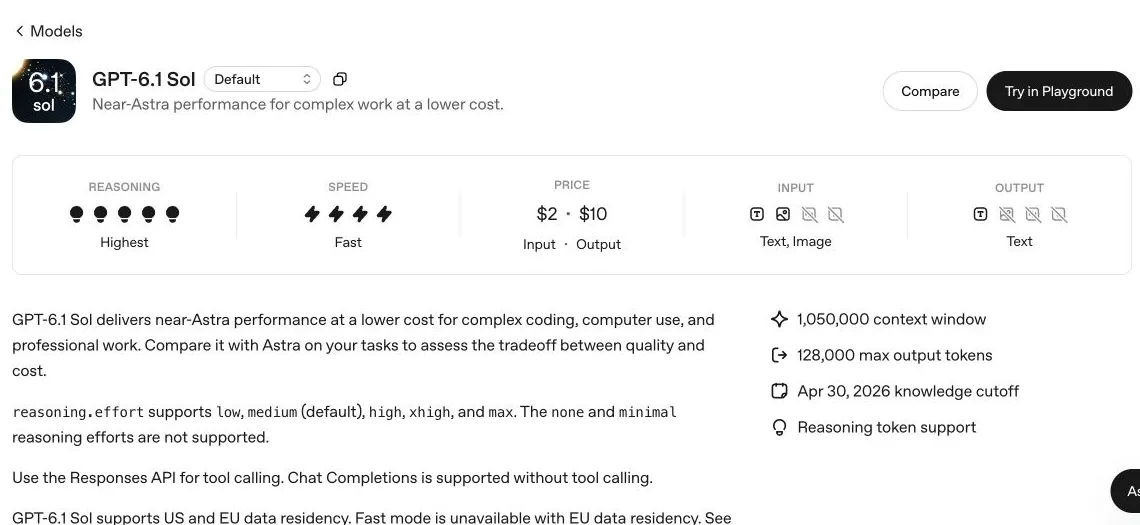
Real English documentation screenshot. It confirms the endpoint restriction; it is not a screenshot of an executed inventory tool.
Replace the request structure, not only the model name
The following is the shape of a Responses function definition. Notice that name, description, and parameters sit directly on the function tool object. Do not copy a Chat Completions function wrapper without adapting it.
tool = {
    "type": "function",
    "name": "lookup_stock",
    "description": "Read stock for one known product SKU.",
    "parameters": {
        "type": "object",
        "properties": {"sku": {"type": "string"}},
        "required": ["sku"],
        "additionalProperties": False,
    },
    "strict": True,
}
For a minimal request, use client.responses.create, input, and reasoning={"effort": "medium"}. Set an appropriate max_output_tokens limit. Do not translate a product UI label such as Ultra into an API enum. Supported Sol reasoning values are low, medium, high, xhigh, and max.
The current migration guide also describes removing unsupported sampling controls for these reasoning requests, including temperature, top_p, and top_logprobs; remove requests for output log probabilities as applicable. A proxy or SDK may insert a default parameter you did not type. If the raw error names a field, inspect the final request configuration rather than only the code nearest the model name. Record endpoint, model, parameter names, status and request ID without exposing secrets.
Run the complete read-only example
Download tool_loop.py. It contains the schema, a two-product fictional inventory, validation, an allowlisted dispatcher, a bounded loop, and offline tests. The products and expected stock values are teaching fixtures, not business records.
First run the offline path with Python 3.9 or newer:
python3 tool_loop.py --self-testExpected result: offline checks passed. This path uses only the standard library and does not read an API key, install a client, or contact OpenAI. It checks a successful function round trip, malformed arguments, an unknown function, an unknown SKU, a non-completed response, and the call-round limit.
For an optional live run in your own authorized API project, create an isolated Python environment, install the official SDK, and provide your key through the environment:
python3 -m venv .venv
. .venv/bin/activate
python -m pip install --upgrade openai
# Set OPENAI_API_KEY in your environment without committing it.
python tool_loop.py --live
The live option incurs API usage and requires access to gpt-6.1-sol. This article did not execute it. Its request asks for the stock of DEMO-A, which the local fixture defines as 12 units. A successful live check must actually contain a lookup_stock call, a matching result, and a final answer consistent with 12. A fluent sentence alone is not enough. Record the SDK version used for your run because the installation command intentionally follows the current official package rather than asserting a version we have not tested live.
Preserve all response items and the exact call ID
The core loop has two responsibilities that a one-line demo often omits:
history.extend(response.output)
for call in calls:
    result = dispatch(call.name, call.arguments)
    history.append({
        "type": "function_call_output",
        "call_id": call.call_id,
        "output": json.dumps(result),
    })
Keep response.output, including reasoning items required by the protocol; do not rebuild the history from response.output_text. Text is only one possible part of the response. If several calls arrive, return a result for each one, using its own call_id. Do not use a tool’s name as a replacement ID or generate a new ID on the client.
This implementation resends the accumulated history and does not also attach previous_response_id. An application can use the documented stateful alternative, but mixing full replay with a previous-response reference without understanding what is already stored can duplicate context. Pick one approach and verify what the next turn actually receives.
The response may contain no function calls. In that case the example requires non-empty final text, a completed status, and a successful lookup_stock result for DEMO-A in the trace. Calling an unknown function or looking up a different SKU does not satisfy that requirement. Refusals, incomplete output, transport failures, and empty results are not converted into an invented success message. Preserve their status for the caller so the UI can tell the difference between “finished” and “needs attention.”
Validate before executing a tool
A strict JSON schema helps constrain the model’s arguments. It does not replace server-side validation or grant authority to perform an action. Our dispatcher parses JSON, requires exactly one sku string, checks the function name against an allowlist, and returns a structured unknown_sku result for a missing product. It never runs model-supplied shell code or treats returned text as an instruction.
For the teaching fixture, malformed arguments return a bounded error object that the model can handle on the next turn. A production application should also record the error category and stop if the same invalid action keeps repeating. Avoid dumping a private database or exception traceback into a tool result; supply only the data required for the user’s task.
Write operations need additional design. A retry after a network timeout may repeat an action that already happened, even if your client never saw the response. Use operation IDs, durable state and an appropriate approval rule for consequential writes. The supplied tool is read-only precisely so that the tutorial can demonstrate protocol handling without pretending to solve payment, deletion, or deployment authorization.
Bound time, rounds and spending separately
The example allows a fixed number of model rounds and stops when that limit is reached. It also configures an SDK timeout and disables automatic retries for the live demonstration, making failure behavior visible rather than silently multiplying attempts. These choices are educational defaults, not universal production settings.
A round limit is not a dollar limit. Each round can carry different input and output quantities, and a long history can cross a pricing threshold. Add a request ledger and a maximum budget if you turn the example into a service. See the Sol API cost calculation for exclusive token buckets and per-request threshold checks.
On a transient transport or rate-limit error, retry only under a defined policy with backoff and a remaining budget. On an invalid field, unsupported endpoint, or inaccessible model, correct the request or access first. On a tool timeout, return a real error rather than guessing the stock. On a model round-limit failure, surface an incomplete task and retain diagnostic IDs so the workflow can be investigated.
Acceptance checklist before replacing the old path
Use an isolated test project and synthetic inputs. Verify that the actual outgoing request uses Responses and the exact model ID; the response contains a structured call; the application executes the allowlisted lookup; the next request contains the original items plus the matching tool result; and the final answer is checked against the fixture. Then test the deliberate failures from the offline suite through your integration.
For rollout, keep a reversible model/endpoint configuration, compare outcomes on the same tasks, and avoid combining the migration with unrelated changes to prompts, tools and permissions. A failure after four simultaneous changes is much harder to attribute. The upgrade guide covers the broader decision, while Codex access and setup concerns the product client rather than this custom API loop.