Use GPT-6 Sol and Luna in Codex, ChatGPT Work and the API
Find the right GPT-6 Sol or Luna entry point, distinguish subscription access from API billing, and check model names before troubleshooting.
 Ofox
Ofox 
GPT-6 Sol and Luna are available through ChatGPT Work, Codex and the OpenAI API, but those entry points do not share one billing system. Start by choosing the product you intend to use. A model missing from an ordinary Chat selector is a different problem from an API request rejected for insufficient permissions.
This guide is for people trying the new models and developers adding them to an existing workflow. Availability was checked against the OpenAI announcement on September 23, 2026. That announcement does not establish that every account, client or third-party provider exposes the same options.
Choose the right entry point
| Where you want to work | What the launch announcement confirms | What to check yourself |
|---|---|---|
| ChatGPT Work or Codex | Sol and Luna for Plus, Pro, Business, Enterprise and Edu | Signed-in account, workspace policy and the available model selector |
| Desktop app with Free or Go | Luna access | Whether you are in the supported desktop experience |
| Ordinary Chat | Neither model was available there at launch | Do not mistake the Chat menu for the Work/Codex menu |
| OpenAI API | gpt-6-sol and gpt-6-luna | API project access, billing and the request format |
The table is an access map, not a promise of identical usage allowances. A paid ChatGPT plan does not tell you the price of an API request. Likewise, a valid API key does not change the models exposed in a consumer product menu.
Start in Work or Codex
Open the product you actually intend to use and check its model selector. Look for the full name, GPT-6 Sol or GPT-6 Luna, rather than assuming that an older Sol/Luna entry changed versions automatically. In a managed workspace, check the workspace’s model policy before changing local settings.
Choose a small task with a clear end state: explain a function, identify the files needed for a bug fix, or turn a short brief into a checklist. For code changes, use a branch and retain the starting commit. You want to learn whether this model and this tool setup fit your work before asking it to make broad changes.
If the option is absent, note the product, account plan, workspace and app version. Compare the current product documentation and account settings before assigning a cause. Do not uninstall a working client or change providers solely because a menu differs from a screenshot.
Use the exact API model ID
The API identifiers are lowercase and hyphenated. gpt-6-sol is not gpt-5.6-sol, and neither the display name nor a guessed dated suffix is a substitute for the documented ID.
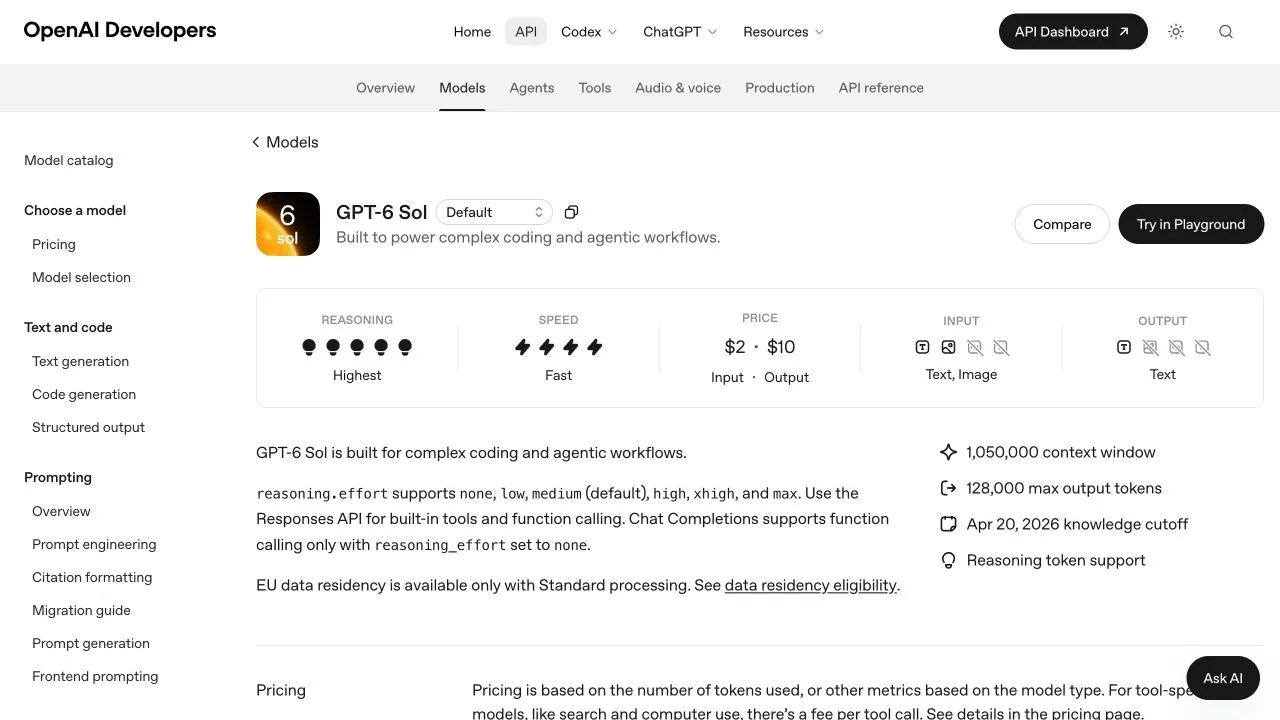
Official English model documentation, captured September 23, 2026. This verifies documentation content; it is not a screenshot of a successful API run.
For a first direct API request, use a minimal Responses payload:
{
  "model": "gpt-6-sol",
  "input": "List three checks before merging a documentation change.",
  "reasoning": {"effort": "low"},
  "max_output_tokens": 2048
}
The body illustrates the official request shape. It was checked locally; this article does not present a paid inference receipt. Switch the model field to gpt-6-luna to prepare the corresponding Luna request. Keep secrets in your normal environment or secret manager, never in a shared screenshot or committed example.
Developers who need tools should read the Responses migration guide before copying a Chat Completions client. Model availability and protocol compatibility are separate questions. A client that can send basic text can still need changes for reasoning with function calls.
Diagnose a missing model without changing everything
| Symptom | First useful check | What it does not prove |
|---|---|---|
| Missing in Chat | Check Work/Codex availability | That the API model does not exist |
| Missing in a managed workspace | Review enabled models and workspace policy | That a different subscription must be purchased |
| API model cannot be selected | Compare provider, project and exact ID | That every provider uses the same identifier |
| Text works, tools fail | Compare endpoint and reasoning settings | That Sol or Luna cannot use tools |
Save the exact response and request ID when troubleshooting an API failure, with credentials removed. There is no need to invent an error string to describe a problem you have not observed.
Decide which model to try first
Use the Sol/Luna/Astra decision guide to choose a starting point. For API budgets, consult the separate Sol cost guide and Luna cost guide. Their token rates cannot be converted directly into a number of subscription messages.
If you connect a third-party service, confirm its actual catalog, authentication and routing. The custom-provider setup guide explains those distinctions. This article verifies OpenAI’s direct product and API documentation; it does not certify that every gateway, including Ofox, has already enabled both models.
Frequently Asked Questions
- Is GPT-6 Luna free?
- The launch announcement includes Luna access for Free and Go users in the desktop app. That does not make direct API usage free.
- Why is Sol missing from Chat?
- The launch announcement distinguishes ordinary Chat from Work and Codex. Check the correct product, account and workspace before diagnosing an access failure.
- Can I reuse an older Sol model name?
- Use the documented gpt-6-sol ID when you intend to request GPT-6 Sol. Older version IDs and provider aliases are separate routes.