Connect Codex CLI and Claude Code to Ofox with CC Switch
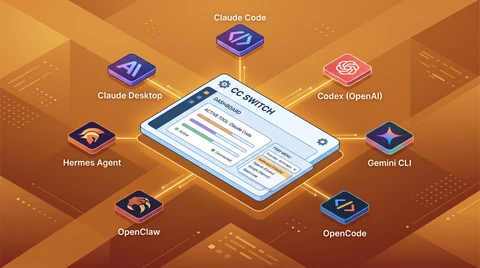
CC Switch sets up Codex CLI and Claude Code against Ofox from one place. The two need different base URLs and API formats — mixing them up is the usual failure.
 Ofox
Ofox 
Codex CLI and Claude Code speak different protocols. CC Switch keeps both entries side by side, which is the main reason to use it — pasting the Claude Code base URL into the Codex tab, or the reverse, is an easy mistake to make by hand.
Two clients, two protocols
| Codex CLI | Claude Code | |
|---|---|---|
| Protocol | OpenAI-compatible | Anthropic native |
| Ofox base URL | https://api.ofox.io/v1 | https://api.ofox.io/anthropic |
| API format in CC Switch | OpenAI Compatible | Anthropic Messages (Native) |
| Auth field | not applicable | ANTHROPIC_AUTH_TOKEN (Default) |
| CC Switch tab | Codex | (provider management page) |
Neither URL takes a trailing slash, and one Ofox key authenticates both. Note that this table describes the client, not the model — every Claude model in the Ofox catalog, Fable 5.1 included, accepts either protocol.
Installing CC Switch
# macOS
brew install --cask cc-switch

# Debian / Ubuntu — download the .deb from Releases first
sudo dpkg -i <downloaded-file>.deb

# Fedora / RHEL
sudo rpm -i <downloaded-file>.rpm

# AppImage
chmod +x <downloaded-file>.AppImage && ./<downloaded-file>.AppImage
Windows ships an .msi installer, and macOS has a .dmg on the releases page if you would rather not use Homebrew. For the full install walkthrough, see the CC Switch setup guide. Minimum supported versions are macOS 12, Windows 10, and Ubuntu 22.04 / Debian 11 / Fedora 34.
Adding the Codex CLI provider
Switch to the Codex tab at the top, then use the + button in the top-right corner.
| Field | Value |
|---|---|
| Provider Name | ofoxai-codex |
| Website URL | https://ofox.io |
| API Key | your Ofox key |
| Request URL | https://api.ofox.io/v1 |
| API Format | OpenAI Compatible |
| Write to Global Config | checked |
Leaving “Write to Global Config” checked applies the provider across all projects rather than just the current one. Add the provider, then activate it from the list.
Adding the Claude Code provider
Same tool, different page and different values.
| Field | Value |
|---|---|
| Provider Name | ofoxai-claude |
| Website URL | https://ofox.io |
| API Key | your Ofox key |
| Request URL | https://api.ofox.io/anthropic |
| API Format / Auth Field | Anthropic Messages (Native) / ANTHROPIC_AUTH_TOKEN (Default) |
| Model Configuration | leave empty |
| Write to Global Config | checked |
Leave Model Configuration empty. It falls through to the default Claude model, which is what you want unless you are deliberately pinning one. CC Switch writes the result to ~/.claude/settings.json.
There are two optional toggles on this page, “Hide AI Signature” and “Teammates Mode”. Neither affects routing or billing.
Turning on usage query
CC Switch can poll Ofox for consumption figures and show them in its dashboard. Four things to set: toggle Enable Usage Query on, paste the same Ofox API key, set the request endpoint to https://api.ofox.io/v1, and pick the Universal Template (通用模板) option, which the Ofox documentation recommends for best compatibility.
Two things to know:
- It does not consume API quota — it uses a dedicated statistics API rather than your call budget.
- Figures lag the calls that produced them by a few minutes.
Turning it off later does not disturb normal API calls.
On Fable 5.1 specifically
Fable 5.1 landed in the Ofox catalog on 3 September 2026, as anthropic/claude-fable-5.1. Nothing above changes for it: same two base URLs, same two API formats, same key. The model string is the only difference.
The setup is worth doing regardless of which model you land on: it gives you a working two-protocol path where switching models is a string change. Alongside Fable 5.1, the catalog has anthropic/claude-fable-5, anthropic/claude-opus-5 and anthropic/claude-sonnet-5 at Anthropic list prices with no markup, and all four are reachable over either protocol on the same key.
That matters for Fable 5.1 in particular, because its only price change is the cache read — $1 down to $0.25. Whether that is worth anything to you depends entirely on your cache-hit ratio, and the way to find out is to run your real workload through this setup and read the number off your own usage. The API reference has the rate table and the TTL arithmetic.
When something does not connect
Three common failure modes:
- A trailing slash on the request URL. The Ofox documentation calls this out for both providers.
- The wrong API format for the tab. Codex CLI with “Anthropic Messages (Native)” selected will not work, and neither will the reverse. Check the format field before the key.
- A model string the catalog does not have. Note that the Ofox ID for Fable 5.1 is
anthropic/claude-fable-5.1with a dot, not a hyphen — though the aliasanthropic/claude-fable-5-1also resolves. The live catalog is the authority:GET /v1/modelsreturns exactly what you can call.
CC Switch installation targets, provider field values, base URLs and usage-query behaviour verified against the Ofox integration documentation on 3 September 2026. Catalog contents checked against the live /v1/models endpoint the same day.
Frequently Asked Questions
- What is CC Switch?
- An open-source provider manager with a visual interface. It writes the config files for Claude Code and Codex CLI, so you do not have to edit JSON or environment variables by hand. For Claude Code it writes ~/.claude/settings.json. It runs on macOS 12+, Windows 10+, and Ubuntu 22.04+ / Debian 11+ / Fedora 34+.
- Do Codex CLI and Claude Code use the same Ofox base URL?
- No — and this is where setups usually go wrong. Codex CLI is an OpenAI-protocol client and takes https://api.ofox.io/v1 with the API format set to OpenAI Compatible. Claude Code is an Anthropic-protocol client and takes https://api.ofox.io/anthropic with the format set to Anthropic Messages (Native). Neither URL takes a trailing slash.
- Can I run Claude Fable 5.1 through this setup?
- Yes, as of 3 September 2026. Fable 5.1 is in the Ofox catalog as anthropic/claude-fable-5.1. Nothing in the setup below changes for it — same base URLs, same API formats, same key. Only the model string differs.
- Does CC Switch's usage query burn API quota?
- No. Per the Ofox integration documentation it uses a dedicated statistics API and does not count against your API call limits. Usage figures typically appear within a few minutes of the calls that produced them.
- Can I keep more than one Ofox account in CC Switch?
- Yes. You can add multiple Ofox provider entries with different API keys and switch between them from the list.