Codex CLI 401 Unauthorized: 9 Tested Causes and Lookalikes
Codex CLI 0.146.0 auth fails nine ways, and not all of them are a literal 401. Read the message body, not the code: no key sent, key rejected, newline.
 Ofox
Ofox 
TL;DR: Codex CLI auth breaks in nine distinct ways, and only some of them arrive as a literal 401, which is exactly why the status code is the least useful part of the output. The message body is what identifies the cause. Missing bearer or basic authentication in header means nothing was sent, and the surprise there is that exporting OPENAI_API_KEY does not help on the default provider. Incorrect API key provided means your key arrived and was rejected. You didn't provide an API key means the header was dropped in transit, almost always because the value ends with a newline. A local Missing environment variable error is not a 401 at all, and neither is a 404 from a base_url that lost its /v1. Every case below was reproduced on Codex CLI 0.146.0 on 2026-07-30.
The 30-Second Diagnosis
Three checks, in this order. Most people skip the first one and spend twenty minutes re-issuing a key that was fine.
| Check | Command | What it tells you |
|---|---|---|
| 1. Did a request even happen? | Look for Missing environment variable in the output | If present, Codex never made a network call. Your config points at a variable that is unset or empty. |
| 2. What does the 401 body say? | Read the text after 401 Unauthorized: | Three distinct messages, three distinct causes. See the table below. |
| 3. Does the key work at all? | curl -s -o /dev/null -w "%{http_code}" -X POST https://api.ofox.io/v1/responses -H "Authorization: Bearer $YOUR_KEY" -H "Content-Type: application/json" -d '{"model":"openai/gpt-5.5","input":"hi","max_output_tokens":16}' | 200 means the key is good and the problem is in your Codex config. 401 means the key itself is the problem. |
One trap in step 3 worth calling out early, because half the troubleshooting advice on the internet gets it wrong: do not use /v1/models as a key check on an aggregator. Tested on 2026-07-30, https://api.ofox.io/v1/models returns 200 with the full catalog when sent with a bogus key, and also with no Authorization header at all. The model catalog is public. OpenAI’s own api.openai.com/v1/models does return 401 without a key, which is where the habit comes from, but the habit does not transfer. Use an endpoint that actually runs inference.
When to Fix This, When to Switch, and When to Stop
Auth failures are cheap to fix when you know which one you have, and expensive when you guess. Rough rule:
- Fix it when the message names a specific cause:
Missing environment variable,Incorrect API key provided, or anything mentioning a refresh token. These have deterministic one-step fixes and take under two minutes each. - Switch the auth path when you are three attempts deep on the ChatGPT login flow. The API key path has fewer moving parts (no refresh tokens, no browser round trip, no 8-day refresh window), and if you are automating anything, it is the only path that survives a container restart.
- Stop and check something else if you get 404 instead of 401, or if the CLI refuses to start with a config error. Those are not auth problems and no amount of key rotation will move them. Same if the error mentions a usage limit rather than authorization; that path is covered in Codex weekly limit drained.
The one case where re-issuing a key is the right first move is Incorrect API key provided with the masked suffix shown in the error matching the key you think you are using. If the suffix does not match, you have a config problem, not a key problem, and a new key will fail identically.
Reading the 401: Three Messages, Three Causes
This is the core table. Every row was reproduced against a live endpoint.
| Message body | What actually happened | Where it comes from | Fix |
|---|---|---|---|
Missing bearer or basic authentication in header | No credential was attached to the request | Default OpenAI provider with no login, or with only OPENAI_API_KEY exported | printenv OPENAI_API_KEY | codex login --with-api-key |
Incorrect API key provided: sk-proj-****7890 | Header arrived, server rejected the value | Wrong, revoked, or cross-account key in auth.json | Re-issue the key, or log out and log in with the right one |
Invalid or expired API key | Same as above, gateway-side wording | Custom provider whose env_key value is wrong or quote-wrapped | Check the variable’s exact bytes, not just that it is set |
You didn't provide an API key. You need to provide your API key in an Authorization header using Bearer auth | Header was malformed and dropped | Newline embedded in the key value | Strip the trailing newline from the variable |
Your access token could not be refreshed... | ChatGPT OAuth refresh failed | Expired, reused, or revoked refresh token | codex logout then sign in again |
Missing environment variable: 'X' | Not a 401. No request was made | env_key names a variable that is unset or empty | Export the variable in the shell that launches Codex |
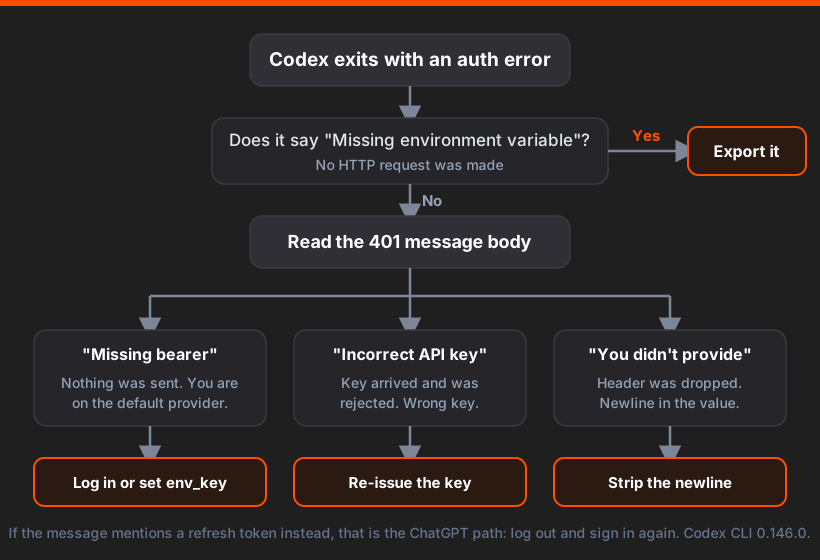
Two details from the test runs that make the output easier to read. On the default OpenAI provider, Codex first tries a WebSocket transport against wss://api.openai.com/v1/responses, retries five times, then falls back to HTTPS and retries five more, so a single auth failure produces roughly ten error lines before the real message. On a custom provider, WebSocket transport is off (codex doctor reports supports websockets: false), so you get one retry loop and a cleaner failure. If you are staring at a wall of Reconnecting... 4/5, scroll to the bottom; the last line is the one that matters.
Cause 1: You Exported OPENAI_API_KEY and Assumed That Was Enough
This is the single most common one, and it is counterintuitive enough that it deserves the top slot.
export OPENAI_API_KEY="sk-proj-..."
codex exec "say hi"
# ERROR: unexpected status 401 Unauthorized: Missing bearer or basic
# authentication in header, url: https://api.openai.com/v1/responses
Note what the server said: Missing bearer. Not “your key is wrong”. Nothing was sent. The default provider in Codex 0.146.0 reads credentials from $CODEX_HOME/auth.json, not from the environment. Setting the variable changes nothing.
The single-variable proof: take the exact same invalid key, write it into auth.json instead of the environment, and the message changes.
echo "sk-proj-invalidkeyfortesting1234567890" | codex login --with-api-key
codex exec "say hi"
# ERROR: unexpected status 401 Unauthorized: Incorrect API key provided:
# sk-proj-**************************7890 ... auth error code: invalid_api_key
Same key, different message. The first run never sent it; the second did and got it rejected. That difference is the whole diagnostic.
Write the key where Codex will actually look for it:
printenv OPENAI_API_KEY | codex login --with-api-keyEnvironment variables do work, but only through a custom provider’s env_key field, which is a different mechanism covered further down.
Cause 2: You Used the Old —api-key Flag
If you followed a tutorial written before mid-2026:
codex login --api-key "sk-proj-..."
# The --api-key flag is no longer supported. Pipe the key instead,
# e.g. `printenv OPENAI_API_KEY | codex login --with-api-key`.
The message is clear, but it exits without writing anything, and in a setup script the output scrolls past. The next command then fails with Missing bearer and the key gets blamed. Check that auth.json exists and contains what you expect:
cat ~/.codex/auth.json
# {
#   "auth_mode": "apikey",
#   "OPENAI_API_KEY": "sk-proj-..."
# }
Cause 3: env_key Points at a Variable That Is Not Set (Not a 401)
With a custom provider block, Codex reads the key from the environment variable you name:
model = "openai/gpt-5.5"
model_provider = "ofox"

[model_providers.ofox]
name = "Ofox"
base_url = "https://api.ofox.io/v1"
env_key = "OFOX_API_KEY"
wire_api = "responses"
If OFOX_API_KEY is unset, you do not get a 401. You get a local error and no network call at all:
ERROR: Missing environment variable: `OFOX_API_KEY`.An empty string produces the identical error, which matches the source: model-provider-info/src/lib.rs filters the variable with !v.trim().is_empty() before using it. So export OFOX_API_KEY="" and never exporting it are the same thing as far as Codex is concerned.
This one bites hardest in launchd, systemd, and Docker, where the shell that starts Codex is not the shell where you exported the variable.
Cause 4: A Newline in the Key Value
This is the nastiest of the set, because the error accuses you of not providing a key that you can see with your own eyes in printenv.
export OFOX_API_KEY="$(cat ~/keys/ofox.txt)"   # file ends with a newline
codex exec "hi"
# ERROR: unexpected status 401 Unauthorized: You didn't provide an API key.
# You need to provide your API key in an Authorization header using Bearer
# auth (i.e. Authorization: Bearer YOUR_KEY). [ofox.ai]
The header was built with a newline inside it and dropped on the floor. The server genuinely never saw a credential, so its message is accurate; it just sounds like you forgot to set anything.
Worth knowing what is not a cause here, because it is the obvious suspect and it is innocent: a trailing space is fine. Tested with export OFOX_API_KEY="$REAL " and the request succeeded. Note that Codex is not cleaning it up for you: the trim() in api_key() is an emptiness check only, and the value it returns is the raw one, trailing space included. Something downstream tolerates it. A newline, by contrast, breaks the header outright. Either way, do not spend time hunting for stray spaces.
A quoted value, on the other hand, does fail, with different wording:
export OFOX_API_KEY='"sk-..."'   # literal quote characters in the value
# ERROR: unexpected status 401 Unauthorized: Invalid or expired API key
That one is common when a .env file is loaded with a naive export $(cat .env | xargs) that keeps the quotes.
Strip the offending bytes at export time and confirm the length:
export OFOX_API_KEY="$(tr -d '\n\r"' < ~/keys/ofox.txt)"
printf '%s' "$OFOX_API_KEY" | wc -c   # confirm the byte count matches the key length
Cause 5: The Provider Block Is Missing env_key Entirely
The quietest failure of the nine. Delete one line from the config above:
[model_providers.ofox]
name = "Ofox"
base_url = "https://api.ofox.io/v1"
wire_api = "responses"
# env_key line deleted
Codex does not complain. It falls back to the credential in auth.json, which for most people is an OpenAI key, and sends that to the gateway. The gateway rejects it:
ERROR: unexpected status 401 Unauthorized: Invalid or expired API key,
url: https://api.ofox.io/v1/responses
Your environment variable is set correctly. Your key is valid. The error says the key is invalid, because a different key was sent. Tested both ways on the same shell: with env_key present the request returns a normal completion, with the line deleted it 401s.
The inverse is also worth knowing, and it is good news: when env_key is present, it wins over auth.json. Tested with a deliberately bogus key stored in auth.json and a valid one in the environment variable, the request succeeded. You do not need to log out before configuring a custom provider.
If you are setting up a gateway provider from scratch, the full vetted block lives in Codex CLI custom model providers, and every key in the file is documented in the config.toml reference.
Cause 6: The ChatGPT Login Path Expired
If you signed in with a ChatGPT subscription rather than an API key, the failure looks completely different:
ERROR: Your access token could not be refreshed. Please log out and sign in again.Note the endpoint in the surrounding log lines: wss://chatgpt.com/backend-api/codex/responses, not api.openai.com. The two login modes talk to different backends, which is a fast way to tell which one you are actually on.
Codex 0.146.0 prints one of five variants here, and they are not interchangeable. From login/src/auth/manager.rs at tag rust-v0.146.0:
| Variant | What it means in practice |
|---|---|
...because your refresh token has expired | Genuine expiry. Sign in again. |
...because your refresh token was already used | Two clients raced on the same auth.json. Copied config or a shared container image. |
...because your refresh token was revoked | Session killed server-side, often by a password change or a sign-out elsewhere. |
...could not be refreshed. (no reason) | Refresh endpoint returned something unclassified. Sign in again. |
...because you have since logged out or signed in to another account | The stored account no longer matches the active one. |
The “already used” variant is the one that surprises people. Refresh tokens are single-use, so baking an auth.json into a Docker image or syncing ~/.codex across two laptops gives you an auth setup that works on whichever machine refreshes first and breaks on the other. The same source file sets TOKEN_REFRESH_INTERVAL to 8 days, so a machine idle for more than a week will attempt a proactive refresh on its next run, which is usually when the conflict surfaces.
There is one fix and it is the blunt one:
codex logout
codex login          # browser flow
# or, for anything automated:
printenv OPENAI_API_KEY | codex login --with-api-key
For unattended environments, prefer the API key path. It has no refresh semantics to get out of sync.
Cause 7: codex login status Told You Everything Was Fine
It lies, in two different ways, and both were reproduced.
With a hand-built auth.json containing an expired ChatGPT token, every request failed with the refresh error above, while:
codex login status
# Logged in using ChatGPT
And under a custom provider, status reports the key sitting in auth.json, which is not the key being used for requests at all:
codex login status
# Logged in using an API key - sk-proj-***n-999
Both outputs describe the contents of a file. Neither performs a network check. Use them to answer “is a credential stored”, never “does my auth work”. For the latter, run the curl from the 30-second diagnosis, or just run codex exec "hi" and read the last line.
codex doctor is more useful here. Its Configuration section shows which config.toml was loaded and whether it parsed, the auth storage mode, and which auth environment variables it can see; its Connectivity section reports the active provider, wire API, whether WebSocket transport applies, and whether the endpoint is reachable. It still does not validate the credential, but it will tell you within a second if Codex is reading a different config file than the one you have been editing, which is a surprisingly frequent root cause when CODEX_HOME is set.
Cause 8: auth.json Is Corrupt (Not a 401)
Rarer, but it produces an error that looks nothing like an auth problem, which is exactly why it costs time. A truncated or hand-edited auth.json:
codex exec "hi"
# EOF while parsing a value at line 2 column 0
No mention of authentication, no HTTP status, no file path. This happens after an interrupted codex login, a partially synced file, or a hand edit that dropped a closing brace. The file is small enough to inspect directly:
python3 -m json.tool ~/.codex/auth.json > /dev/null && echo "valid JSON"If it does not parse, delete it and log in again. There is nothing in it worth recovering; it is either an API key you can re-paste or OAuth tokens that will be reissued.
Cause 9: Codex Is Reading a Different Config Than the One You Edited
CODEX_HOME relocates both config.toml and auth.json. If it is set in your shell profile, in a wrapper script, or by a tool that launched Codex for you, every edit you make to ~/.codex/config.toml is going into a file Codex never opens. The symptom is a 401 that survives changes that should have fixed it.
codex doctor answers this in one line, under its state section:
CODEX_HOME /private/tmp/codex401/home7 (dir)and under Configuration:
config.toml  /private/tmp/codex401/home7/config.toml
config.toml parse  ok
If that path is not the file you have been editing, stop debugging the key.
The same command flags a second version of this problem. On a machine where Codex is installed both globally and locally, doctor prints:
✗ install   npm install -g @openai/codex would update a different install
✗ updates   update would target a different npm install
Read literally, that means the update command targets a different package root than the binary you are running, so an upgrade meant to pick up an auth fix can leave the running copy untouched. Worth resolving before you conclude that a version bump did not help.
One thing exit codes will not tell you
Every failure mode in this article exits 1. No credential, missing environment variable, config parse error, corrupt auth.json, rejected key: all 1. If you are wrapping Codex in a script and branching on the exit status, you cannot distinguish “your key is wrong” from “your config file has a typo”. Capture stderr and match on the message text instead:
out=$(codex exec "ping" 2>&1) || {
  case "$out" in
    *"Missing environment variable"*) echo "config points at an unset variable" ;;
    *"Missing bearer"*)               echo "no credential was sent" ;;
    *"Incorrect API key"*|*"Invalid or expired API key"*) echo "credential rejected" ;;
    *"could not be refreshed"*)       echo "ChatGPT session expired, log in again" ;;
    *) echo "other failure: $out" ;;
  esac
}
Two Things That Look Like 401 and Are Not
A base_url missing its /v1 gives you a 404, not a 401:
ERROR: unexpected status 404 Not Found: 404 page not found,
url: https://api.ofox.io/responses
If you see 404 page not found with a URL that is missing a path segment you expected, fix the URL and stop looking at credentials.
wire_api = "chat" fails before any request, at config load:
Error loading config.toml: `wire_api = "chat"` is no longer supported.
How to fix: set `wire_api = "responses"` in your provider config.
More info: https://github.com/openai/codex/discussions/7782
The chat value was removed; the enum has a single Responses variant left. Any gateway you point Codex at has to expose a Responses-compatible endpoint. This trips people migrating from older configs, and because it kills the process at startup it sometimes gets filed as “auth broke after upgrade”. It did not. More on which models survive that constraint in OpenCode vs Codex CLI.
A third near-miss: if you are behind a corporate proxy, the failure mode is usually a TLS or connect error rather than 401, and the fix is a different one entirely. That path is covered in Codex CLI behind a corporate proxy.
Fixes by Auth Mode
The same symptom needs a different fix depending on how you authenticate. This is the table to bookmark.
| Auth mode | Where the credential lives | Most likely 401 cause | Fix |
|---|---|---|---|
| ChatGPT subscription | auth.json OAuth tokens | Refresh token expired or reused across machines | codex logout then codex login |
| OpenAI API key | auth.json OPENAI_API_KEY field | Key never written (old --api-key flag, or only exported to the env) | printenv OPENAI_API_KEY | codex login --with-api-key |
| Custom gateway provider | Environment variable named by env_key | Variable unset in the launching shell, newline in the value, or env_key line missing from the config | Export in the right shell, strip newlines, confirm the line exists |
| Automated or container | Environment variable, injected at runtime | Baked-in auth.json with single-use refresh tokens | Use the API key path, inject the key as an env var, never ship auth.json in an image |
For container and CI setups specifically: mount nothing from ~/.codex, set the variable in the container environment, and use a custom provider block with env_key. That combination has no refresh state and no file to go stale.
Common Failure Patterns, With What Each One Actually Prints
Everything above, in one grid. Reproduced on Codex CLI 0.146.0 on 2026-07-30, macOS, against api.openai.com for default-provider rows and api.ofox.io for custom-provider rows.
| # | Setup | Result | Output |
|---|---|---|---|
| 1 | No credential anywhere | 401 | Missing bearer or basic authentication in header |
| 2 | OPENAI_API_KEY exported, default provider | 401 | Missing bearer or basic authentication in header (identical to #1) |
| 3 | Invalid key written via --with-api-key | 401 | Incorrect API key provided: sk-proj-****7890, auth error code: invalid_api_key |
| 4 | codex login --api-key (old flag) | exits | The --api-key flag is no longer supported |
| 5 | Custom provider, env_key variable unset | local error | Missing environment variable: 'OFOX_API_KEY' |
| 6 | Custom provider, env_key variable empty string | local error | identical to #5 |
| 7 | Custom provider, invalid key | 401 | Invalid or expired API key |
| 8 | Custom provider, key wrapped in literal quotes | 401 | Invalid or expired API key |
| 9 | Custom provider, key with trailing space | 200 | request succeeds, the trailing space is tolerated downstream |
| 10 | Custom provider, key with trailing newline | 401 | You didn't provide an API key... |
| 11 | Custom provider, env_key line deleted from config | 401 | Invalid or expired API key (auth.json key sent instead) |
| 12 | Bogus key in auth.json, valid key in env_key | 200 | env_key takes precedence |
| 13 | ChatGPT auth.json, stale refresh token | refresh error | Your access token could not be refreshed... |
| 14 | base_url missing /v1 | 404 | 404 page not found |
| 15 | wire_api = "chat" | config error | wire_api = "chat" is no longer supported |
Rows 9 and 12 are the two that save time by ruling things out. If you have been hunting for whitespace or assuming you need to log out before configuring a gateway, both of those are dead ends.
When You Cannot Fix the Credential: Alternatives That Work Now
If the auth path itself is the obstacle rather than a typo, you have a few options.
| Option | What it solves | Trade-off |
|---|---|---|
| API key instead of ChatGPT login | Removes refresh tokens, browser flows, and the 8-day refresh window | Metered per token instead of covered by a subscription |
A gateway provider with env_key | One key, one variable, works in containers and CI without a login step | Requires a Responses-compatible endpoint, so per-model support varies |
| A second provider block as a manual fallback | Lets you switch with --config model_provider=... when one credential dies | Manual, not automatic |
| A different agent | OpenCode reads provider credentials straight from environment variables with no login step | Different tool, different defaults, see the head-to-head comparison |
The gateway route is the one that removes the most moving parts for automated setups, because there is no login step to expire. Ofox works as one: it exposes /v1/responses, so the wire_api = "responses" requirement is satisfied, and a single OFOX_API_KEY reaches models from several vendors, which means a credential problem with one upstream does not leave you with nothing to run. Support is per model rather than per gateway, so check the model you want before committing. The setup block is the one shown in Cause 3, and the longer version with model IDs is in the Codex CLI API configuration guide.
If you are coming from Claude Code and comparing auth ergonomics between the two, migrating Claude Code to Codex covers what carries over and what has to be reconfigured.
How to Keep This From Recurring
A few habits that prevent most repeat incidents:
Verify with a real request, not a catalog call. Put this in your setup script rather than a /v1/models ping:
code=$(curl -s -o /dev/null -w "%{http_code}" -X POST https://api.ofox.io/v1/responses \
  -H "Authorization: Bearer $OFOX_API_KEY" \
  -H "Content-Type: application/json" \
  -d '{"model":"openai/gpt-5.5","input":"ping","max_output_tokens":16}')
[ "$code" = "200" ] || echo "auth check failed: HTTP $code"
Guard against the newline at the point of export, not after the fact:
export OFOX_API_KEY="$(tr -d '\n\r' < ~/keys/ofox.txt)"Never ship auth.json in an image or sync it between machines. Single-use refresh tokens make that a race by design. Inject a key through the environment instead.
Run codex doctor after any config change. It catches the wrong-CODEX_HOME and config-did-not-parse cases in about a second, which are the two failures most likely to make you doubt a perfectly good key.
Sources
- https://github.com/openai/codex
- https://github.com/openai/codex/blob/rust-v0.146.0/codex-rs/model-provider-info/src/lib.rs
- https://github.com/openai/codex/blob/rust-v0.146.0/codex-rs/login/src/auth/manager.rs
- https://github.com/openai/codex/discussions/7782
- https://learn.chatgpt.com/docs/config-file/config-reference
For what a 401 means at other providers, see LLM API error codes. For Codex failures that are not authentication at all, the Codex error index sorts them by surface.
Frequently Asked Questions
- Why does Codex CLI say 401 Unauthorized when I already set OPENAI_API_KEY?
- Because the default OpenAI provider in Codex 0.146.0 does not read the OPENAI_API_KEY environment variable. Tested on 2026-07-30: with the variable exported and nothing else configured, Codex still fails with 'Missing bearer or basic authentication in header', which is the server saying no credential arrived at all. Either run
printenv OPENAI_API_KEY | codex login --with-api-keyto write it into auth.json, or define a custom provider with anenv_keyfield, which is the only path that reads an environment variable directly. - What is the difference between 'Incorrect API key provided' and 'You didn't provide an API key'?
- They point at opposite problems. 'Incorrect API key provided' means the header arrived and the server rejected its contents, so the key is wrong, revoked, or from another account. 'You didn't provide an API key' means the header never arrived intact, and the most common cause is a trailing newline in the value, which happens when you build the key with
$(cat keyfile)or source a .env file that ends the line badly. A trailing space is harmless, tested; a trailing newline is not. - How do I check whether my API key is actually valid?
- Send one real request. Do not use /v1/models as a health check on an aggregator: tested on 2026-07-30, api.ofox.io/v1/models returns 200 with the full catalog and no key at all, because the catalog is public. The endpoint that actually authenticates is the one Codex uses, /v1/responses. A minimal POST with your key returns 200 on success and a JSON body containing invalid_api_key on failure.
- Why does codex login status say I am logged in when Codex still returns 401?
- Because
codex login statusreads auth.json and reports what is stored there, without validating it against the server. Tested with a hand-built auth.json holding an expired ChatGPT token: status printed 'Logged in using ChatGPT' while every request failed. It is also misleading under a custom provider, where it prints the key from auth.json even though the request uses your env_key value instead. Treat it as 'a credential exists', not 'a credential works'. - Does codex login --api-key still work?
- No. In 0.146.0 the flag prints 'The --api-key flag is no longer supported. Pipe the key instead' and exits. The current form reads from stdin:
printenv OPENAI_API_KEY | codex login --with-api-key. Tutorials written before this change will send you in circles, because the old command fails quietly enough that people assume the login succeeded and blame the key. - My custom gateway provider returns 401 even though my key works elsewhere. What is wrong?
- Check that your provider block actually has an
env_keyline. If it is missing, Codex does not error out. It silently falls back to whatever is in auth.json, which is usually an OpenAI key, and sends that to your gateway, which rejects it as invalid. Tested: the same environment variable that works withenv_keypresent produces 401 when the line is deleted. The message you get accuses your key of being invalid, which sends you to re-issue a key that was never the problem. - How do I fix 'Your access token could not be refreshed'?
- Run
codex logoutand sign in again. That message is the ChatGPT login path, not the API key path, and Codex prints one of five variants depending on why the refresh failed: expired, already used, revoked, unknown, or account mismatch. The 'already used' variant is worth knowing about, because it is what you get when the same auth.json is copied across two machines or baked into a container image and both sides try to refresh. - Is a 401 ever actually a rate limit or a billing problem?
- Not on any path tested here. Every 401 reproduced for this article came from a credential that was missing, malformed, or rejected, and the message body always said which. A bad base_url gives you 404 rather than 401, tested. Usage-limit exhaustion was not reproducible on demand and so is not covered here; if your error text talks about limits rather than authorization, that is a different fix path with its own article.