Kimi 2.6 Released: 256K Context, Native Video, Beats Claude Opus 4.6 on Benchmarks
Kimi K2.6 just launched with 256K context, native video understanding, and improved long-horizon coding.
 Ofox
Ofox 
TL;DR — Kimi K2.6 dropped today with 256K context across all variants, native video input, and benchmark scores that beat Claude Opus 4.6. ofox has it live — swap in moonshotai/kimi-k2.6 and you’re done.
What is Kimi 2.6
MoonshotAI released K2.6 today, a direct upgrade to K2.5. The official announcement focuses on two things: more stable long-horizon code generation, and better instruction following.
The gap between K2.5 and K2.6 is under two months. That is a fast iteration cycle for a model this capable.
Key specs
| Capability | K2.6 |
|---|---|
| Context window | 256K tokens (all variants) |
| Multimodal input | Text + images + video |
| Reasoning modes | Thinking / Non-thinking |
| Agent support | Multi-step tool calls, autonomous execution |
| Coding languages | Rust, Go, Python, frontend, DevOps |
256K context — and this time it holds
256K tokens is roughly 200,000 words. For code, that means loading an entire mid-size codebase — source, docs, tests — in a single prompt.
K2.5 already had 256K. What K2.6 improves is stability at that length. The question was never how much you can fit; it was whether the model stays coherent and instruction-following once you do. Long-horizon coding tasks are where models tend to drift, and that is exactly what K2.6 targets.
Native video input
K2.6 is built on a native multimodal architecture — not a vision module bolted on after the fact.
Image formats: png, jpeg, webp, gif. Recommended max 4K resolution. Video formats: mp4, mpeg, mov, avi, webm, wmv, 3gpp. Recommended max 2K. Token cost is calculated dynamically from keyframes. Large files go through the file upload API to avoid request body limits.
Practical use cases: analyzing screen recordings, reviewing UI walkthroughs, processing demo videos without manual transcription.
Long-horizon coding: Rust, Go, Python
MoonshotAI specifically called out Rust, Go, Python, frontend, and DevOps. These are not random picks — they are the scenarios that stress-test long-range reasoning the most.
Rust’s ownership and lifetime system means one error can cascade across a dozen files. Go’s concurrency patterns require global consistency. Dockerfile and CI/CD configs have deep cross-file dependencies. K2.6’s stability improvements are aimed directly at these patterns.
Thinking mode
Two modes, pick based on task:
Non-thinking outputs directly — fast, good for simple Q&A and code completion. Thinking mode runs internal reasoning before responding — better for complex logic, math, and multi-step code generation.
Note: tool calling has some restrictions when thinking is enabled. Choose based on whether you need the reasoning trace or the tool calls.
Benchmarks: beats Claude Opus 4.6
MoonshotAI published full benchmark data. K2.6 leads Claude Opus 4.6 on the coding metrics that matter most:
| Benchmark | K2.6 | Claude Opus 4.6 | GPT-5.4 |
|---|---|---|---|
| SWE-Bench Pro | 58.6 | 53.4 | 57.7 |
| Terminal-Bench 2.0 | 66.7 | 65.4 | 65.4 |
| DeepSearchQA (f1) | 92.5 | 91.3 | 78.6 |
| HLE-Full w/ tools | 54.0 | 53.0 | 52.1 |
| LiveCodeBench v6 | 89.6 | 88.8 | — |
| AIME 2026 | 96.4 | 96.7 | 99.2 |
SWE-Bench Pro — real-world codebase repair tasks — is the most meaningful coding benchmark. K2.6 scores 58.6 vs Opus 4.6’s 53.4, a 5-point gap that holds up across multiple runs.
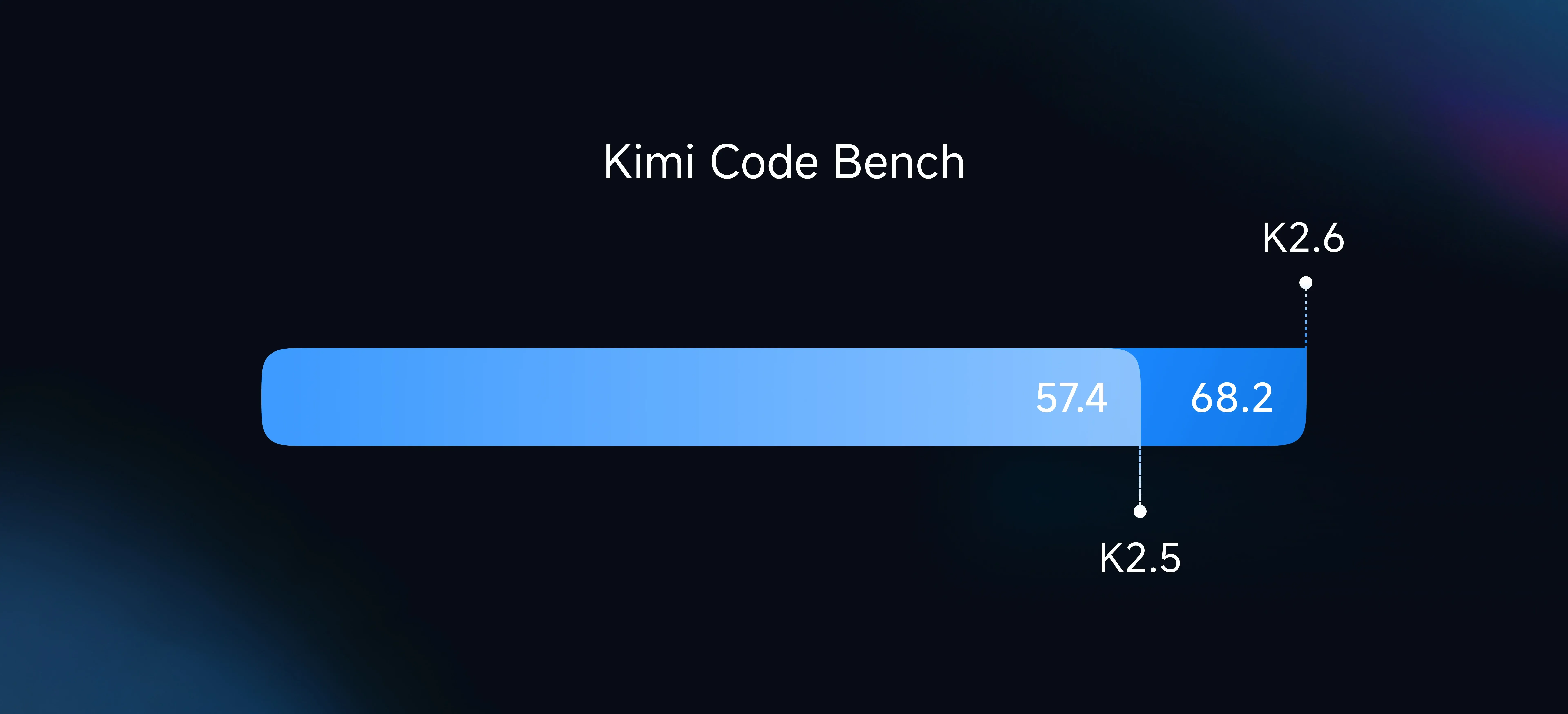
Source: MoonshotAI official benchmark, April 21 2026
The improvement over K2.5 is primarily in long-horizon task stability and instruction-following precision, not just single-benchmark scores.
Access via ofox
ofox was among the first platforms to support K2.6. If you are already using ofox, one line changes:
from openai import OpenAI

client = OpenAI(
    api_key="your-ofox-key",
    base_url="https://api.ofox.io/v1"
)

response = client.chat.completions.create(
    model="moonshotai/kimi-k2.6",
    messages=[{"role": "user", "content": "Write a concurrent file processor in Rust"}]
)
print(response.choices[0].message.content)
To enable thinking mode:
response = client.chat.completions.create(
    model="moonshotai/kimi-k2.6",
    messages=[{"role": "user", "content": "Analyze this code for performance bottlenecks"}],
    extra_body={"thinking": {"type": "enabled"}}
)
No ofox key yet? Sign up at ofox.ai — one key covers Claude, GPT, Gemini, Kimi, MiniMax, and the rest.
K2.5 vs K2.6: when to upgrade
If you are running K2.5 today, here is the practical breakdown:
Long-horizon coding tasks (50K+ token context, multi-file edits) — upgrade. The stability improvement is real. Simple Q&A and short completions — either works, pick by price. Video understanding — K2.6 only, K2.5 does not support video input. Agent workflows with multi-step tool calls — K2.6 is more reliable.
Pricing follows the moonshot-v1 series. Check the ofox model page for current rates.
Related reading
Frequently Asked Questions
- What is Kimi 2.6?
- Kimi K2.6 is MoonshotAI's latest model, released April 21 2026. It features a 256K context window, native multimodal input (text, images, video), improved long-horizon coding stability, and thinking/non-thinking modes. Benchmarks show it outperforms Claude Opus 4.6.
- How do I access Kimi 2.6 via ofox?
- ofox was among the first platforms to support K2.6. Use model ID moonshotai/kimi-k2.6 with your existing ofox API key and the base URL https://api.ofox.io/v1. No new key needed.
- Does Kimi 2.6 support video input?
- Yes. K2.6 accepts mp4, mov, avi, webm, and other common video formats. Recommended resolution is under 2K. Token cost is calculated dynamically based on keyframes.