Self-Host GLM 5.2 (2026): 8×H200 vLLM Cost vs $30/mo Cloud
Self-host GLM 5.2 (753B MIT weights): 8×H200 vLLM FP8, 4×H100 Q4, or Mac Studio 2-bit. Hardware sizing + cloud GPU $/hr breakeven vs Z.ai's $30/mo plan.
 Ofox
Ofox 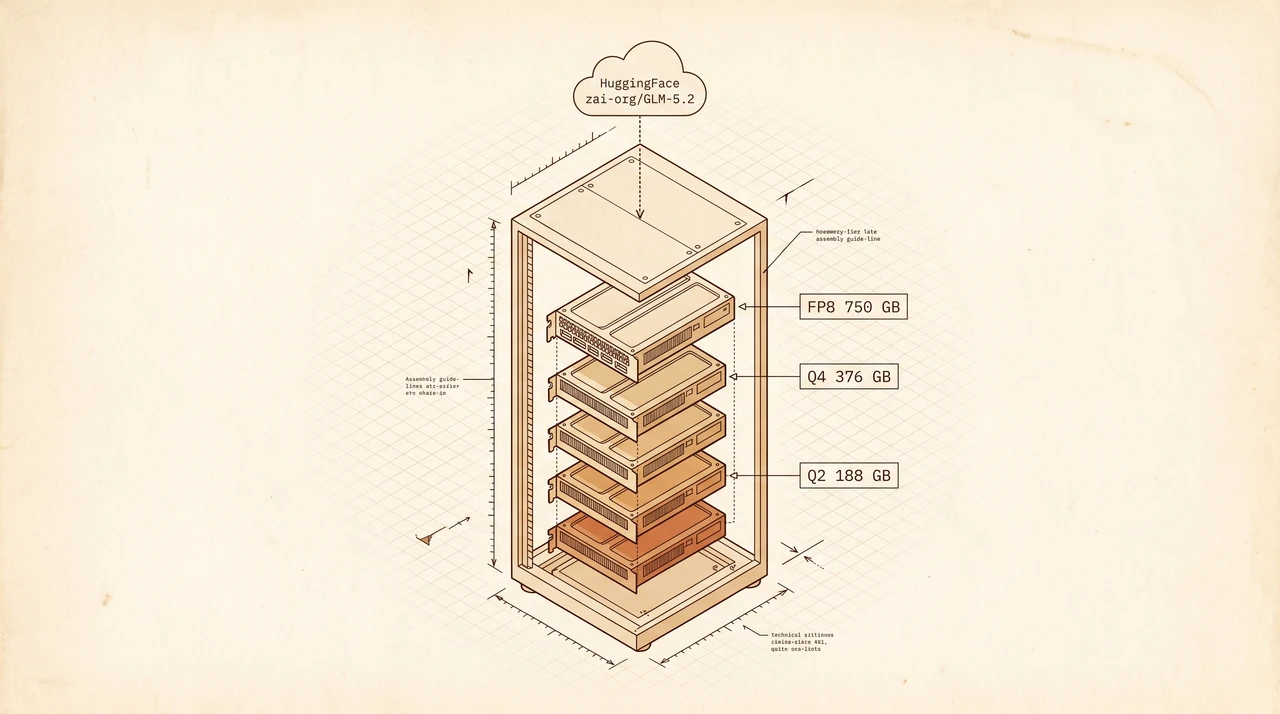
Zhipu’s GLM 5.2 isn’t just an API release. The MIT-licensed weights landed on HuggingFace this week, which means for the first time a frontier-class 1M-context coding model is something you can actually pull, audit, and run on metal you own. The catch is the metal: 753B parameters do not fit on the laptop under your desk.
What You Get When You Self-Host GLM 5.2 (30-Second Answer)
| Item | Value |
|---|---|
| What you can do today | Pull zai-org/GLM-5.2-FP8 from HuggingFace and serve it with vllm serve on a single 8x H200 node |
| What you need on disk | ~750 GB for FP8, ~1.5 TB for BF16, ~376 GB for Q4_K_M GGUF, ~241 GB for 2-bit UD-IQ2_XXS |
| Minimum production rig | 8x H200 141GB (FP8) or 4x H100 80GB (Q4_K_M GGUF via llama.cpp) |
| Tinkerer’s rig | Mac Studio M3 Ultra with ≥256 GB unified memory (the M3 Ultra was originally configurable up to 512 GB; top SKU discontinued March 2026), running UD-IQ2_XXS at 3–9 tokens/sec |
| Engines that work on day one | vLLM v0.23.0+, SGLang v0.5.13.post1+, Transformers v5.12+ (5.x line; v5.12.1 released June 15, 2026), KTransformers v0.6.1+; llama.cpp for GGUF; xLLM v0.10.0+ |
| License | MIT — commercial use, modification, redistribution all allowed |
| What this costs vs hosted | An 8x H200 cloud node is ~$30–$50/hour; Z.ai’s Pro Coding Plan is ~$30/month. Self-host breaks even somewhere north of 3,000 prompts/day |
Early Third-Party Evidence: Benchmarks + Code Arena Frontend
Zhipu shipped a full first-party benchmark table with the release (see github.com/zai-org/GLM-5 README). The headline numbers that matter for the self-host decision:
| Benchmark | GLM 5.2 | Claude Opus 4.8 | GPT-5.5 |
|---|---|---|---|
| SWE-bench Pro | 62.1 | 69.2 | 58.6 |
| Terminal-Bench 2.1 (Terminus-2) | 81.0 | 85.0 | 84.0 |
| Terminal-Bench 2.1 (Best Reported Harness) | 82.7 | 78.9 | 83.4 |
| AIME 2026 | 99.2 | 95.7 | 98.3 |
| GPQA-Diamond | 91.2 | 93.6 | 93.6 |
| MCP-Atlas (Public Set) | 76.8 | 77.8 | 75.3 |
| DeepSWE | 46.2 | 58.0 | 70.0 |
| HLE | 40.5 | 49.8* | 41.4* |
(* = with tools / disclosed harness variations — see source table for footnotes.) GLM 5.2 trails Opus 4.8 on raw SWE-bench Pro (62.1 vs 69.2) but pulls ahead on Terminal-Bench 2.1’s “Best Reported Harness” run (82.7 vs 78.9) and on agentic-math (AIME 99.2 vs 95.7). What’s still missing from the public set: SWE-bench Verified, LiveCodeBench, and Aider polyglot — the three canonical agentic-coding benchmarks the open-weights community usually leans on.
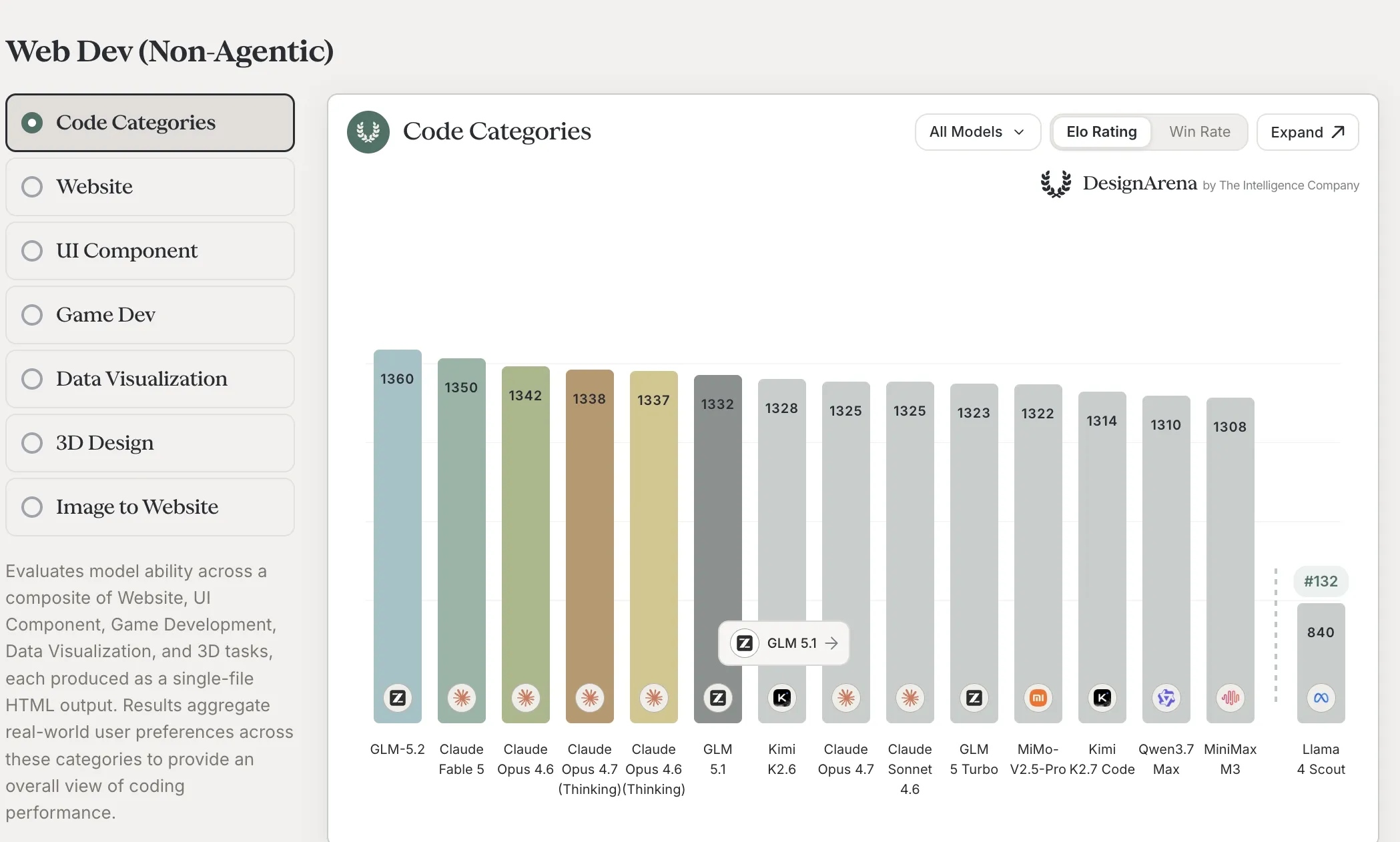
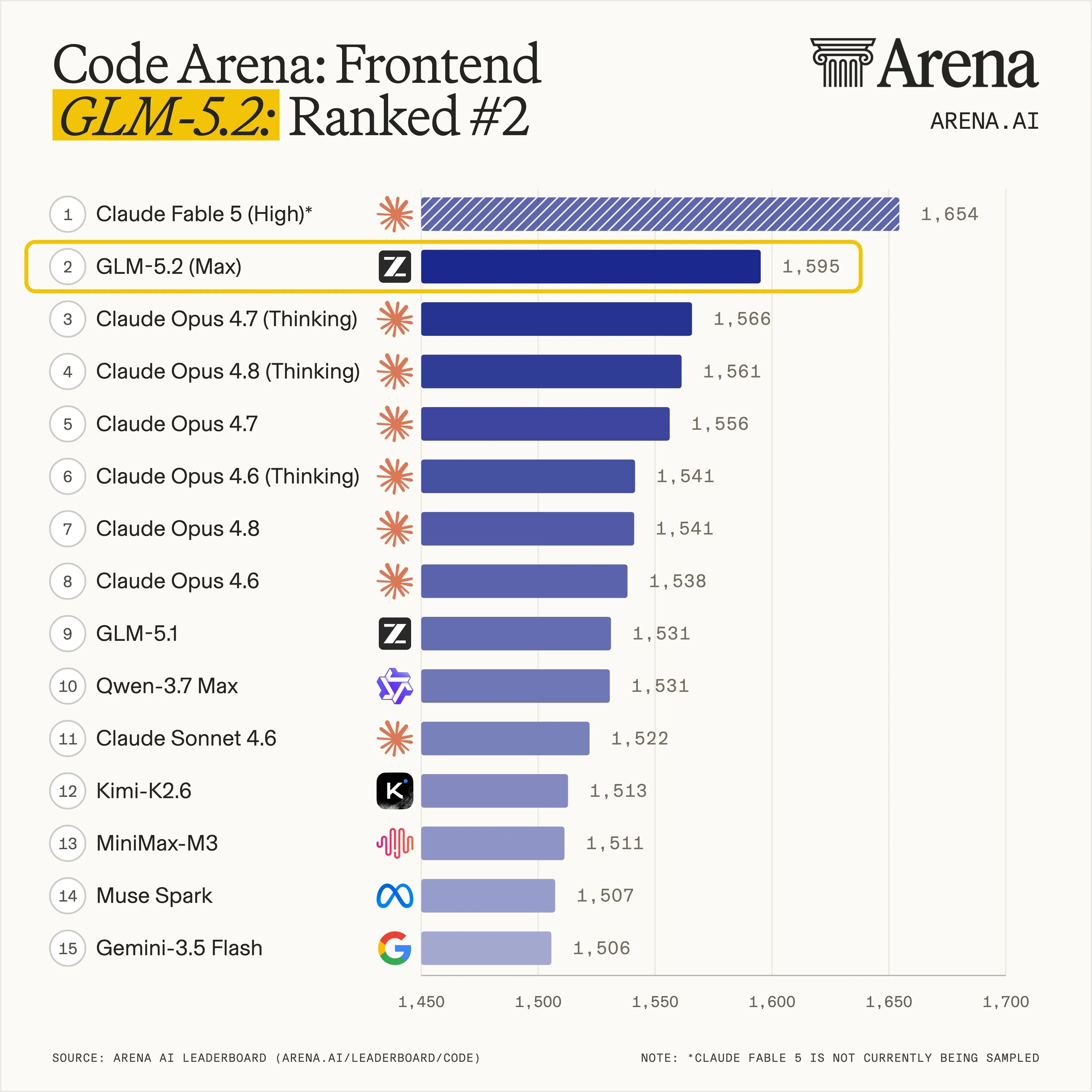
Two independent third-party leaderboards from The Intelligence Company landed signal within 72 hours. On DesignArena’s Web Dev (Non-Agentic) composite GLM 5.2 sits at rank #1 (Elo 1,360, ahead of Claude Fable 5 at 1,350 and the full Claude Opus 4.6 / 4.7 / 4.7-Thinking stack). On Arena Intelligence’s separately-hosted Code Arena Frontend slice it sits at rank #2 (Elo 1,595, behind Claude Fable 5 at 1,654 — which carries an explicit “not currently being sampled” asterisk on that view).
Two reads on this evidence:
- For the self-host decision: GLM 5.2 closes most of the gap to Opus 4.8 on Zhipu’s first-party table while staying ahead of GPT-5.5 on coding-flavored evals, and on DesignArena’s blind-preference web-dev composite it is now the top model overall — beating every actively-sampled Claude Opus variant on the same chart. The gap to the rest of the open-weights field (Qwen 3.7 Max at 1,310, Kimi K2.6 at 1,328, GLM 5.1 at 1,332) is 30–50 Elo on the composite and 60+ Elo on the frontend slice. If you were already evaluating open-weights options for production coding work, GLM 5.2 just leapfrogged the open field
- For the skeptic: a vendor benchmark table is a vendor benchmark table — Zhipu picked the harnesses. DesignArena measures pairwise blind preference on web-dev outputs, not end-to-end pass rates on a held-out test set, and the Fable 5 asterisk on the frontend slice reminds you that “rank” can swing when sampling restarts. Treat both as strong leading indicators, not substitutes for running your own evals on your own codebase
Decision Frame: When Self-Host Is Actually the Answer
Use this section to bail out before reading the rest of the post.
When to self-host GLM 5.2
- Data residency — your customers’ code or prompts cannot leave your VPC, your region, or your hardware perimeter
- Custom fine-tuning — you need LoRAs or full fine-tunes on your own codebase, and the hosted API doesn’t expose that surface
- Air-gapped deployment — bench, factory, defense, or restricted-network environments where any outbound traffic to
api.z.aiis non-starter - High sustained throughput — you’re burning ≥3,000 prompts/day, where amortized hardware beats the per-prompt cloud rate
When NOT to self-host GLM 5.2
- You’re a solo developer or a 2-person team. The Z.ai Pro Coding Plan at ~$30/month covers your usage at 1% of the cost of running an 8x H200 node 24/7. Read the hosted access guide instead
- You don’t already have a vLLM or SGLang deployment in production. The setup cost (driver lifecycle, KV cache tuning, observability) is real and is not paid back for at least a quarter
- You want vendor-blessed SWE-bench Verified, LiveCodeBench, or Aider polyglot numbers specifically. Zhipu’s published table covers SWE-bench Pro (62.1), Terminal-Bench 2.1 (81.0 / 82.7 best-harness), AIME 2026 (99.2), GPQA-Diamond (91.2), MCP-Atlas (76.8), and more — see the table above — but the three benchmarks the open-weights community usually leans on for agentic-coding comparison are still missing. Independent FP8-quality deltas are also still days out
Stop rule
If your peak load is below 100 prompts/day and you have no compliance constraint that rules out hosted, do not self-host. Use the Coding Plan, save yourself a quarter of engineering, and revisit when one of the four “when to self-host” triggers actually fires.
What’s Actually Available on Day One
flowchart LR
  HF[huggingface.co/zai-org] --> BF16[GLM-5.2 BF16<br/>~1.5 TB]
  HF --> FP8[GLM-5.2-FP8<br/>~750 GB]
  US[huggingface.co/unsloth] --> GGUF[GLM-5.2-GGUF<br/>Q4 376 GB / Q2 241 GB]
  BF16 --> vLLM[vLLM 0.23+]
  FP8 --> vLLM
  FP8 --> SGLang[SGLang 0.5.13+]
  GGUF --> Llama[llama.cpp]
GGUF --> LMS[LM Studio]| Source | Repo / tag | Format | Disk | Best for |
|---|---|---|---|---|
| HF (official) | zai-org/GLM-5.2 | BF16 | ~1.5 TB | Research, fine-tuning, max-quality production |
| HF (official) | zai-org/GLM-5.2-FP8 | F8_E4M3 | ~750 GB | Production inference on H100/H200/MI300X |
| HF (community) | unsloth/GLM-5.2-GGUF | GGUF quants | 188–376 GB | llama.cpp, LM Studio, single-node hobbyist |
| Ollama | glm-5.2:cloud | Cloud-routed | n/a | Convenience only — not a local download |
A note on the Ollama tag: as of June 17, 2026 the glm-5.2:cloud entry on ollama.com/library/glm-5.2 is cloud-only (the :cloud suffix routes through Ollama’s hosted inference, not your machine). There is no glm-5.2:latest or quantized local tag on the official Ollama library yet. If you specifically want Ollama-style ergonomics for local inference, use llama.cpp with the Unsloth GGUF and wrap it in an Ollama-compatible proxy.
Also worth flagging: the Unsloth GGUF repo was published a few hours before this post went live; specific per-quant file sizes were not yet listed on the HuggingFace UI when verified. The 188–376 GB range above is computed from the raw bits-per-weight math (188 GB at 2-bit, 376 GB at 4-bit, for 753B parameters). Real on-disk sizes may run 10–20% higher with overhead — check the live “Files and versions” tab before pulling.
Hardware Sizing by Quantization Tier
The right tier is set by what fits in your VRAM after the model weights are loaded. KV cache is the silent killer at 1M context.
| Tier | Disk | Weights in VRAM | KV cache at 256K ctx | Minimum production rig |
|---|---|---|---|---|
| BF16 | ~1.5 TB | ~1.5 TB | ~50 GB | 16x H100 80GB (1.28 TB) or 8x H200 141GB (1.13 TB) — H200 tight, may need offload |
| FP8 (E4M3) | ~750 GB | ~750 GB | ~25 GB at FP8 KV | 8x H200 141GB (1.13 TB) — comfortable; 8x H100 80GB (640 GB) — KV cache constrained |
| Q4_K_M GGUF | ~376 GB raw weights (file size may run higher with overhead) | ~376 GB | ~20 GB | 4x H100 80GB (320 GB) — tight; 2x H200 141GB (282 GB) — workable |
| Q2_K / UD-IQ2_XXS | ~188–241 GB | ~188–241 GB | ~15 GB | Single workstation: ≥256 GB DDR5 + 80 GB GPU offload, or Mac Studio M3 Ultra with ≥256 GB unified memory |
A few rules of thumb to apply this table:
- Leave 20% VRAM headroom above the weights-plus-KV total. CUDA fragmentation will eat the rest, and you do not want to debug OOM at 90% prefill on a 900K-token request
- KV cache scales linearly with context length. The 256K numbers above are illustrative; at 1M context expect ~4x the KV cache footprint. For 1M production work you almost always want FP8 KV cache (
--kv-cache-dtype fp8in vLLM) - GGUF on llama.cpp uses host RAM, not VRAM — the M3 Ultra works because its 256 GB UMA is addressable by both CPU and GPU. A 256 GB DDR5 workstation with a 24 GB GPU does the same thing, slower
vLLM Setup (FP8 on 8x H200)
This is the path most production teams will take. vLLM v0.23.0 is the minimum; later patch releases add throughput improvements but the FP8 GLM 5.2 path works on 0.23 GA.
Step 1: Pull the weights
# Roughly 750 GB; budget 30–60 minutes on a 10 GbE connection
huggingface-cli download zai-org/GLM-5.2-FP8 \
  --local-dir /models/glm-5.2-fp8 \
  --local-dir-use-symlinks False
Expected result: 750 GB of safetensors shards plus config in /models/glm-5.2-fp8. Verify with du -sh /models/glm-5.2-fp8 and confirm the directory contains config.json and a *.safetensors.index.json.
Step 2: Launch the vLLM server
vllm serve "zai-org/GLM-5.2-FP8" \
  --tensor-parallel-size 8 \
  --max-model-len 262144 \
  --kv-cache-dtype fp8 \
  --enable-prefix-caching \
  --port 8000
Why these flags:
--tensor-parallel-size 8shards the 753B weights across 8 GPUs. With H200s you have 1.13 TB of aggregate HBM, comfortable for FP8 weights plus a working KV cache--max-model-len 262144starts at 256K context. Raise to 1048576 (1M) only after you’ve benchmarked KV-cache pressure on your actual workload--kv-cache-dtype fp8halves the KV cache footprint vs the default BF16, which is the difference between fitting 256K vs 128K context per concurrent request--enable-prefix-cachingreuses computed KV for shared prompt prefixes — table-stakes for coding agents that hammer the same system prompt across hundreds of calls
Expected result: vLLM logs Available KV cache memory: X GB and Maximum concurrency for Y tokens: Z requests within ~3–5 minutes of startup. The first request will take 30–90 seconds (compile + KV cache warm-up); subsequent requests sub-second for short prompts.
Step 3: Smoke test
curl -s http://localhost:8000/v1/chat/completions \
  -H "Content-Type: application/json" \
  -d '{
    "model": "zai-org/GLM-5.2-FP8",
    "messages": [{"role":"user","content":"Reply with only the string OK."}],
    "max_tokens": 16
  }' | jq -r '.choices[0].message.content'
Expected result: OK or OK. within ~1 second. If you get a 500 with out of memory or device-side assert, your KV cache budget is too tight for the model length — drop --max-model-len to 131072 and retry.
SGLang Setup (FP8, RadixAttention)
SGLang is the alternative production engine, and it tends to win on long-context throughput when your workload has heavy prefix reuse (multi-turn coding agents, RAG with stable system prompts).
python -m sglang.launch_server \
  --model-path zai-org/GLM-5.2-FP8 \
  --tp 8 \
  --context-length 262144 \
  --kv-cache-dtype fp8_e4m3 \
  --enable-mixed-chunk \
  --port 30000
SGLang’s RadixAttention is the long-context win — for a coding agent that re-uses 100K tokens of system prompt across every turn, you’ll see ~3x the requests/second vs vLLM 0.23 at the same hardware. The trade-off is slightly higher engineering surface (RadixAttention has its own observability story).
llama.cpp / Mac Studio Path (Q4 or Q2 GGUF)
For tinkering, on-laptop development, or a single-node air-gapped deployment, llama.cpp with Unsloth’s GGUF quants is the cheapest path to “GLM 5.2 is running.”
# Pull a 4-bit quant — adjust the filename to whichever Q4_K_M shard is published
huggingface-cli download unsloth/GLM-5.2-GGUF \
  GLM-5.2-Q4_K_M.gguf \
  --local-dir /models/glm-5.2-gguf

# Build llama.cpp with CUDA (skip if Mac — Metal builds automatically)
cmake -B llama.cpp/build -DGGML_CUDA=ON
cmake --build llama.cpp/build --config Release -j

# Serve with OpenAI-compatible API on port 8080
./llama.cpp/build/bin/llama-server \
  --model /models/glm-5.2-gguf/GLM-5.2-Q4_K_M.gguf \
  --ctx-size 32768 \
  --n-gpu-layers 999 \
  --host 0.0.0.0 --port 8080
On an M3 Ultra Mac Studio with 256 GB unified memory, the 2-bit UD-IQ2_XXS quant delivers ~3–9 tokens/second depending on context length. Plenty for solo coding-agent work; not enough for a multi-developer team. Drop --ctx-size to 16K on Mac for the highest interactive throughput.
Cost: Self-Host vs the Z.ai Coding Plan
The “self-host saves money” claim is almost always wrong. Here’s the math at June 2026 cloud prices.
| Scenario | Hardware | Monthly cost | Notes |
|---|---|---|---|
| Hosted (Z.ai Pro Coding Plan) | None | ~$30 | ~2,000 prompts/week ceiling |
| Hosted (Z.ai Max Coding Plan) | None | ~$80 | ~8,000 prompts/week ceiling |
| Self-host on 8x H200 (cloud, 24/7) | Reserved instance | ~$21–36k | $30–50/hr blended rate |
| Self-host on 8x H200 (cloud, on-demand 9–5) | Same hardware, 200 hrs/mo | ~$6–10k | Most teams don’t actually run 24/7 |
| Self-host on owned 8x H200 | Capex + electricity | ~$3–5k/mo amortized | ~$200k hardware over 4 years + power |
| Self-host on 256 GB M3 Ultra | Owned workstation | ~$50/mo amortized | One-time ~$8k; electricity ~$30/mo |
Break-even points worth knowing:
- Hosted Pro vs owned M3 Ultra: M3 Ultra wins on amortized cost above ~$30/month of hosted usage, but only if 3–9 tokens/sec is enough for your workflow
- Hosted Max vs cloud 8x H200: you need ~3,000+ prompts/day and ~30%+ duty cycle on the H200 node for cloud to beat $80/month hosted. That’s a 20-developer team running coding agents constantly
- Owned 8x H200: wins on cost above ~10,000 prompts/day only if you actually have the data-center capacity and the operational team. For most companies this means a 6-month procurement cycle before the first prompt runs
The pattern: hosted wins for 95% of teams. Self-host wins for the 5% with compliance, residency, or sustained-throughput requirements that override price.
Common Errors During Self-Host Setup
| Error | Likely cause | Fix |
|---|---|---|
CUDA out of memory during model load | TP size too low or KV cache budget too generous | Increase --tensor-parallel-size to match GPU count; drop --max-model-len to half the planned value and grow it |
RuntimeError: FP8 ops not supported | GPU is Ampere (A100), not Hopper (H100/H200) | FP8 E4M3 needs Hopper or newer. A100 owners should use Q4_K_M GGUF via llama.cpp instead |
model has tied_word_embeddings: false warning | vLLM auto-detection mismatch with config | Safe to ignore for GLM 5.2; the config is correct |
| 504 / connection reset on 500K+ token requests | First-token latency exceeds default client timeout | Set client timeout to 600s; for vLLM use --max-num-seqs 4 to reduce concurrent prefills |
IndexError in RadixAttention on SGLang first run | Tokenizer cache mismatch | Delete ~/.cache/sglang/ and restart — the cache rebuilds on first inference |
GGUF load fails with tensor not found: blk.X.attn_q.weight | llama.cpp version too old for GLM MoE DSA architecture | Update llama.cpp to a build ≥ the day the Unsloth GGUF was published; rebuild with cmake --build llama.cpp/build |
| Wildly inconsistent outputs vs Z.ai hosted | Sampling params not aligned | Match the official defaults from huggingface.co/zai-org/GLM-5.2/generation_config.json: temperature 1.0, top_p 0.95 (top_k unset); smoke-test the same prompt against both endpoints to confirm parity |
When Self-Host Is the Wrong Answer: ofox-Managed Alternatives
If the self-host math doesn’t pencil out but you still want a Chinese-origin coding model behind one OpenAI-compatible endpoint, ofox lists three alternatives that ship on day one:
| Model | ofox model ID | Context | When to pick over self-hosting GLM 5.2 |
|---|---|---|---|
| DeepSeek V4 Pro | deepseek/deepseek-v4-pro-0813 | 1M | You want SWE-bench Verified numbers (DeepSeek publishes those; GLM 5.2’s public table is SWE-bench Pro only) and a longer community track record |
| Kimi K2.6 | moonshotai/kimi-k2.6 | 262K | You need long-context that’s been independently benchmarked, not just “claimed” |
| Qwen 3 Coder Next | bailian/qwen3-coder-next | 256K | Multilingual codebases (Chinese / Japanese / Korean comments and identifiers) |
Same wiring shape as the self-host endpoint — only the base URL and model ID change:
export OPENAI_BASE_URL="https://api.ofox.io/v1"
export OPENAI_API_KEY="ofox-..."
export OPENAI_MODEL="deepseek/deepseek-v4-pro-0813"
GLM 5.2 is not yet listed on the ofox catalog as of June 17, 2026. Once it lands, switching from deepseek-v4-pro to the eventual z-ai/glm-5.2 is a one-string change in this config. For the hosted-via-Z.ai path today, the companion GLM 5.2 access guide covers the Z.ai Coding Plan endpoint shape, API keys, and the same model on the official Anthropic-compatible endpoint for Claude Code users.
Observability You Want From Day One
Three signals are non-negotiable on a self-hosted production GLM 5.2:
- Tokens-per-second under load — track p50 / p95 separately, since a single 900K-context request can drag p99 by an order of magnitude
- KV cache utilization — vLLM exposes
vllm:gpu_cache_usage_percon/metrics; once you cross 90% sustained, throughput collapses - Per-request total tokens — coding agents drift toward burning tokens on rabbit-hole refactors; instrument at the PR or session level so you can spot a runaway loop before it eats the budget
Wire these into whichever stack you already run (Datadog, Honeycomb, Grafana — pick one, don’t build a fourth). For SGLang the equivalent metrics live at /metrics_collect.
References
- HuggingFace official model card — https://huggingface.co/zai-org/GLM-5.2
- HuggingFace FP8 model card — https://huggingface.co/zai-org/GLM-5.2-FP8
- Zhipu GLM-5 GitHub README — https://github.com/zai-org/GLM-5
- DesignArena leaderboard — https://www.designarena.ai/leaderboard
- Arena Intelligence Code Arena Frontend — https://arena.ai/leaderboard/code
- Ollama library page — https://ollama.com/library/glm-5.2
- Unsloth GGUF community quants — https://huggingface.co/unsloth/GLM-5.2-GGUF
- ofox model catalog — https://ofox.io/en/models
- Companion ofox access guide — https://ofox.io/blog/glm-5-2-access-guide-2026/
- Reddit r/LocalLLaMA discussion thread — https://www.reddit.com/r/LocalLLaMA/comments/1u7o9vp/glm_52_api_is_live_weights_are_on_hf_and_ollama/
- PyPI version index — https://pypi.org/project/transformers/,
The most interesting thing about this drop isn’t the 1M context or the FP8 release — it’s that for the first time, the open-weights frontier model with a real coding pedigree fits inside the procurement budget of a mid-sized research lab. The next 90 days are when we’ll learn whether the community can ship FP4 quants that drop the production rig from 8x H200 down to 4x H100. If that happens, the self-host math flips.
Frequently Asked Questions
- Where are the GLM 5.2 weights hosted?
- Two HuggingFace repos under the official
zai-orgorg:huggingface.co/zai-org/GLM-5.2for BF16 (753B parameters) andhuggingface.co/zai-org/GLM-5.2-FP8for the FP8 quantization (same 753B params, ~half the disk footprint). Both were published the week of June 16, 2026 under MIT license. Community 2-bit and 4-bit GGUF quants are arriving athuggingface.co/unsloth/GLM-5.2-GGUFfor llama.cpp / LM Studio users. - What hardware do I actually need to run GLM 5.2 locally?
- For BF16 you need ~1.5 TB of HBM, which in practice means 16x H100 80GB or 8x H200 141GB. FP8 cuts that roughly in half — 8x H200 fits comfortably, and 8x H100 is tight but workable for short context. Q4_K_M GGUF lands around 376 GB raw weights and runs on 4x H100, 2x H200, or a 512 GB DDR5 workstation with GPU offload. The 2-bit (UD-IQ2_XXS) quant is ~241 GB and runs on a Mac Studio M3 Ultra with ≥256 GB unified memory at 3–9 tokens/second.
- Which inference engines support GLM 5.2 today?
- Four day-one engines: vLLM v0.23.0+, SGLang v0.5.13.post1+, Transformers v5.12+ (Hugging Face's Transformers reached 5.x; the v5.12.1 release on June 15, 2026 added GLM MoE DSA), and KTransformers v0.6.1+ (the upstream HF model card cites v0.5.12+, but no such release exists on PyPI — the closest stable is v0.6.2.post4). xLLM v0.10.0+ is listed as a fifth option. For GGUF quants you also have llama.cpp and LM Studio. Ollama only ships a
glm-5.2:cloudtag today — there is no local Ollama variant yet. - How does self-host cost compare to the Z.ai Coding Plan?
- Z.ai's Pro tier is ~$30/month for ~2,000 prompts/week. A single 8x H200 node on a major cloud is roughly $30–$50/hour ($21–$36k/month if you run it 24/7). Self-host only pencils out at high throughput (≥3,000 prompts/day) or when the use case demands data residency, custom fine-tuning, or air-gapped deployment. For solo developers, the hosted plan stays cheaper by two orders of magnitude.
- Does the 1M context work in vLLM out of the box?
- Yes, but you have to pass
--max-model-len 1048576explicitly and budget enough KV cache memory — at FP8 a single 1M-token request consumes roughly 80–100 GB of additional VRAM for the KV cache on top of the weights. For 8x H200, the practical context ceiling without KV swapping is around 800K tokens unless you also enable prefix caching and chunked prefill. Drop to 256K context for most production workloads; reserve 1M for offline batch jobs. - What FP8 method does Zhipu use, and does it hurt quality?
- The HuggingFace model card lists tensor types F32, BF16, and F8_E4M3 — E4M3 is the standard 4-bit exponent / 3-bit mantissa FP8 format used by H100/H200 hardware. Zhipu has not published a quality delta vs BF16. Independent benchmarks are days away; until they land, treat FP8 as the recommended production format because it is officially shipped (not community-quantized) and runs at the engineered numerical precision the model was tuned for.
- Can I run GLM 5.2 through ofox?
- Not as of June 17, 2026. The ofox catalog at
ofox.ai/en/modelslistsz-ai/glm-5.1,z-ai/glm-5v-turbo, andz-ai/glm-5-turbobut does not yet show GLM 5.2. If you want a managed Chinese coding model on a single OpenAI-compatible endpoint today,deepseek/deepseek-v4-pro-0813andmoonshotai/kimi-k2.6are the closest analogs already listed. For the hosted GLM 5.2 path specifically, follow the GLM 5.2 access guide covering the Z.ai Coding Plan setup. - What is the IndexShare architecture in GLM 5.2?
- Per the official model card, IndexShare reuses indexers across sparse-attention layers and cuts per-token FLOPs by 2.9x at 1M context. The improved MTP (Multi-Token Prediction) layer raises speculative-decoding acceptance length by up to 20%. Both are inference-time wins: the same hardware runs longer contexts and bigger batches than GLM 5.1 on equivalent VRAM. You do not configure either explicitly — they are part of the model architecture and active automatically in vLLM / SGLang.