curl works but Claude Code cannot connect: test the same protocol first
Diagnose why curl succeeds while Claude Code fails. Compare actual protocol probes, authentication, base URLs and a minimal client test through Ofox.
 Ofox
Ofox 
If an API request works in curl but Claude Code fails, first check whether they sent the same kind of request. A successful OpenAI Chat Completions request proves that one route and credential worked. It does not prove that an Anthropic Messages request, a streaming response, or the process running Claude Code will work.
We reproduced this distinction with Ofox and Claude Haiku 5.5. The model answered through Chat Completions. A deliberately mismatched Messages URL returned HTTP 401. The correct Anthropic-compatible route returned READY, and a minimal Claude Code request also completed. Correcting the HTTP probe’s route and protocol pairing produced a successful response. We did not reproduce a failing Claude Code session, so this does not establish a client-failure fix or make every connection error a base-URL error.
This guide is for developers who already have a working API credential but need to isolate why the coding client fails. For first-time provider setup, use the Claude Code configuration guide. Here, keep your existing project settings intact until the failing layer is identified.
What our test actually established
The test used Claude Code 2.1.296, the Ofox model ID anthropic/claude-haiku-5.5, and short, nonsensitive prompts. These are individual requests, not availability or speed benchmarks.
| Probe | Request or configuration | Observed result |
|---|---|---|
| OpenAI-compatible text request | /v1/chat/completions, Bearer authentication | HTTP 200; requested JSON returned |
| Deliberately mismatched Messages request | /v1/v1/messages, x-api-key | HTTP 401; response requested Bearer authentication |
| Anthropic-compatible text request | /anthropic/v1/messages, x-api-key | HTTP 200; READY |
| Minimal Claude Code invocation | Base URL /anthropic, explicit model, tools disabled | Exit 0; is_error: false; result READY |
The mismatched request combined an incorrect path and an authentication convention inappropriate to that route. It does not establish which one would fail first if changed independently. In particular, its 401 response is not evidence that the API key itself was invalid: the same credential worked on the matching route.
The client also emitted an unrecognized_model warning for the namespaced model identifier, despite completing the request. Preserve that warning in diagnostics; do not equate it with a failed response or infer that every feature is supported. This probe disabled tools and did not test a coding workflow, MCP, account switching, or long streaming sessions.
Match the endpoint, body and credential
Write down the tuple you are testing: provider, base URL, final path, model ID, authentication header and request body format. Do not copy a model name from one provider into another provider’s example without checking its mapping.
| Client contract | Ofox URL used in this test | Body shape |
|---|---|---|
| OpenAI Chat Completions | https://api.ofox.io/v1/chat/completions | model, messages |
| Anthropic Messages | https://api.ofox.io/anthropic/v1/messages | model, messages, max_tokens |
| Claude Code base | https://api.ofox.io/anthropic | Client appends the operation path |
For this Anthropic-compatible configuration, putting /v1 at the end of the base URL used by an OpenAI SDK is not an interchangeable substitute. Nor should you paste the entire /v1/messages URL into a base field that expects a prefix.
Anthropic’s gateway documentation distinguishes gateway configuration from the underlying provider. It also explicitly does not promise support for non-Claude models routed through third-party gateways. This test uses a Claude model; a working text probe on another model would not establish full Claude Code compatibility.
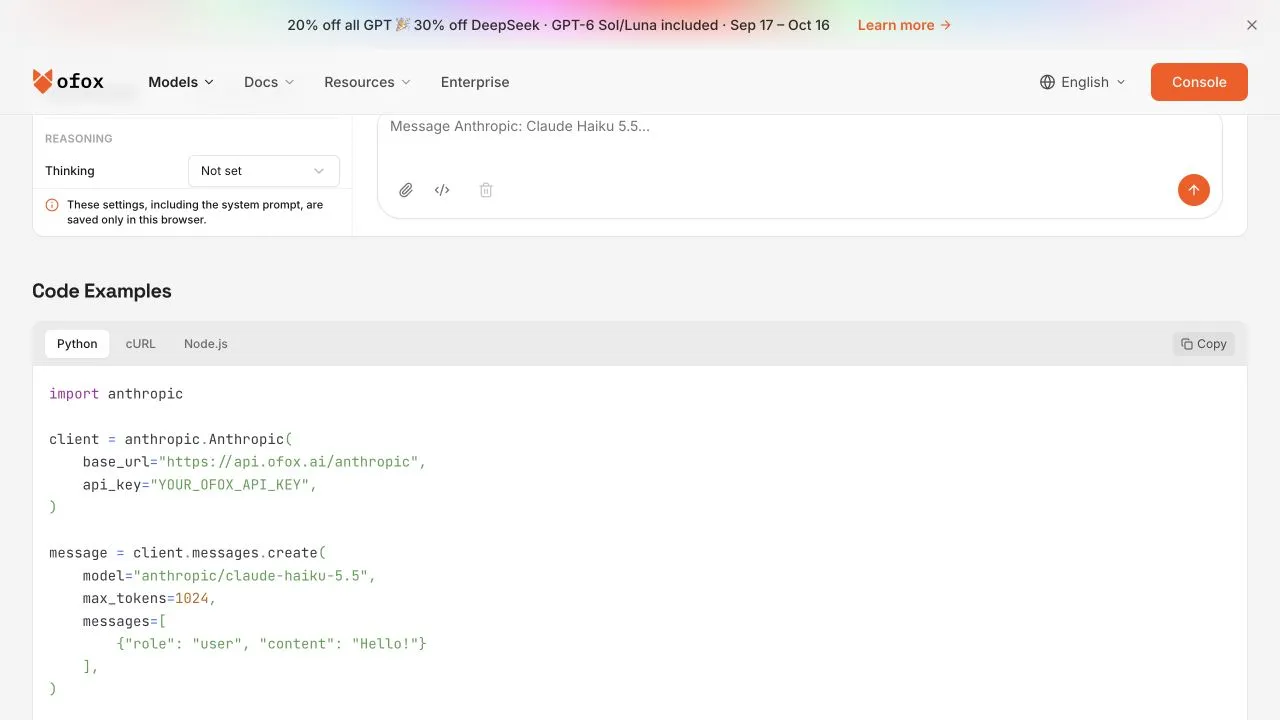
Actual public Ofox code-example interface captured October 12. It identifies the Anthropic route and model; it is not a screenshot of the CLI test result.
Send a minimal Messages probe
Keep the key in an environment variable populated through your normal secret-management method. Do not put it in a screenshot, article comment, command transcript or shared diagnostic file. The following POSIX shell example assumes OFOX_API_KEY is already set.
curl --silent --show-error --fail-with-body \
  --connect-timeout 10 --max-time 45 \
  'https://api.ofox.io/anthropic/v1/messages' \
  -H "x-api-key: $OFOX_API_KEY" \
  -H 'anthropic-version: 2023-06-01' \
  -H 'content-type: application/json' \
  --data '{"model":"anthropic/claude-haiku-5.5","max_tokens":64,"messages":[{"role":"user","content":"Reply with READY only."}]}'
Expected success is a Messages response whose content contains a text block with READY. Check the HTTP result and body together. An HTML login page, an empty success body, or an error object is not an accepted model response.
If the command fails, save the HTTP status, error type and request ID where available. Use the request ID when reporting the problem to your provider; omit authorization headers and personal prompts. A connect timeout, a certificate error and an HTTP 401 happen at different layers and should not receive the same remedy.
Run the client without a project workload
For our installed version, --bare supplies a minimal client mode; --tools "" disables tools for this text-only probe. Check claude --help on your own version before copying version-specific flags.
claude --version

(
  unset ANTHROPIC_AUTH_TOKEN
  export ANTHROPIC_BASE_URL='https://api.ofox.io/anthropic'
  export ANTHROPIC_API_KEY="$OFOX_API_KEY"
  claude --bare -p 'Reply with READY only.' \
    --model 'anthropic/claude-haiku-5.5' \
    --tools '' --no-session-persistence --output-format json
)
The parentheses limit these environment changes to the probe. We ran it from an empty temporary directory. It does not rewrite your project configuration or remove organizational controls. If your organization restricts providers, use the approved destination; this is not a procedure for bypassing a managed policy.
Acceptance requires exit status 0, is_error: false, and the expected result. In our run the process took 2.64 seconds end to end. The CLI’s cost field was not reconciled with an Ofox bill and must not be used as the gateway’s settled charge. Even a correct answer establishes only this minimal connection.
If the two probes disagree
If Messages succeeds but the client fails, compare the process environment. A shell and an IDE-launched process may start with different environment values. Restart the affected client after correcting its launch configuration, then inspect its effective provider and model. Do not print whole environment dumps: they can contain keys.
Next inspect settings scope. Claude Code documents user, project, local and managed settings in its settings guide. Check the effective value rather than assuming the most recently edited file won. Preserve a copy before changing any setting. If only one repository fails, compare its project configuration with the clean probe rather than changing global configuration first.
| Symptom | Next discriminating test | What to avoid |
|---|---|---|
| HTTP 401 or 403 | Check matching route, credential type and provider policy | Rotating a working key before checking the route |
| Model-not-found response | Compare exact ID with that provider’s available models | Treating a marketing name as an API identifier |
| Certificate or proxy error | Compare the affected process’s approved network configuration | Disabling TLS verification |
| Minimal response works; long session fails | Collect stream termination and timeout evidence | Calling a text-only probe a streaming test |
| Text works; tool call fails | Verify tool-call request and result protocol separately | Blaming the model solely because text succeeded |
| Only the IDE fails | Restart it with the intended environment and recheck settings | Editing several unrelated global settings at once |
For a DeepSeek-specific connection, the DeepSeek Claude Code setup article covers that separate provider contract. Do not mix its direct endpoint with this Ofox example.
Return to real work in stages
Once the minimal probe passes, restore one layer at a time: your normal project, the intended model, a harmless read-only tool request, then the normal workflow. Verify the expected operation and usage record at each stage. Keep the successful probe as a baseline so a later failure can be narrowed to what changed.
A useful report contains the client version, operating system, provider route, redacted model configuration, time of failure, request ID, and the smallest prompt that reproduces it. State separately which checks passed. “curl works” becomes useful evidence only when someone can see which protocol it tested.
Frequently Asked Questions
- Does a successful curl request prove Claude Code is configured correctly?
- No. It proves that specific request worked. Compare the actual path, authentication convention, model and process environment before extending the conclusion to the client.
- Should I disable certificate verification to fix a connection failure?
- No. Investigate the certificate chain and approved proxy configuration. Disabling verification conceals the problem and weakens the connection.
- Does the client test prove tool calling and coding will work?
- No. Our probe intentionally disabled tools. Validate a read-only tool operation and a representative project task separately before relying on the configuration.